
After much struggle I conviced airtel people to enable bridge mode on Airtel ONT router. They enabled it but I can't access internet with my new TP-Link router (WAN of it connected to LAN4 of airtel router). I entered PPPoE username and password. I also tried cloning MAC address of airtel router on TP-Link router, directly creating dial-up connection on Windows PC. Nothing works.
It looks like they did enable bridge mode but did not bind any LAN port to it. When I pointed out this to the technician who came for troubleshooting, he said it should work even without it (I can access airtel admin gui when I connect my PC with a cable, is that possible if LAN port was bound and bridge mode enabled?). I can't enable on my own because checkboxes are disabled. When contacting NOC team, they say bridge mode is enabled, over job is done. Now my technician has given up and closed the service request despite no internet yet.
Can someone confirm if these settings are correct. If so what settings do I need to set on TP-Link router apart from PPPoE creds.
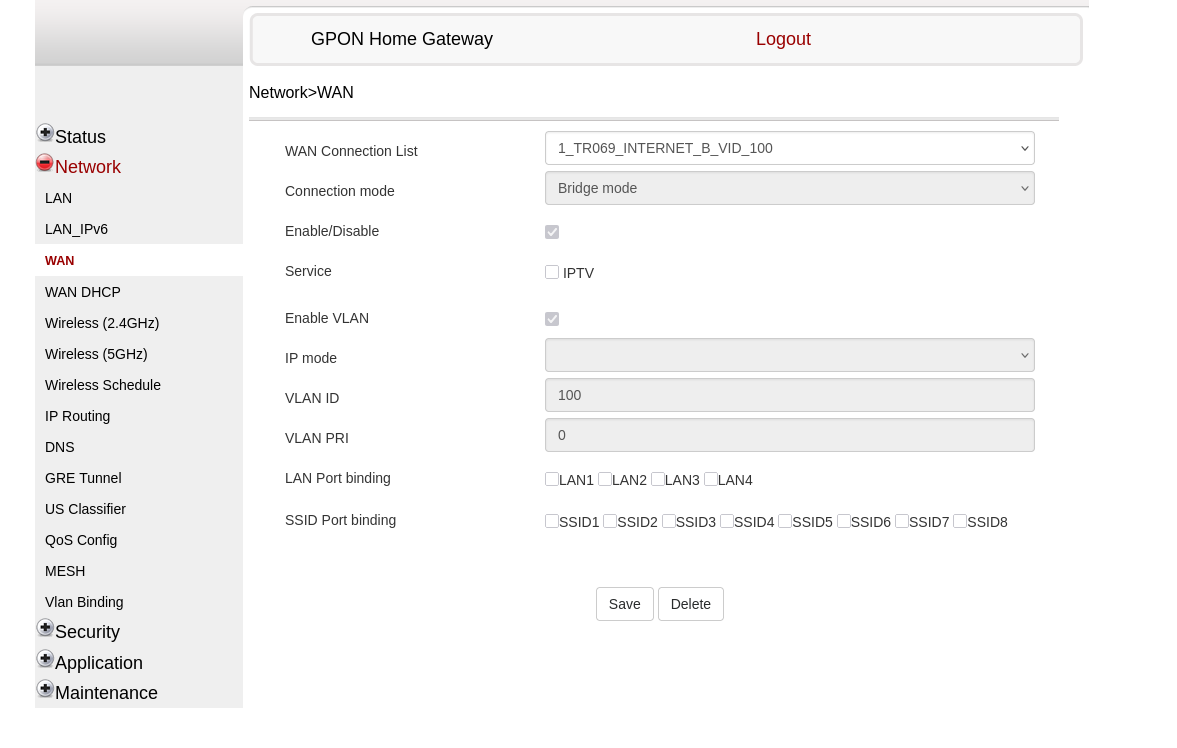
It looks like they did enable bridge mode but did not bind any LAN port to it. When I pointed out this to the technician who came for troubleshooting, he said it should work even without it (I can access airtel admin gui when I connect my PC with a cable, is that possible if LAN port was bound and bridge mode enabled?). I can't enable on my own because checkboxes are disabled. When contacting NOC team, they say bridge mode is enabled, over job is done. Now my technician has given up and closed the service request despite no internet yet.
Can someone confirm if these settings are correct. If so what settings do I need to set on TP-Link router apart from PPPoE creds.
