
-
Amazon Deals - ToS - Like us?
You are using an out of date browser. It may not display this or other websites correctly.
You should upgrade or use an alternative browser.
You should upgrade or use an alternative browser.
Can anyone do a ping test for me in cmd for valorant mumbai servers
- Thread starter kanansrin
- Start date
- Replies 66
- Views 40,175


Hello , can anyone help me out with this.
I live at Ranchi and used to get 55-60ms ping in Valorant but for the last couple of days it is shoeing 260+. I am using Jio fiber 100 Mbps plan.
these are the tracert and ping results from command prompt.
tracert 99.83.136.104
Tracing route to a2c926c3ec71a09d3.awsglobalaccelerator.com [99.83.136.104]
over a maximum of 30 hops:
1 1 ms <1 ms <1 ms reliance.reliance [192.168.29.1]
2 3 ms 3 ms 2 ms 10.21.136.1
3 7 ms 2 ms 1 ms 172.26.12.229
4 3 ms 3 ms 2 ms 192.168.86.240
5 3 ms 1 ms 1 ms 172.26.104.52
6 3 ms 3 ms 2 ms 172.26.104.147
7 2 ms 2 ms 3 ms 192.168.85.52
8 13 ms 2 ms 3 ms 192.168.85.55
9 30 ms 31 ms 30 ms 172.16.92.145
10 33 ms 32 ms 33 ms 172.26.12.230
11 29 ms 28 ms 29 ms 172.16.4.199
12 30 ms 29 ms 30 ms 172.16.2.46
13 * * * Request timed out.
14 * * * Request timed out.
15 * * * Request timed out.
16 * * * Request timed out.
17 * * * Request timed out.
18 * * * Request timed out.
19 * * * Request timed out.
20 * * * Request timed out.
21 * * * Request timed out.
22 * * * Request timed out.
23 * * * Request timed out.
24 * * * Request timed out.
25 * * * Request timed out.
26 * * * Request timed out.
27 * * * Request timed out.
28 * * * Request timed out.
29 * * * Request timed out.
30 * * * Request timed out.
Trace complete.
ping 99.83.136.104
Pinging 99.83.136.104 with 32 bytes of data:
Request timed out.
Request timed out.
Request timed out.
Request timed out.
Ping statistics for 99.83.136.104:
Packets: Sent = 4, Received = 0, Lost = 4 (100% loss)
I live at Ranchi and used to get 55-60ms ping in Valorant but for the last couple of days it is shoeing 260+. I am using Jio fiber 100 Mbps plan.
these are the tracert and ping results from command prompt.
tracert 99.83.136.104
Tracing route to a2c926c3ec71a09d3.awsglobalaccelerator.com [99.83.136.104]
over a maximum of 30 hops:
1 1 ms <1 ms <1 ms reliance.reliance [192.168.29.1]
2 3 ms 3 ms 2 ms 10.21.136.1
3 7 ms 2 ms 1 ms 172.26.12.229
4 3 ms 3 ms 2 ms 192.168.86.240
5 3 ms 1 ms 1 ms 172.26.104.52
6 3 ms 3 ms 2 ms 172.26.104.147
7 2 ms 2 ms 3 ms 192.168.85.52
8 13 ms 2 ms 3 ms 192.168.85.55
9 30 ms 31 ms 30 ms 172.16.92.145
10 33 ms 32 ms 33 ms 172.26.12.230
11 29 ms 28 ms 29 ms 172.16.4.199
12 30 ms 29 ms 30 ms 172.16.2.46
13 * * * Request timed out.
14 * * * Request timed out.
15 * * * Request timed out.
16 * * * Request timed out.
17 * * * Request timed out.
18 * * * Request timed out.
19 * * * Request timed out.
20 * * * Request timed out.
21 * * * Request timed out.
22 * * * Request timed out.
23 * * * Request timed out.
24 * * * Request timed out.
25 * * * Request timed out.
26 * * * Request timed out.
27 * * * Request timed out.
28 * * * Request timed out.
29 * * * Request timed out.
30 * * * Request timed out.
Trace complete.
ping 99.83.136.104
Pinging 99.83.136.104 with 32 bytes of data:
Request timed out.
Request timed out.
Request timed out.
Request timed out.
Ping statistics for 99.83.136.104:
Packets: Sent = 4, Received = 0, Lost = 4 (100% loss)
@WandereR I also live at Ranchi and facing major routing issue. I am getting 260ms in Valorant Mumbai server. I wrote a mail to Jiofibercare regarding the issue but they are saying " As per ACS ping, latency is normal". I don't understand how they came to the conclusion.JioFiber has poor pings even in Jharkhand. Talk to cc if they have one. If they understand your problem, I'm sure they can bring it down to 50-60ms if not lesser.

- Messages
- 131
- Location
- KOLKATA
- ISP
- Wired - AS9829 | Not using AS55836, AS132115, AS142451
Mobile - Chotel (Primary) , VI 4G
~$ traceroute 99.83.136.104
traceroute to 99.83.136.104 (99.83.136.104), 64 hops max
1 192.168.29.1 0.612ms 0.319ms 0.366ms
2 10.25.200.1 2.372ms 1.718ms 1.974ms
3 172.16.3.101 2.647ms 2.488ms 3.037ms
4 172.17.117.70 3.998ms 3.967ms 4.111ms
5 * * 99.83.67.52 3.143ms
6 99.83.67.52 3.780ms 3.236ms *
7 * * *
8 * * *
9 * * *
10 * * *
11 * * *
12 * * *
13 * * *
14 * * *
15 * * *
16 * * *
17 * * *
18 * * *
19 * * *
20 * * *
21 * * *
22 * * *
traceroute to 99.83.136.104 (99.83.136.104), 64 hops max
1 192.168.29.1 0.612ms 0.319ms 0.366ms
2 10.25.200.1 2.372ms 1.718ms 1.974ms
3 172.16.3.101 2.647ms 2.488ms 3.037ms
4 172.17.117.70 3.998ms 3.967ms 4.111ms
5 * * 99.83.67.52 3.143ms
6 99.83.67.52 3.780ms 3.236ms *
7 * * *
8 * * *
9 * * *
10 * * *
11 * * *
12 * * *
13 * * *
14 * * *
15 * * *
16 * * *
17 * * *
18 * * *
19 * * *
20 * * *
21 * * *
22 * * *

The ping here is around 60ms and ingame it's 140ms. couldn't expect any worse.
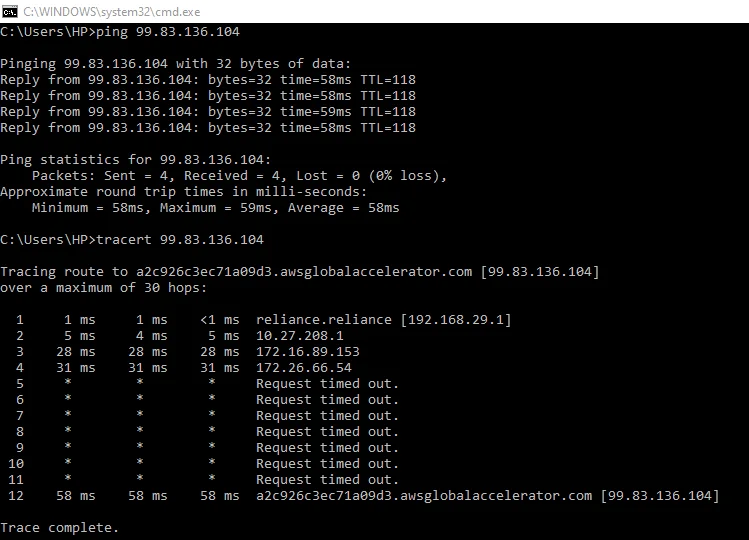
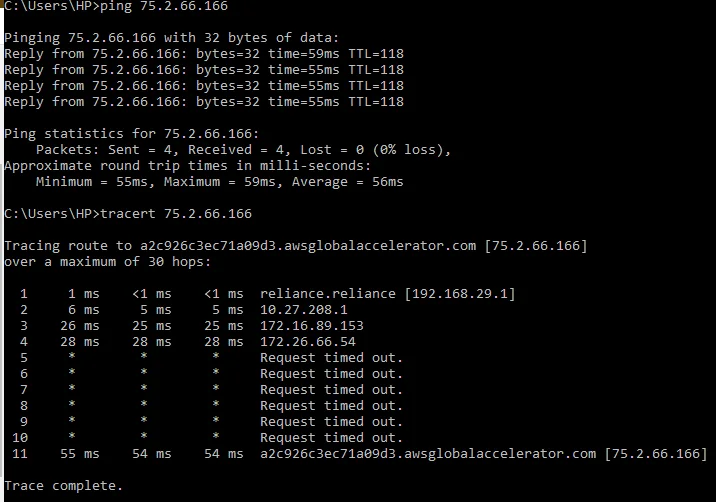
bro I m having same issue did u find the solution??
Last edited by a moderator:

For A temporary solution u can use CLOUDFLARE WRAP VPN while playing Valorant and then turn it off for normal usage/browsing.
- Messages
- 441
- Location
- Jharkhand
- ISP
- Airtel 100Mbps
Airtel 4G, Jio4g
(Past - Railwire 100Mbps, Jio Fiber 500Mbps)
Having 200ms+ ping since 4 days. Both the above IPs are not responding to pings on jiofiber. Have mailed them but no response yet.bro I m having same issue did u find the solution??

Update: Getting 50ms in menu and around 60-65ms ingame. Thanks @kanansrin for the suggestions. I know it's not ideal but still it's way better than what I had(90-140mswhoa the pg portal tr
whoa the pg portal trick worked, k ill try it tooUpdate: Getting 50ms in menu and around 60-65ms ingame. Thanks @kanansrin for the suggestions. I know it's not ideal but still it's way better than what I had(90-140ms)

I'm using local ISP and having an issue of service unavailable in valorant. I tried everything i could to fix it. If you have any idea regarding this, please update me.Something which you should know is that Valorant's Mumbai servers are hosted on AWS. My ISP is present along with Amazon in EIX Kolkata, which has 6-8ms ping from my location. Due to this, both the valorant IPs too have similar ping, but the ping in-game is similar to those for other Mumbai servers(35-50ms). So IMO the traceroute wouldn't suggest much.