
Hello there!
I have received 707GR1 ONT with firmware version V01.00.01_72 from Airtel with 300Mbps speed. I have requested bridge mode and the option is now available under WAN connection. I have TP-Link router and I couldn't find a way to enable bridge mode on the ONT to connect tp-link router as there were multiple configuration options which I couldn't figure out.
I have called Airtel support and received username and password. Previously, the username is [email protected] and the password is hidden. I have tried with dsl number such as [email protected] and account number as password and it didn't work. I have done nothing apart from enabling the bridge option under WAN configuration page. May be there is something else that I must configure?
Any further help/advise would be appreciated.
Thank you.
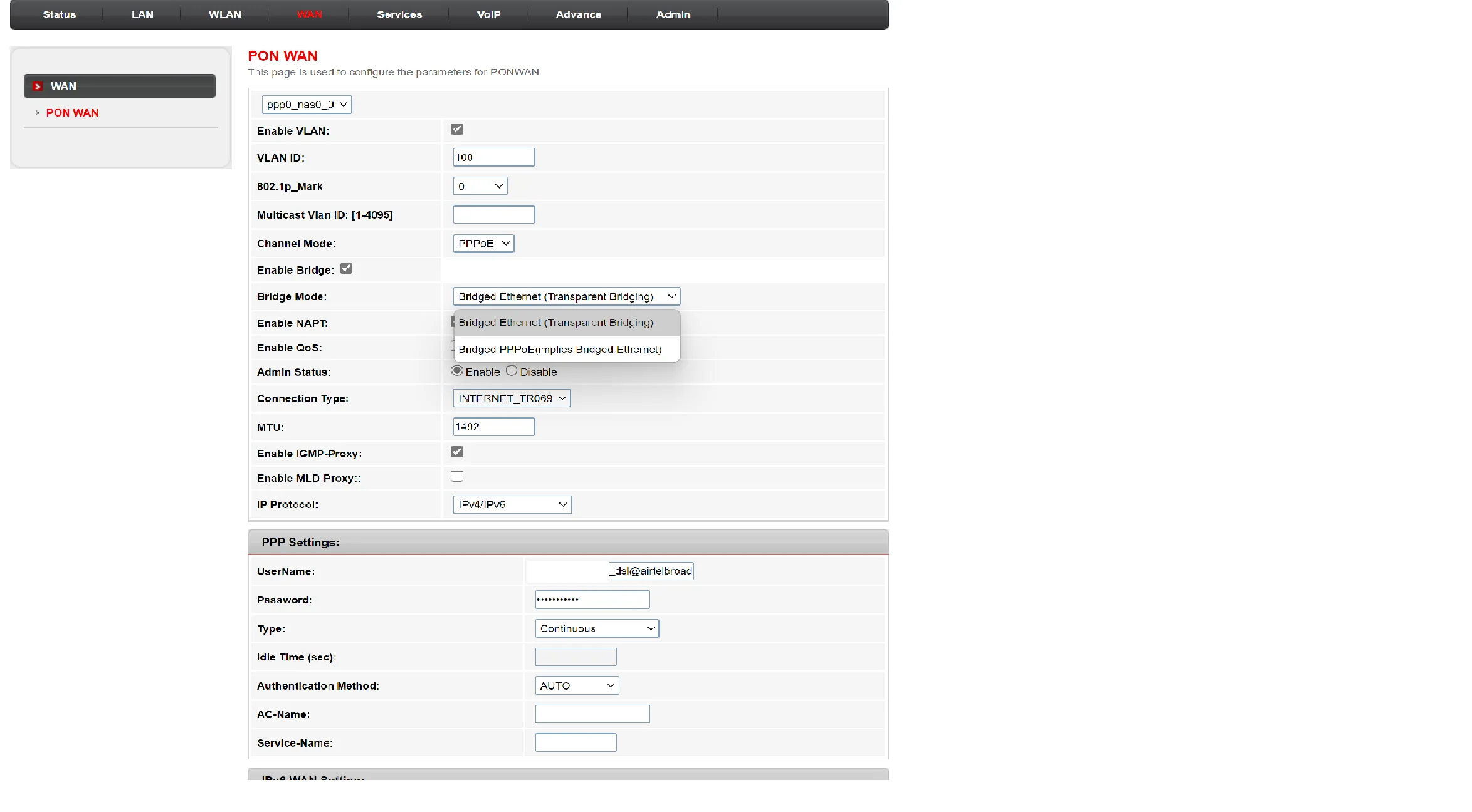
I have received 707GR1 ONT with firmware version V01.00.01_72 from Airtel with 300Mbps speed. I have requested bridge mode and the option is now available under WAN connection. I have TP-Link router and I couldn't find a way to enable bridge mode on the ONT to connect tp-link router as there were multiple configuration options which I couldn't figure out.
I have called Airtel support and received username and password. Previously, the username is [email protected] and the password is hidden. I have tried with dsl number such as [email protected] and account number as password and it didn't work. I have done nothing apart from enabling the bridge option under WAN configuration page. May be there is something else that I must configure?
Any further help/advise would be appreciated.
Thank you.
Last edited by a moderator:


