
No issues here, checked with a friend too, he also doesn't have any issues like this.are other airtel ftth users having similar issues?

-
Amazon Deals - ToS - Like us?
You are using an out of date browser. It may not display this or other websites correctly.
You should upgrade or use an alternative browser.
You should upgrade or use an alternative browser.
Different routing/speed on LAN and Wi-Fi?
- Thread starter Rehan Kumar
- Start date
- Replies 59
- Views 12,431
I saw something even more inexplicable today. Basically as said in my other thread, I was getting low speeds in wifi on some devices which didn't even connect on 802.11n mode. 5-8mbps on my D-Link router. However, just now strangely was getting 17mbps on youtube with no buffer, so decided to check on google fiber speed test and actually am getting 26-27mbps which is what it should get on 802.11g. Still getting 5-8mbps on speedtest.net and similar speed on file download. So it seems Airtel is doing traffic shaping and has some bugs and is putting their own low quality firmware on the router. Am getting wired today so will see if its okay with that. Them having complete control over the router is already very
suspicious
Also getting 5-8mbps from google drive download
suspicious
Also getting 5-8mbps from google drive download
Last edited:

I am throttling to 10Mbps on US servers and appx 15 Mbps european by my cable wala on my 100 Mbps (fiber to switch) unlimited connection. Today, I checked on my OP Nord CE 5G and OP 5 phones, I am getting full Int'l speed. However, to confirm I checked on laptop connected through WIFI and ethernet, again I am being throttled to 10Mbps. Any help why this is happening?

- Messages
- 57
- Location
- Gurugram NCR || Chandigarh || Punjab
- ISP
- Airtel FTTH || Jio True5G || Airtel 4G || Vi 4G
I also tried the same on Samsung Galaxy Tab, I was able to max the speed at 78-80 Mbps on Int'l servers. However, as soon I tried connecting my laptop via wired / Wifi, I am throttled to 10Mbps. Do note that my laptop as well as my router have gigabit ports (RJ45). So seems lile there is no throttling for android devices or speed test measures android devices differently as compared to laptops / desktopsI am throttling to 10Mbps on US servers and appx 15 Mbps european by my cable wala on my 100 Mbps (fiber to switch) unlimited connection. Today, I checked on my OP Nord CE 5G and OP 5 phones, I am getting full Int'l speed. However, to confirm I checked on laptop connected through WIFI and ethernet, again I am being throttled to 10Mbps. Any help why this is happening?

Airtel wifi Dasan router speed

 ibb.co
Screenshot-20211112-220815-Speedtest hosted at ImgBB
Image Screenshot-20211112-220815-Speedtest hosted on ImgBB
ibb.co

i think this is because the speedtest app works differently compared web browser version. maybe it opens more tcp connections than web version?
around 27 conversations when speedtest was done on android app in emulator:
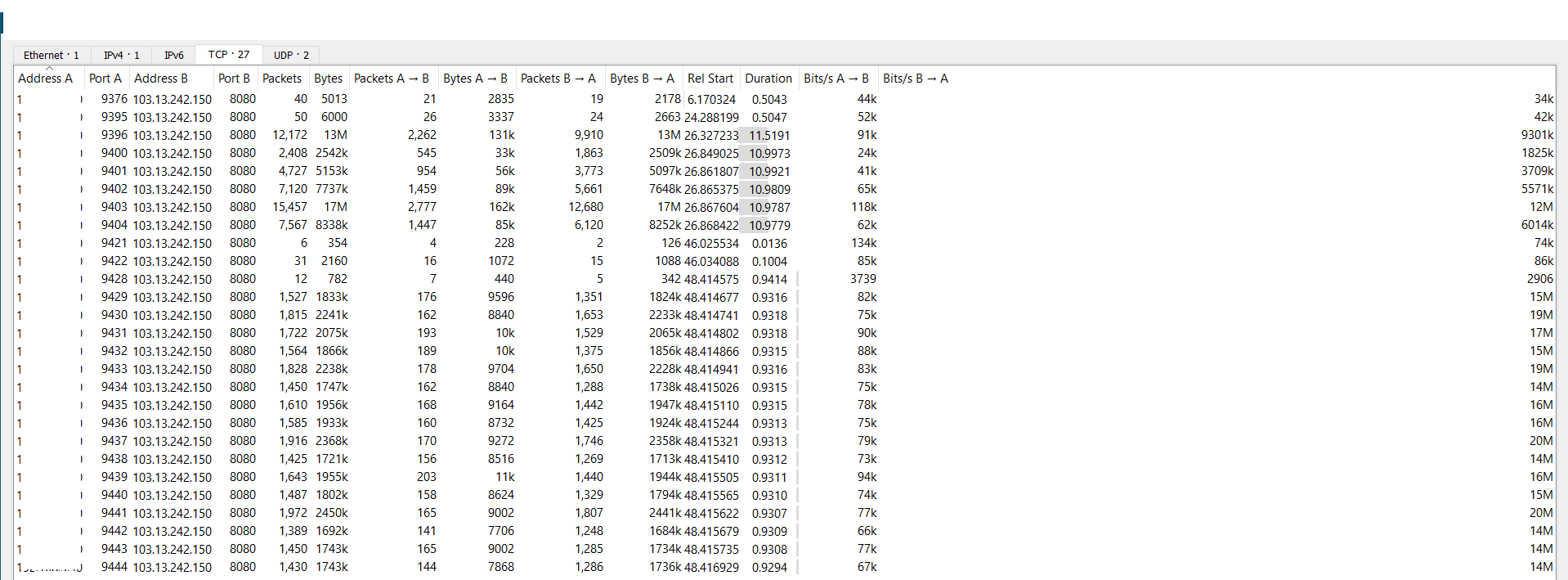
only 7 conversations on desktop browser:

i'll try again with tests complete
around 27 conversations when speedtest was done on android app in emulator:
only 7 conversations on desktop browser:
i'll try again with tests complete
Last edited:
@Rehan Kumar
UPDATE!: As I posted earlier that I faced severe international and local bandwidth throttling, I figured the reason for the bandwidth cap.Throttling of International and local Bandwidth | Airtel Xstream Broadband .The CULPRIT was that I had DISABLED the windows autotuning on my Windows 10. Due to only this fact, the bandwidth was being capped at such low speeds.
Currently, I am able to max out on my 200 Mbps plan across the world, though there is some throttling on LAN as compared to Wifi, but thats manageable.
UPDATE!: As I posted earlier that I faced severe international and local bandwidth throttling, I figured the reason for the bandwidth cap.Throttling of International and local Bandwidth | Airtel Xstream Broadband .The CULPRIT was that I had DISABLED the windows autotuning on my Windows 10. Due to only this fact, the bandwidth was being capped at such low speeds.
Currently, I am able to max out on my 200 Mbps plan across the world, though there is some throttling on LAN as compared to Wifi, but thats manageable.