Distribution box left open by Jio Engineers

  • Thread starter Thread starter ramishtaha
  • Start date Start date
  • Replies Replies 10
  • Views Views 2,061
Messages
13
Location
Biharsharif
ISP
Jio Fiber
So I got a new JioFiber connection and the distribution box was left open by Jio Engineers, I sent this email to jiofibercare@jio.com

What are your thoughts guys??

Good Morning Sir,

I am writing this email with reference to my Service Request number SR0000######.

Summary of the problem

JioFiber connection has been installed in my house for less than One Month, The engineer that visited and did the installation was in a hurry and did a really bad wiring in the house. The Nail in the coffin is that he left the Distribution Box open and some animals (most likely Squirel) chewed up both input(fiber comming from jio) and output(fiber comming to my home) fibers resulting in it's breakage and disconnection.

What I did

I raised a Service request and Some other engineer visited my premise, he told me to not to tell anyone that the Distribution box was open and he fixed the output(Fiber comming to my house) connection. He raised a ticket on his end and stated on phone to Jio that there was low Optical power as the subject of ticket. He told me again not to tell anyone that the distribution box was open.

After that....

I was told by him as well as by JioFiber Customer care that my issue will be resolved within 24 hrs. 24 hrs have passed and I still don't see any good news.
I do WFH(Work from Home) and this downtime has affected me severly both financially and emotionally, for now I have resumed my connection with my local broadband provider.

What I demand

If this was because of some natural or something uncontrollable then it's understandable because fiber cuts do happen. But this is because of incompetency, I demand that I get a compensation for the downtime and the damage caused to me.

I demand a compensation of 1000 INR (the other broadband connection cost)
 
All is good but don't expect compensation. It's a broadband residential connection that is not backed by any Service Level Agreements (SLA).
 
Last edited:
@ramishtaha bro, sad to say it, but you won't get a single paisa out of Jio, forget Rs 1000. At the most they may extend your plan expiry date by 1-2 days as indirect compensation. Or reducing the recharge value of the renewal pack, i.e. a small discount, when the time comes. Outraging doesn't work. You don't like the service? Give it up and get another provider if one is available in your area. Alternatively use a wireless dongle when you experience downtimes. I use 2 BB providers as I too work extensively from home. I need that backup line. Since you work from home it maybe well worth investigating the possibility of 2 providers and investing in a router that can handle 2 WAN connections with fall back/fall forward + load balancing features.

Also, what people need to do, and literally nobody does, is read the fine print in the agreement signed with the ISP. Please understand that our home broadband connections do not come with SLAs related to speed/performance, uptime, routing (and obsession with ping times), support turn around times, etc etc. If anybody wants all those guarantees, go in for a leased line at a much higher, rather exponentially higher cost. For the ISP, domestic connections are all provided on what I see as a "best efforts" basis with suitable clauses for force majeure etc.
 
@ramishtaha bro, sad to say it, but you won't get a single paisa out of Jio, forget Rs 1000. At the most they may extend your plan expiry date by 1-2 days as indirect compensation. Or reducing the recharge value of the renewal pack, i.e. a small discount, when the time comes. Outraging doesn't work. You don't like the service? Give it up and get another provider if one is available in your area. Alternatively use a wireless dongle when you experience downtimes. I use 2 BB providers as I too work extensively from home. I need that backup line. Since you work from home it maybe well worth investigating the possibility of 2 providers and investing in a router that can handle 2 WAN connections with fall back/fall forward + load balancing features.

Also, what people need to do, and literally nobody does, is read the fine print in the agreement signed with the ISP. Please understand that our home broadband connections do not come with SLAs related to speed/performance, uptime, routing (and obsession with ping times), support turn around times, etc etc. If anybody wants all those guarantees, go in for a leased line at a much higher, rather exponentially higher cost. For the ISP, domestic connections are all provided on what I see as a "best efforts" basis with suitable clauses for force majeure etc.
Yes I understand, and I am just giving it a try.
I have read the terms.

Your suggestion about load balancing multiple WANs is great.
 
Well, my connection is fixed now, the fiber repair team was serving another city, that's why the delay.

They have just one fiber repair team working in a area range of about 400 Kilometres (distance between cities). After repairing my connection they were going to a city 100 Kilometres far from here.( This is what they said)
 
I have setup a makeshift Load Balancing system by using my JioFiber HomeGateway as a switch, what are your thoughts??

This is what I did.

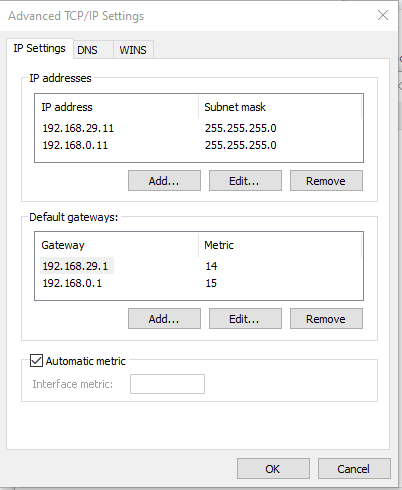
Both My Jio Fiber and Local Broadband connections are in different Networks (192.168.29.xx Jio and 192.168.0.xx Local Broadband) and have different routers

1. I conencted the lan port of both routers
2. Turned off DHCP on one Router (I turned off for local broadband because it has higher ping and no IPv6)
3. Added manual IP and gateway configurations in my Computer and Server like this
2peCjnf.png

I also changed the metric so that JioFiber Gateway (192.168.29.1) has more priority than LocalISP
4. Seems to be working fine for now.
 
If you have a router from brands like TP-Link, you can flash OpenWrt. enabling you to use the same Failover configuration with all your home devices and also making sure you do not have to go through such hassles.
 
Interesting approach. Me like.

(Even though I'm lazy and using TP-Link ER605 device)
 
@ramishtaha, this may or may not work...but since you have given different metrics i.e. priorities what you are doing is basically telling the interface to prefer 1 gateway over the other. I have not tried it with Windows adapter settings. So it's the luck of the draw for you.

You should refer to this doc: An explanation of the Automatic Metric feature for IPv4 routes

Here's what I need to do for load bal and failover at least in pfSense and OPNSense:

a) WAN1 - Priority 1, WAN 2 Metric 1 (so it equal weightage)

b) For Failover (when WAN 1 fails):
WAN1 - Pri 1, WAN2 - Pri 2 (so WAN2 gets higher weightage and packets are sent via this gateway)

c) For Failover (when WAN2 fails)
WAN1 - Pri 2 and WAN2 pri 1 (so WAN1 gets higher weightage)

Simple solution? Just buy a router with dual WAN or use an existing router and check if you can flash developer firmware like OpenWRT for extra features.
 
Back