
-
Amazon Deals - ToS - Like us?
You are using an out of date browser. It may not display this or other websites correctly.
You should upgrade or use an alternative browser.
You should upgrade or use an alternative browser.
Enable/disable wifi in Sercomm 4221 SR. ( black router) without buttons
- Thread starter dogeshji
- Start date
- Replies 9
- Views 1,643


- Messages
- 57
- Location
- Gurugram NCR || Chandigarh || Punjab
- ISP
- Airtel FTTH || Jio True5G || Airtel 4G || Vi 4G
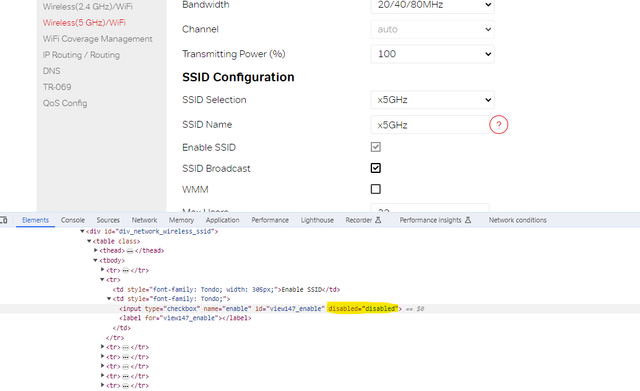
Uncheck, Enable SSID and SSID Broadcast.
UPDATE: I asked for a replacement . I convinced ISP as it keeps disconnecting and needs to be restarted to function properly.
I got H660GM-A by DASAN. It doesnt have physical wifi on/off button. But when logged in as admin , 2.4Ghz and 5Ghz bandwidth can be disabled separately. Much better than Sercomm router
I got H660GM-A by DASAN. It doesnt have physical wifi on/off button. But when logged in as admin , 2.4Ghz and 5Ghz bandwidth can be disabled separately. Much better than Sercomm router
@rohancyberdude this method doesn't actually turns off radio.

anmolbhard004
Resonating
yeah it wont as soon as you refresh the page its back to square one.
Similar threads
- Replies
- 0
- Views
- 621