High pings on Airtel fiber. Need help diagnosing a Traceroute...

  • Thread starter Thread starter Severus
  • Start date Start date
  • Replies Replies 6
  • Views Views 2,031
Messages
7
Location
Srinagar, Jammu & Kashmir, India
ISP
Airtel
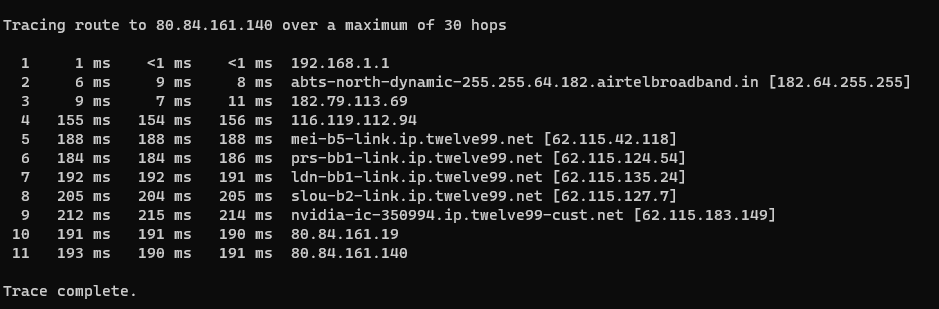
Hi there, I have a Airtel xstream fiber connection and I play games on Nvidia GFN using a VPN (just to connect to the GFN server (in EUROPE), then disable it when connected).I have 100mbps down and 100mbps up internet, I used to get 120-130ms of ping, which is understandable due to the distance between me and the Nvidia server (offline games work fine on that ping). From a past couple weeks I am getting 200+ms ping all the time on all Nvidia EU servers, I have attached a traceroute to the server IP, which i got by opening a browser in the background of the game.
Hops 1-4 are my pc and my ISP (Airtel), Hops 5-9 are the IP-transit provider? (Arelion), last 2 hops are the Nvidia servers.
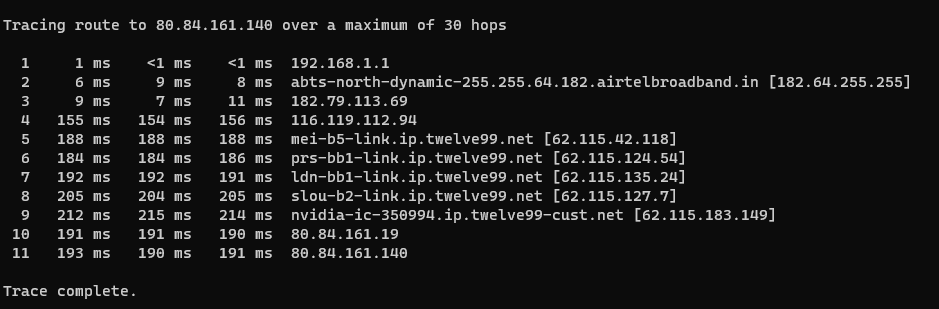
image.png.08192ef75033a824aa13cd25b46c4c8c.png


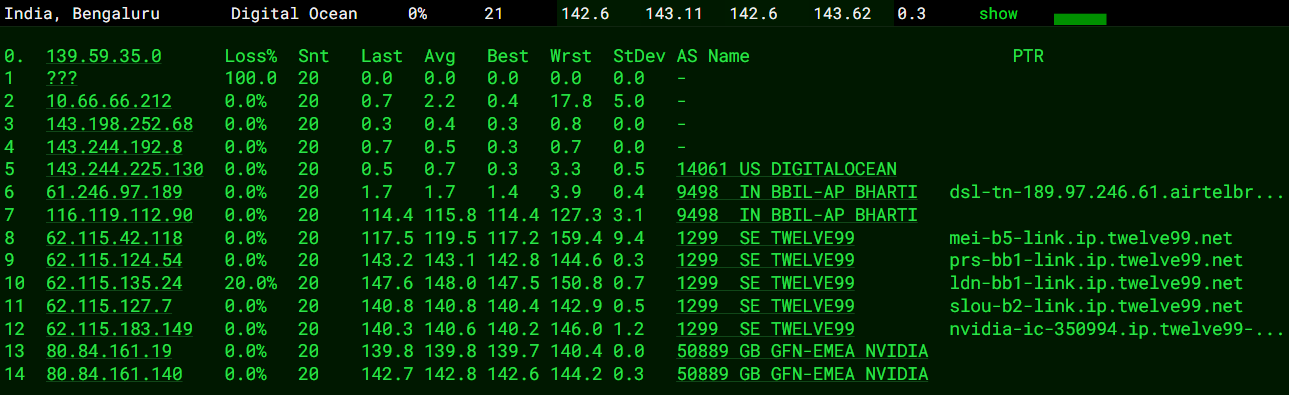
Here is another tracert which i did from ping.pe, it uses different ISP (DigitalOcean) but somehow uses Airtel as an IP-transit provider? or something (hops 6,7 is Airtel), resulting in almost same routing as mine.
Screenshot2024-01-08112203.thumb.png.8f88d533de51d67a84120dcc9ed5c869.png
Here you can see the latencies are much lower than what I am experiencing.
Now I don't know what to do.

All I need to know is who is at fault.
I am awaiting a response from Airtel regarding this matter but i just needed a second opinion on this.
Thank you.
 
Whats happening is, your packets are first went to Pakistan (Don't know why) -> South India ->, then agian to EU, check that 182.179.113.69.

You can't do much, Airtel has messed up its routes. Some CDNs like Cloudflare, GCore has this same issue. Try following up with them regularly, btw how much you're paying for cloud gaming?
 
Last edited:
Airtel in its heists of expansion, has forgotten to maintain quality routing which it used to in past.
Not favourite ISP choice for gaming anymore in my locality.
Code:
Trace Route Result:
traceroute to 80.84.161.140 (80.84.161.140), 30 hops max, 64 byte packets
 1  223.177.255.255  20.538 ms  20.441 ms  20.334 ms
 2  125.21.141.225  23.116 ms  21.722 ms  22.222 ms
 3  * * *
 4  62.115.42.118  214.339 ms  213.788 ms  214.196 ms
 5  62.115.124.56  227.141 ms  227.079 ms  226.827 ms
 6  * * *
 7  62.115.112.63  234.652 ms  234.243 ms  236.448 ms
 8  62.115.183.149  221.279 ms  221.316 ms  221.464 ms
 9  80.84.161.19  220.144 ms  220.004 ms  229.204 ms
10  80.84.161.140  220.148 ms  219.794 ms  220.229 ms
 
Your traceroute is perfectly fine. Do note that your shared traceroute is only useful for upload traffic.
Need to reverse trace to find the root cause for the high latency.

Your latency penalty appears to be beyond Airtel, so I doubt there is much they can do.
 
I believe it might be due to capacity issues to EU. The return path for my VPS at Frankfurt (Vultr) is coming via NTT.
Which comes via US, so quite high latency.
This decision seems to be deliberate on Airtel's end.
This has happened before and they'll fix it.
 
@albonycal This shitty routing has been consistent in my area since 3 months now. Had been emailing to airtel multple times. Nodal Officers are well aware of this situation and all they could provide are fake promises for our retention. I mean who would want a connection that provides 70 ms latency to Mumbai servers with such a high gateway ping (i.e. 20 ms).
 
i am facing the same problem but when i traceroute or ping test to the server then my pings are around 150 but when i go in game then its showing high pings like 250+ ..
ANy solution ?
 
Back