

Just wanted to create a thread about bonding two networks together for faster speed.
Unlike Load balancing where one connection is routed over one gateway and next one through next etc, bonding takes each packet through alternating WANs to a common VPS on the internet, these packets are then reassembled by the VPS and sent as a single connection to the actual site you are connecting to so you get full speed even over a single connection.
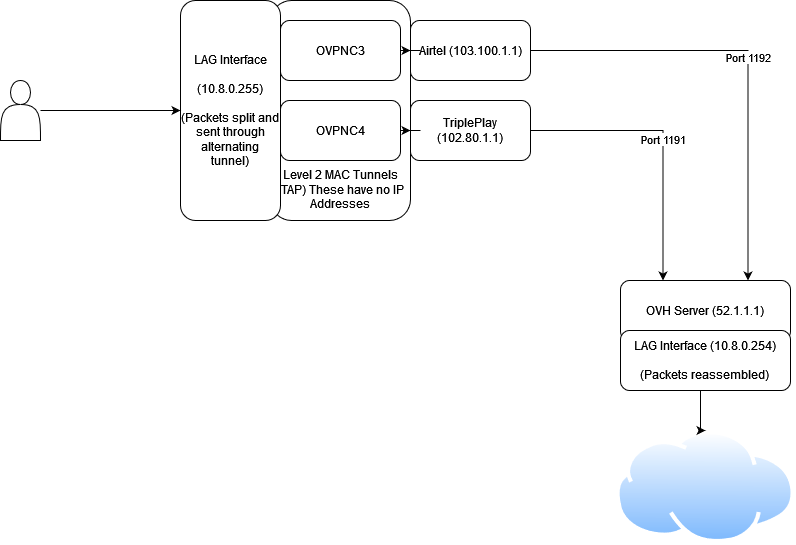
Unlike load balancing where many connections (applications like torrents work well using load balancing as you are connecting to many peers all around the world) are needed to take proper advantage of the full bandwidth, bonding can work even on single connection transfers (eg. downloading a file on a browser).
Source
I followed this video and used the script to create 3 tunnels (two for Airtel and one for Tripleplay) on my OVH VPS in Singapore.

 github.com
Then I added these 3 clients on my PFSense box at home:

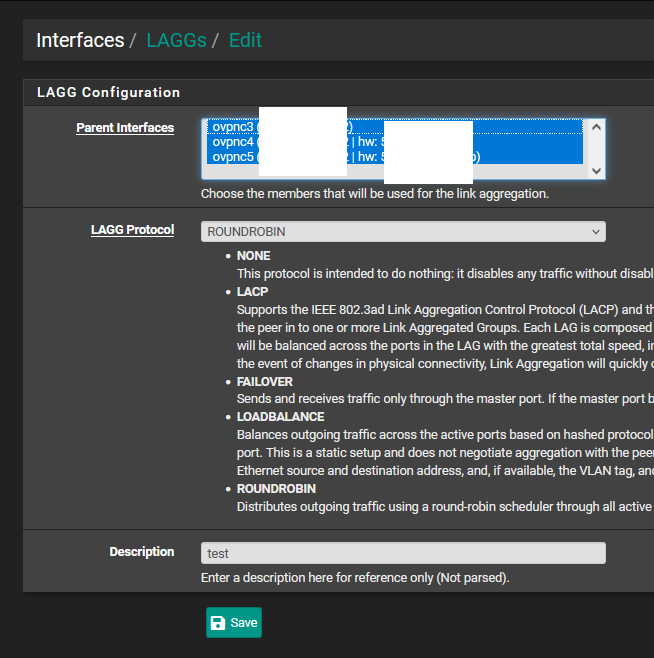
I created a LAGG (Link Aggregation) interface in PFSense and add the OVPN Clients to it:
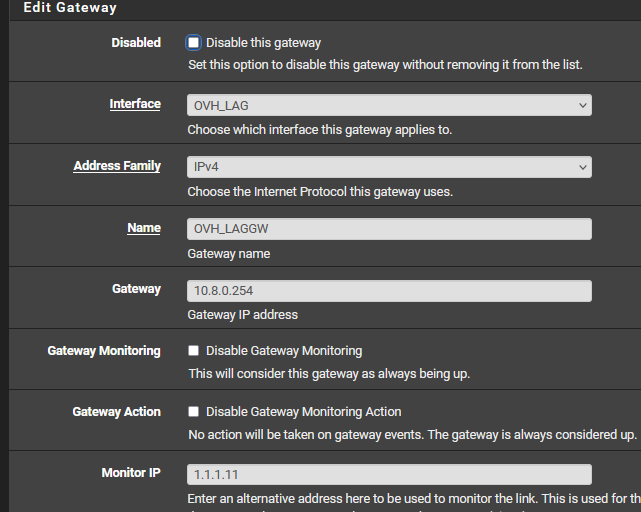
Created a gateway for the LAG Interface (which is the internal openvpn ip of the server):
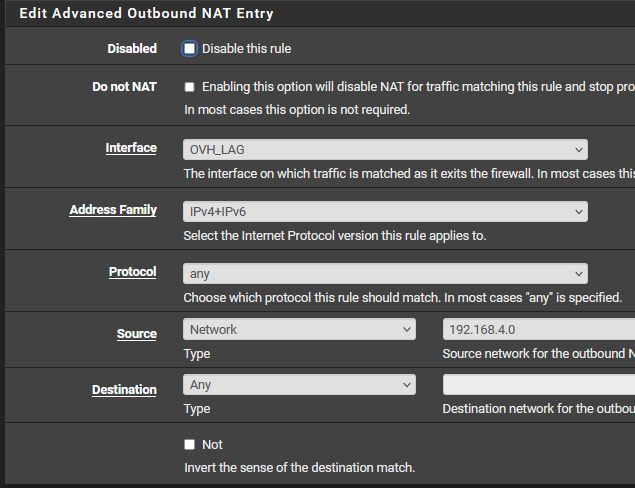
NAT Rules:
And Policy Routed my devices over the gateway:

Speeds turned out to be pretty mid, but this was just for testing anyway. I think there is some bottleneck somewhere (likely with the config) as I get 300Mbps using WireGuard. Maybe the i3 7th gen cpu on my PFSense box is too weak for 3x OVPN (even with no encryption).
I used the single connection test to make sure it wasn't just load balancing the two connection and instead actually bonding it.

Source
What I wanted to show was that the traffic was indeed flowing through both the ISPs despite the speedtest being on a single connection!:
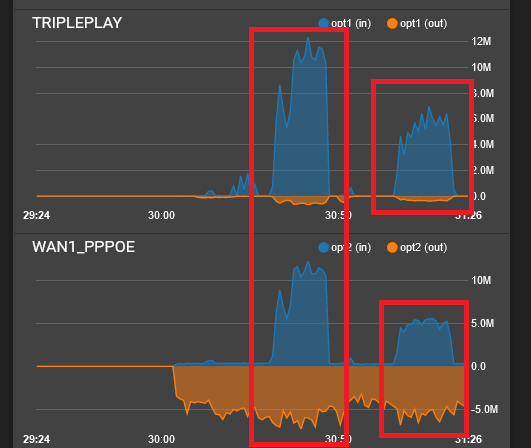
Yes, the full capacity of my WANs aren't being utilized but I wanted to share this nonetheless.
Unlike Load balancing where one connection is routed over one gateway and next one through next etc, bonding takes each packet through alternating WANs to a common VPS on the internet, these packets are then reassembled by the VPS and sent as a single connection to the actual site you are connecting to so you get full speed even over a single connection.
Unlike load balancing where many connections (applications like torrents work well using load balancing as you are connecting to many peers all around the world) are needed to take proper advantage of the full bandwidth, bonding can work even on single connection transfers (eg. downloading a file on a browser).
Source
I followed this video and used the script to create 3 tunnels (two for Airtel and one for Tripleplay) on my OVH VPS in Singapore.
GitHub - onemarcfifty/openvpn-bonding: bond multiple tap interfaces over openvpn
bond multiple tap interfaces over openvpn. Contribute to onemarcfifty/openvpn-bonding development by creating an account on GitHub.
github.com
Then I added these 3 clients on my PFSense box at home:
I created a LAGG (Link Aggregation) interface in PFSense and add the OVPN Clients to it:
Created a gateway for the LAG Interface (which is the internal openvpn ip of the server):
NAT Rules:
And Policy Routed my devices over the gateway:
Speeds turned out to be pretty mid, but this was just for testing anyway. I think there is some bottleneck somewhere (likely with the config) as I get 300Mbps using WireGuard. Maybe the i3 7th gen cpu on my PFSense box is too weak for 3x OVPN (even with no encryption).
I used the single connection test to make sure it wasn't just load balancing the two connection and instead actually bonding it.
Source
What I wanted to show was that the traffic was indeed flowing through both the ISPs despite the speedtest being on a single connection!:
Yes, the full capacity of my WANs aren't being utilized but I wanted to share this nonetheless.
Last edited:
