internet too slow until restart router

  • Thread starter Thread starter starter
  • Start date Start date
  • Replies Replies 52
  • Views Views 2,884
Messages
65
Location
india
ISP
BSNL
6sqLsgF.png
HcuToz5.png

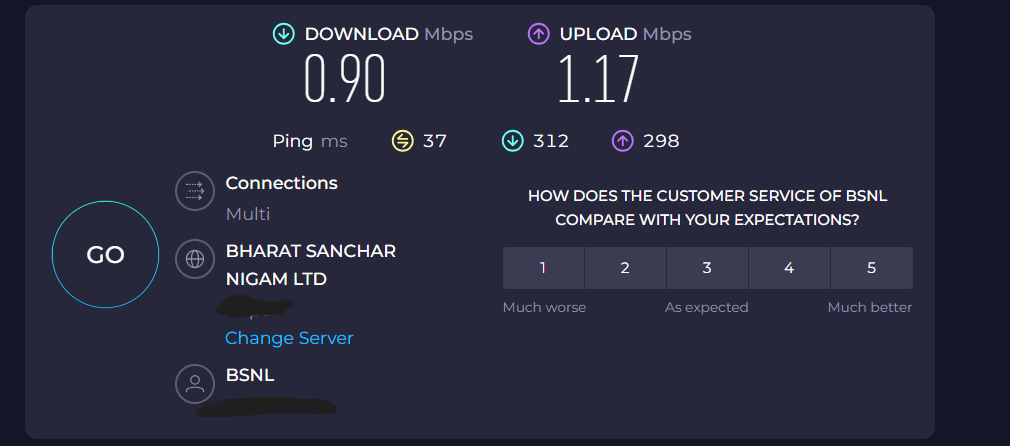
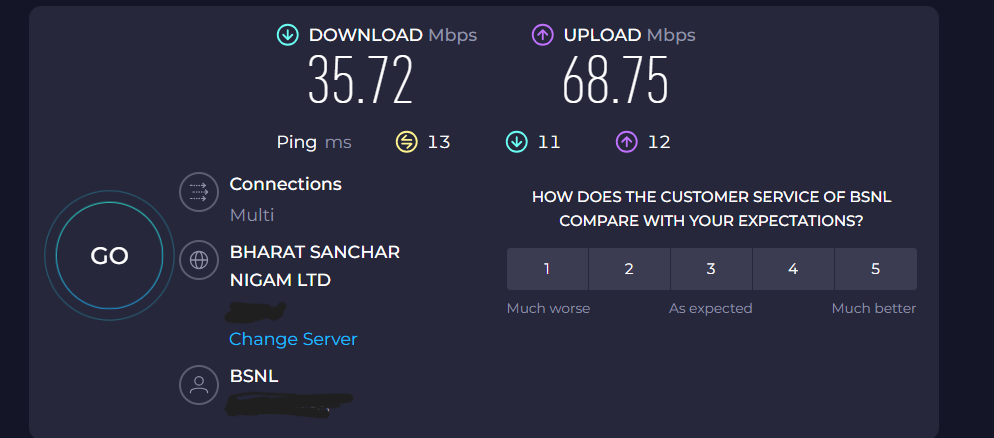
speedtest before and after restart


i really need help

im using bsnl broadband from last 3 years ,but from last 3-4 months it giving me too much trouble

on wifi

i earlier used to get 45+ mbps upload /download on 40 mbps plan

then bsnl auto upgraded 40 mbps to 60 mbps last year,i get 50-60 mbps upload/download


but from last 3-4 months , my speed reduces 1-10 mbps and sometimes speed test fail

but after multiple attempts to speedtest ,i get good ping ( usually under 15 ms ) with 1-10 mbps

sometimes sites doesn't load ( no response ) like my internet is down, have to refresh multiple times

youtube auto sets quality to 480p


but after restarting router, everything comes to normal

but this remains only for few hours before same problem come again


more details

router -Syrotech single band
rx power - 23
tx -around 2

i have around 5 nearby wifi

tried searching google

people said - most people suggest need 5ghz router

already tried changing dns
already reset router
tried changing position


but with the cost of new 5 ghz router ( 3000+ rupees ) i can get airtel whole year for just 1000-2000 rupees extra


but 2.5 ghz router shouldn't be this bad, i mean you cant even watch youtube at fullhd

why restarting resolve all the problem
 
Sometimes the hardware isn't good/powerful enough for doing multiple tasks. You can bridge the ONT/router and get a separate router for connecting to ISP and routing.
 
thank you @sloj for your response ,but it was all working good till recent few months ago,it was capable of delivering 60+ mbps upload /download ,then suddenly want happened, i cant even youtube site sometimes ,even after opening i cant watch youtube at full hd till i restart router

even i worst condition ,2.5 ghz router should able to provide 20+ mbps

so its highly unlikely that router is not capable,even with 1 connection ,its same

i complaint multiple times at bsnlselfcare , they take 2-3 days then automatically tag it as solved

i dont even know ,if its router problem or isp problem
 
Something definitely happened as you are experiencing issues. Changes from ISP side or hardware degradation or maybe something else altogether. But since things go back to normal once you restart the issues seems to be the router. It's best if you bridge and add a separate router but if you don't want to, then you can ask them for a new replacement ONT/router.
 
@sloj their is no replacement ,i have to purchase new router of 3500 rupees, whereas my local broadband provider provinding internet for whole year in just 4000 with 40 mbps plan

im now in deep confusion ,because purchasing new router doest gurantee that my problem will be solved

it looks like router problem ,but what i notice that ,when ever i restart router ,i get ip in 117.xxx.xxx.xxx ,but it changes to 59.xxx.xxx.xxx after some time
 
@supukabi thanks for response , bro in 4000 rupees ,radinet is giving for whole year with 40 mbps plan ,and they will provide router for free

yes ,people also recommending to bridge router

i do have old D-Link 600m , can i test with it to confirm ,if router is the creating problem
 
You are comparing costs, first check how is the service of the other ISP. If it's good enough for your needs then go for it.

IP address changing shouldn't be an issue. BSNL gives dynamic public IP address for now in most places and that changes every 24 hrs unless there is connection interruption.

Test with the old router you have. Configuration should be easy.
 
@sloj my D-Link 600m support mac cloning

but i cant find any good tutorial ,on youtube i watched ,but none shows acutally bridging router,all shows just connect 2 router with lan and setup wlan ,basically just showing how to configure repeater

i do have some confusion with vlan ,mac address ( i do have vlan ,username and password )

can you please give link to bridging tutorial

and last question - its safe to bridge router , because in bsnl office ,only one old uncle sits ,and he knows nothing , i dont wanna mess with him to reset my mac address ( in case different mac address registered )
what if i forgot to clone mac address ,does new mac address will be registered automatically ??

if bridging solve my problem , i will invest in good wifi 6 router ( will take suggestion from users here )

and bsnl was unbeatable in my area, when everything was good , i used to get 7-8 ping ,with speed always above base plan ,
 
You will have to login into ONT with admin account to change settings. Just search for "ONT bridge" and there will be plenty of videos to get an idea of how to change to bridge mode. You will need to clone the WAN MAC address. VLAN will be in the ONT bridge profile, no need to copy that on the router. Bridging is totally safe, MAC address will have to be reset if cloning doesn't work and can be done by LCO or BSNL people.

Before doing anything, save the ONT configuration in a file for easy restoration if you mess up (option available in the ONT interface). Or take screenshots.
 
Back