

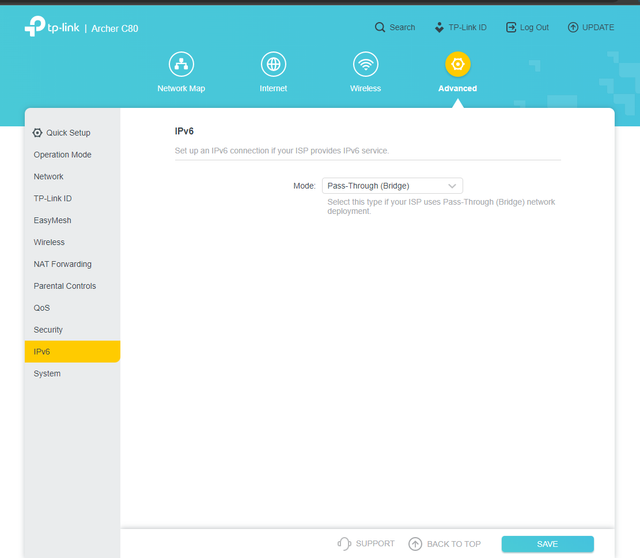
I use a TP-Link Archer C90 router that has a Pass-Through (Bridge Mode) option under the IPv6 settings. It is easy to enable with just one click. However, I was surprised to find out that after enabling it, all my devices are started receiving IPv6 IP addresses directly from the Jio router, even though I had configured access point on my TP-link router and extenders.
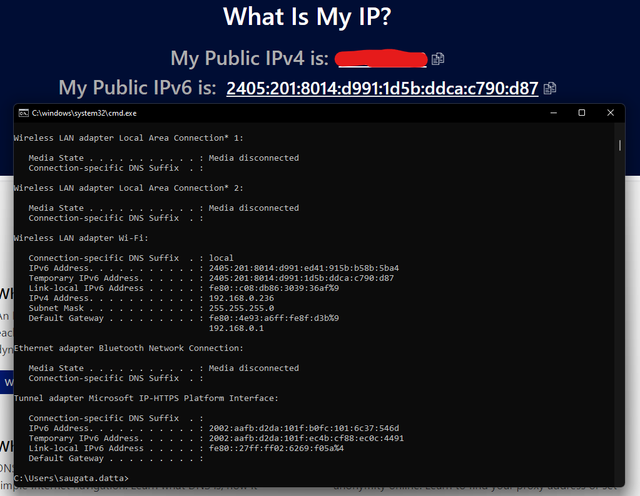
All my devices that support IPv6 are getting public IPv6 addresses assigned to them. I can also access Jio VoIP from my existing access point that is configured on TP link.
The best part is that you don’t have to make any changes to your existing wifi network or follow any long steps. If you have Archer C90 or any other router with a similar feature, you can use bridge mode without breaking anything.
I hope this information will be useful for others.
Regards,
Saugata D.
All my devices that support IPv6 are getting public IPv6 addresses assigned to them. I can also access Jio VoIP from my existing access point that is configured on TP link.
The best part is that you don’t have to make any changes to your existing wifi network or follow any long steps. If you have Archer C90 or any other router with a similar feature, you can use bridge mode without breaking anything.
I hope this information will be useful for others.
Regards,
Saugata D.


