

Hello comrades
I hope you all are doing well!
So, a big goof up happened, last night.
I'm using a JioFiber Corporate connection, it's a 100 Mbps plan and yesterday, I was trying to replace my JioFiber ONT (JCOW414) with TP-Link XZ000-G3 v1 GPON Terminal. I already cloned my GPON SN in my GPON terminal
I was able to connect to the internet after setting the correct VLAN ID in either the GPON terminal or my PC. I also had to change the MAC address of my PC's ethernet adapter. It also worked for a while in my TP-Link Archer C6 v3.20 (after modifying the MAC and VLAN ID) before some bug related to WAN connection cropped up and the router was no longer getting the Dynamic IP and the WAN indicator was intermittently turning on orange and then turning off again in a few seconds.
After this router thing happened, I decided to go back to the JioFiber ONT. Yes, this is exactly where this fiasco started.
I turned off my JioFiber ONT and plugged the fiber patch cord in it and turned it on.
After the solid red light, there was a blinking red light and I was expecting a solid green light to come on soon as had happened during my previous reboots, though during these reboots, I hadn't taken out the fiber patch cord.
But what I was greeted with, after the blinking red light, was the blinking green light. To investigate, I connected my PC to one of the LAN ports of the ONT and logged into the WebGUI (192.168.29.1) and the this is what I saw:
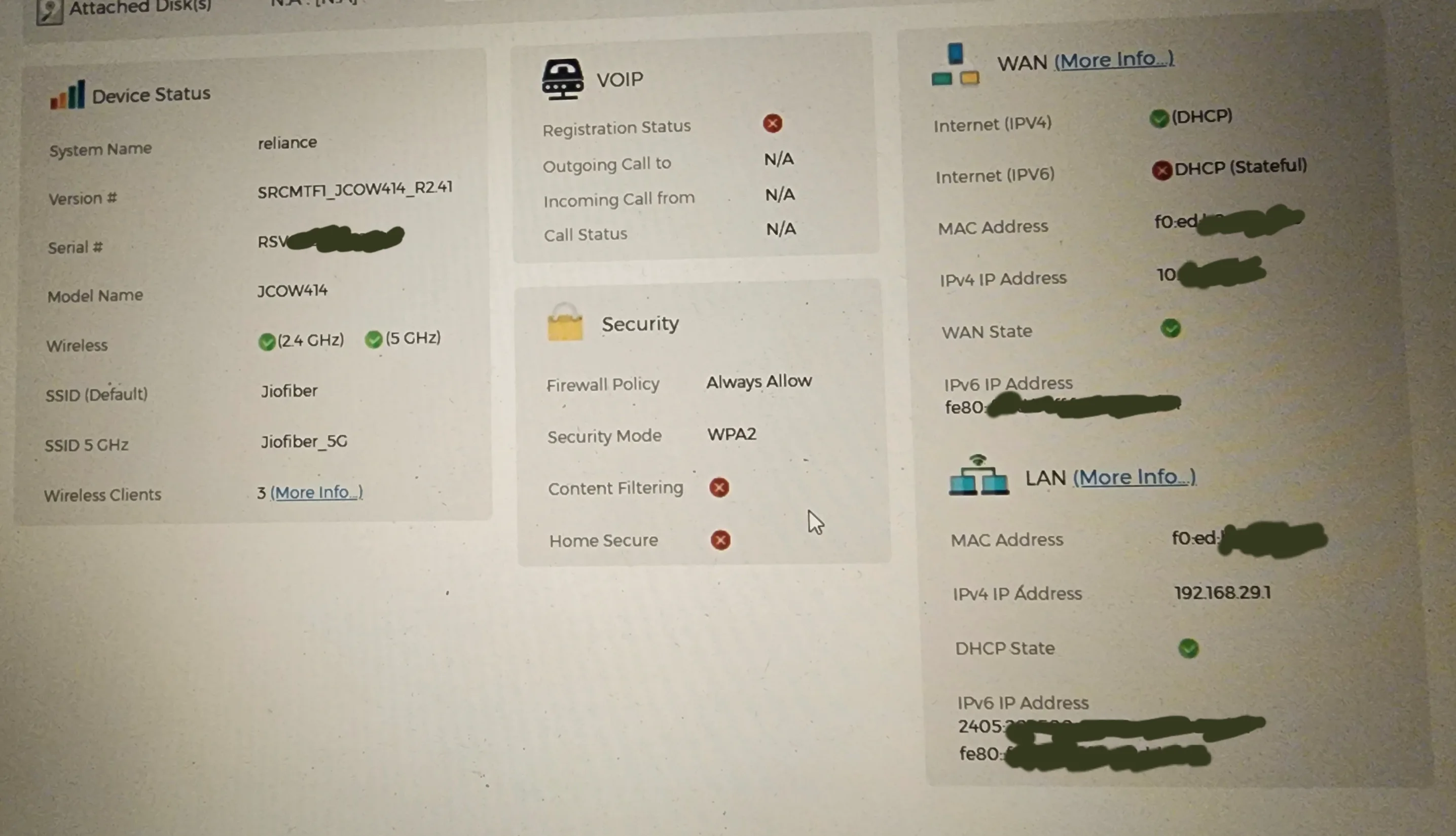
I noticed that the internet worked just fine for a few minutes before it stopped working altogether after the reboot and the light on the ONT had started blinking red again.
The homepage looked the same.
I also checked the WAN status page:
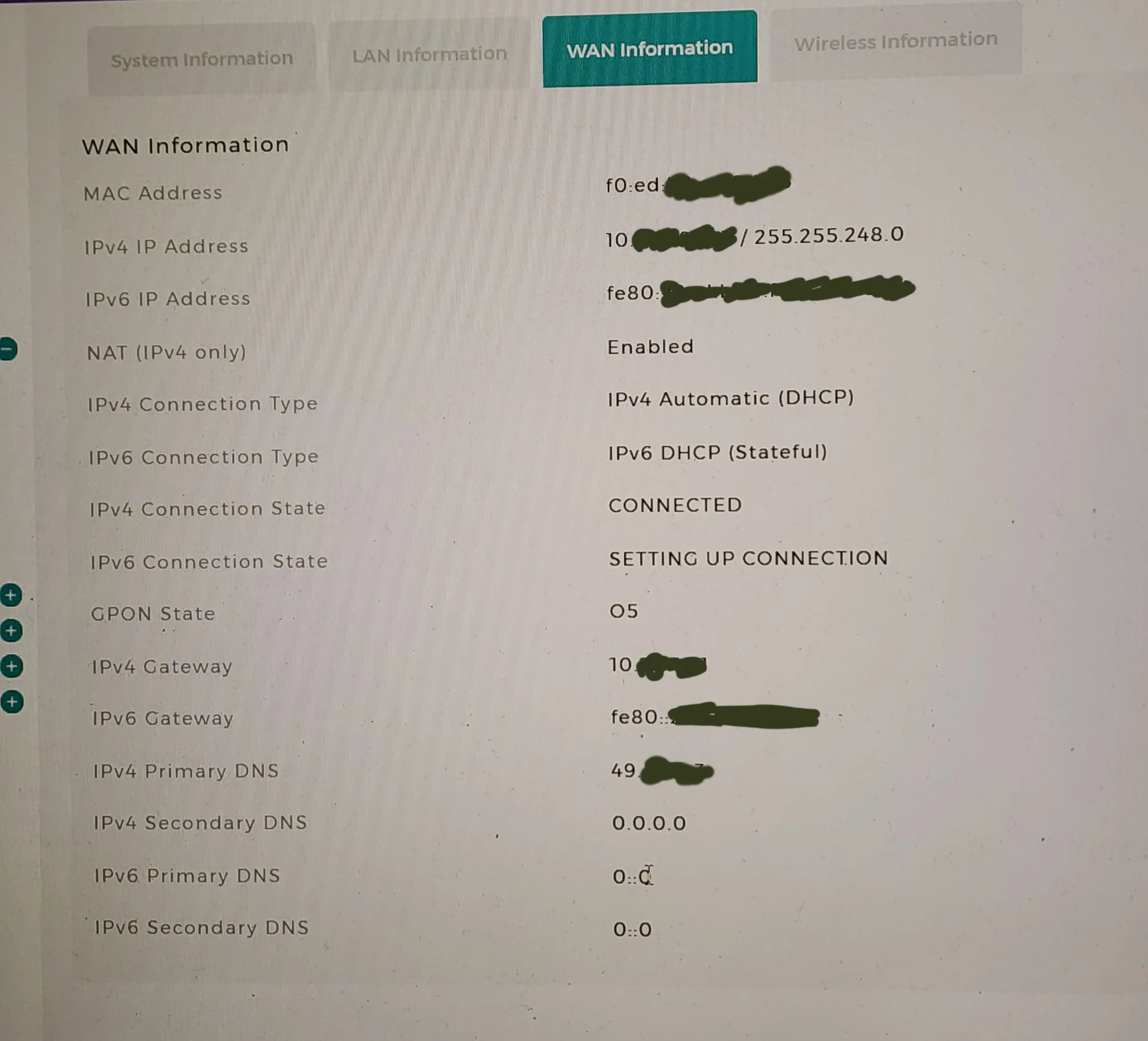
Last evening when this thing happened, I tried several things, including factory reset, restoring the unlocked telnet firmware, and of course, rebooting the router.
After one such reboot from the WebGUI, the solid green light came on all by itself, and to nobody's surprise, I heaved a sigh of relief.
But last night, I started experimenting again with the GPON terminal and my router and after I concluded I might have to get a new router, I plugged the patch cord back into the JioFiber ONT. Though I was quite optimistic that there would be no issues, disregarding the precedent, I couldn't have been more wrong.
The green-blinking-and-then-red-blinking-light phenomenon reared its ugly head again and the internet worked for a few minutes and then refused to work despite numerous reboots, factory resets, etc.
I also tried to leave the ONT turned off for 15 minutes and then several hours before booting it up again and FML, the issue still persists.
Just so you know, I also tried contacting JioFiber helpline, they picked up my calls but after the call got disconnected one or two times, they simply refuse to pick it up now.
Any help/suggestions/insights would be greatly appreciated!
I hope you all are doing well!
So, a big goof up happened, last night.
I'm using a JioFiber Corporate connection, it's a 100 Mbps plan and yesterday, I was trying to replace my JioFiber ONT (JCOW414) with TP-Link XZ000-G3 v1 GPON Terminal. I already cloned my GPON SN in my GPON terminal
I was able to connect to the internet after setting the correct VLAN ID in either the GPON terminal or my PC. I also had to change the MAC address of my PC's ethernet adapter. It also worked for a while in my TP-Link Archer C6 v3.20 (after modifying the MAC and VLAN ID) before some bug related to WAN connection cropped up and the router was no longer getting the Dynamic IP and the WAN indicator was intermittently turning on orange and then turning off again in a few seconds.
After this router thing happened, I decided to go back to the JioFiber ONT. Yes, this is exactly where this fiasco started.
I turned off my JioFiber ONT and plugged the fiber patch cord in it and turned it on.
After the solid red light, there was a blinking red light and I was expecting a solid green light to come on soon as had happened during my previous reboots, though during these reboots, I hadn't taken out the fiber patch cord.
But what I was greeted with, after the blinking red light, was the blinking green light. To investigate, I connected my PC to one of the LAN ports of the ONT and logged into the WebGUI (192.168.29.1) and the this is what I saw:
I noticed that the internet worked just fine for a few minutes before it stopped working altogether after the reboot and the light on the ONT had started blinking red again.
The homepage looked the same.
I also checked the WAN status page:
Last evening when this thing happened, I tried several things, including factory reset, restoring the unlocked telnet firmware, and of course, rebooting the router.
After one such reboot from the WebGUI, the solid green light came on all by itself, and to nobody's surprise, I heaved a sigh of relief.
But last night, I started experimenting again with the GPON terminal and my router and after I concluded I might have to get a new router, I plugged the patch cord back into the JioFiber ONT. Though I was quite optimistic that there would be no issues, disregarding the precedent, I couldn't have been more wrong.
The green-blinking-and-then-red-blinking-light phenomenon reared its ugly head again and the internet worked for a few minutes and then refused to work despite numerous reboots, factory resets, etc.
I also tried to leave the ONT turned off for 15 minutes and then several hours before booting it up again and FML, the issue still persists.
Just so you know, I also tried contacting JioFiber helpline, they picked up my calls but after the call got disconnected one or two times, they simply refuse to pick it up now.
Any help/suggestions/insights would be greatly appreciated!
Last edited by a moderator:


