
Recently changed houses in Pune, so I had to switch ISPs too. Figured I'd share my experience since it might help someone else going through the same thing.
A bit of background first. My last connection was Gazon, and before that I had Airtel Xtreme Fiber, which was honestly the worst of the lot in terms of value. Cancelling Airtel alone took me nearly 2 hours on calls and chat, just a complete waste of time. On other hand cancelling Gazon was a much smoother experience overall, and cancelling it was almost too easy. I just messaged my LCO on WhatsApp, he confirmed it was done, said he'd refund the deposit and collect the hardware sometime that week. No fuss at all.
Now onto YOU Broadband, which is what I've settled on at the new place.
International routing has genuinely surprised me. This is where YOU Broadband seems to be doing something right on the backend:
Traceroute, Domestic (Cloudflare, 1.1.1.1):
Traceroute, Singapore (StarHub):
Traceroute, UK (BT network):
Local (Pune):
Singapore (Verizon):
London (BT):
Local numbers basically hit the plan ceiling even over Wi-Fi on a busy network. International download holds up well too, though upload clearly tapers off on the longer routes, which makes sense given the distance and number of hops involved.
✔ Symmetrical and reliable upload speeds
✔ Fairly low latency, both domestic and international
✔ Proactive communication during outages
Happy to answer any questions if anyone's thinking of switching.
A bit of background first. My last connection was Gazon, and before that I had Airtel Xtreme Fiber, which was honestly the worst of the lot in terms of value. Cancelling Airtel alone took me nearly 2 hours on calls and chat, just a complete waste of time. On other hand cancelling Gazon was a much smoother experience overall, and cancelling it was almost too easy. I just messaged my LCO on WhatsApp, he confirmed it was done, said he'd refund the deposit and collect the hardware sometime that week. No fuss at all.
Now onto YOU Broadband, which is what I've settled on at the new place.
Plan Details
- Plan: 500 Mbps FTTH
- FUP: 3.5 TB/month
- Monthly Rent: ₹3,186 incl. GST, genuinely one of the cheapest 500 Mbps plans I've come across
- Connection Type: FTTH (Fiber), PPPoE
- ISP provided router: RLTech dual band GPON router (currently running in bridge mode)
Installation Experience
Installation was sorted the same day I called in. No drama, no back and forth. The technician showed up, pulled fiber, and had the connection live within a couple of hours. Only the plan amount (₹3,186) was charged, nothing extra for installation or router.Router Setup
The ISP supplied RLTech router has been in bridge mode from day one, so it's basically just doing GPON duty. I started off with a Mikrotik hEX behind it, and have since moved to a Ubiquiti Cloud Gateway Ultra, which has been handling routing duties nicely.Connection Basics
- Optical Power (Rx): -16 dBm, stable
- WAN Type: CGNAT (100.78.x.x range)
- IPv6: Not provisioned
- Connection Mode: PPPoE
Speed and Performance
Speeds have been consistent so far:- LAN: Usually 490 to 530 Mbps, occasionally touching 540 Mbps
- Wi-Fi: 460 to 500 Mbps both up and down
- Upload is fully symmetrical with download, no compromises there
- Google (8.8.8.8): avg 11.7 ms, min 7.2 ms, max 16.8 ms, 0% loss
- Cloudflare (1.1.1.1): typically 5 to 10 ms, though I've seen it spike to the high 20s or low 30s during peak hours. Likely a temporary anycast routing shift on Cloudflare's side rather than anything to do with the ISP.
Code:
ping -c 30 8.8.8.8

PING 8.8.8.8 (8.8.8.8): 56 data bytes
64 bytes from 8.8.8.8: icmp_seq=0 ttl=117 time=9.731 ms
64 bytes from 8.8.8.8: icmp_seq=1 ttl=117 time=12.262 ms
64 bytes from 8.8.8.8: icmp_seq=2 ttl=117 time=10.545 ms
...
64 bytes from 8.8.8.8: icmp_seq=29 ttl=117 time=12.962 ms

--- 8.8.8.8 ping statistics ---
30 packets transmitted, 30 packets received, 0.0% packet loss
round-trip min/avg/max/stddev = 7.177/11.722/16.842/2.362 ms
International routing has genuinely surprised me. This is where YOU Broadband seems to be doing something right on the backend:
- Singapore: around 58 to 60 ms
- Europe (UK): around 135 to 140 ms
Traceroute, Domestic (Cloudflare, 1.1.1.1):
Code:
traceroute to 1.1.1.1 (1.1.1.1), 64 hops max, 40 byte packets
 1  192.168.0.1 (192.168.0.1)  9.853 ms  1.919 ms  2.027 ms
 2  100.78.0.1 (100.78.0.1)  6.801 ms  6.718 ms  8.853 ms
 3  pune-core01.youbroadband.in (203.187.215.1)  13.249 ms  6.403 ms  8.658 ms
 4  123.63.152.142 (123.63.152.142)  5.531 ms  6.006 ms  3.816 ms
 5  182.19.106.105 (182.19.106.105)  9.082 ms  8.867 ms  7.756 ms
 6  * * *
 7  162.158.226.17 (162.158.226.17)  12.753 ms
    162.158.226.89 (162.158.226.89)  10.504 ms
    162.158.226.73 (162.158.226.73)  9.814 ms
 8  one.one.one.one (1.1.1.1)  7.346 ms  6.660 ms  7.993 ms
Traceroute, Singapore (StarHub):
Code:
traceroute to 202.94.70.1 (202.94.70.1), 64 hops max, 40 byte packets
 1  rt-ax82u-1288 (192.168.2.1)  1.371 ms  0.733 ms  0.551 ms
 2  10.240.12.76 (10.240.12.76)  2.421 ms  3.076 ms  2.397 ms
 3  * * *
 4  aes-static-033.51.246.61.airtel.in (61.246.51.33)  2.988 ms  3.401 ms  2.419 ms
 5  182.79.152.152 (182.79.152.152)  55.494 ms
    116.119.42.1 (116.119.42.1)  55.526 ms
    182.79.224.183 (182.79.224.183)  54.211 ms
 6  203.117.32-209.unknown.starhub.net.sg (203.117.32.209)  55.758 ms  55.414 ms  69.763 ms
 7  203.118.7.74 (203.118.7.74)  55.864 ms  55.563 ms
    203.118.6.234 (203.118.6.234)  73.341 ms
 8  202.94.70.1 (202.94.70.1)  58.532 ms  61.124 ms  60.396 ms
Traceroute, UK (BT network):
Code:
traceroute to 217.38.149.236 (217.38.149.236), 64 hops max, 40 byte packets
 1  rt-ax82u-1288 (192.168.2.1)  1.158 ms  0.674 ms  0.439 ms
 2  10.240.12.76 (10.240.12.76)  3.458 ms  2.398 ms  2.066 ms
 3  * * *
 4  aes-static-033.51.246.61.airtel.in (61.246.51.33)  3.038 ms
    aes-static-013.51.246.61.airtel.in (61.246.51.13)  2.841 ms  2.842 ms
 5  116.119.112.190 (116.119.112.190)  151.265 ms
    116.119.33.226 (116.119.33.226)  128.039 ms
    116.119.112.192 (116.119.112.192)  149.089 ms
 6  ixp2.de-fra.eu.ignite.net (80.81.193.84)  125.324 ms  125.175 ms  124.865 ms
 7  t2c4-et-7-0-5.uk-lof.gia.bt.net (166.49.208.34)  131.147 ms  139.220 ms
    t2c4-et-7-1-5.uk-lof.gia.bt.net (166.49.195.102)  130.291 ms
 8  * 166-49-209-195.gia.bt.net (166.49.209.195)  129.997 ms  128.386 ms
 9  core2-gig10-0-0.edinburgh.ukcore.bt.net (62.172.102.85)  137.212 ms  136.453 ms  138.582 ms
10  ftip004512660.acc3.mr.21cn-ipp.bt.net (109.159.234.155)  141.062 ms  141.684 ms  143.619 ms
11  217.38.149.236 (217.38.149.236)  140.619 ms  142.840 ms  139.415 ms
Speedtest.net, Multiple Servers
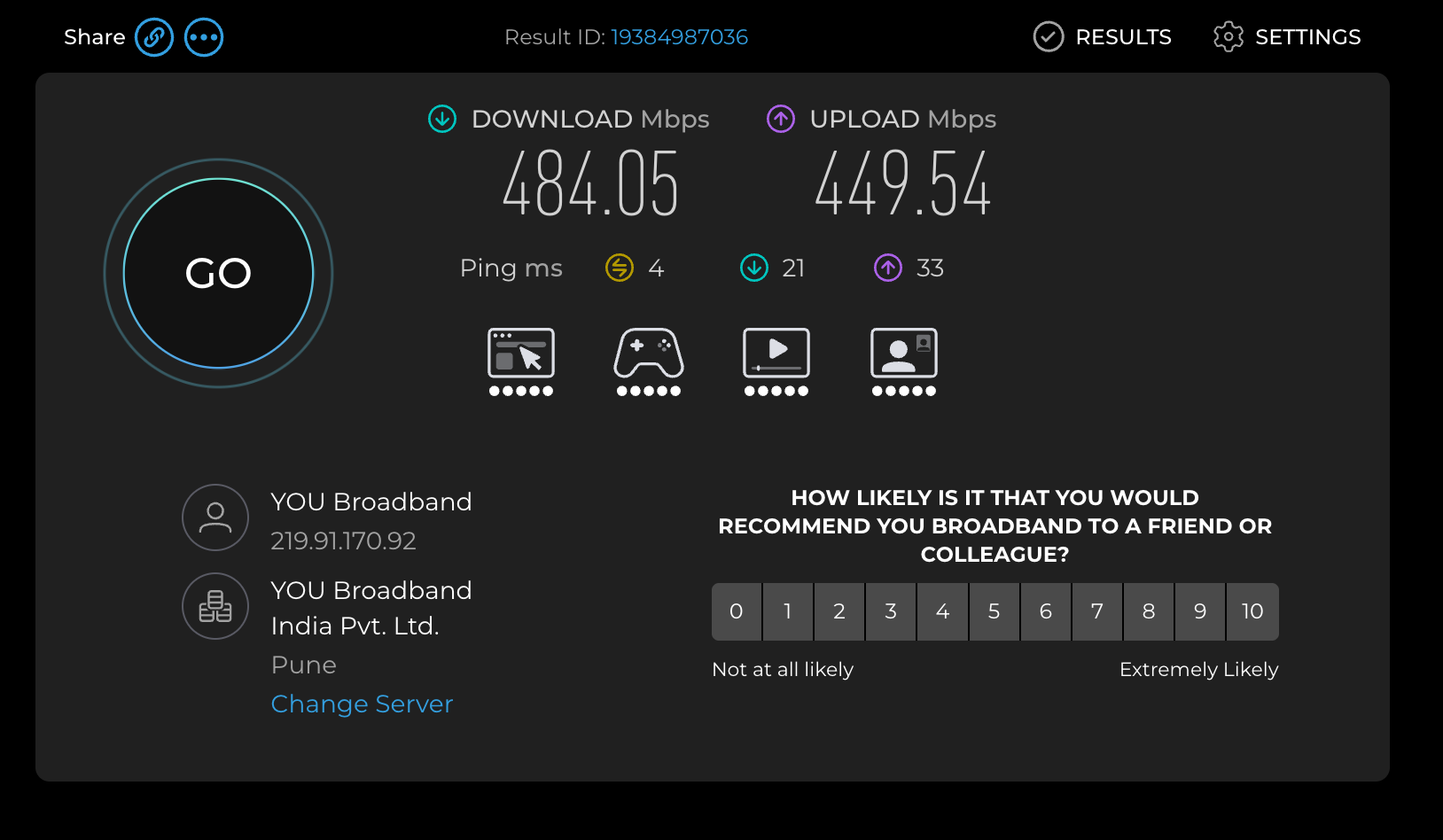
Note: all of these were run on the 5GHz Wi-Fi AP, with multiple other devices connected and actively in use, not a clean single device LAN test. So these are real world numbers, not best case ones.Local (Pune):
- Download: 484.05 Mbps
- Upload: 449.54 Mbps
- Ping: 4 ms unloaded, 21 ms loaded down, 33 ms loaded up
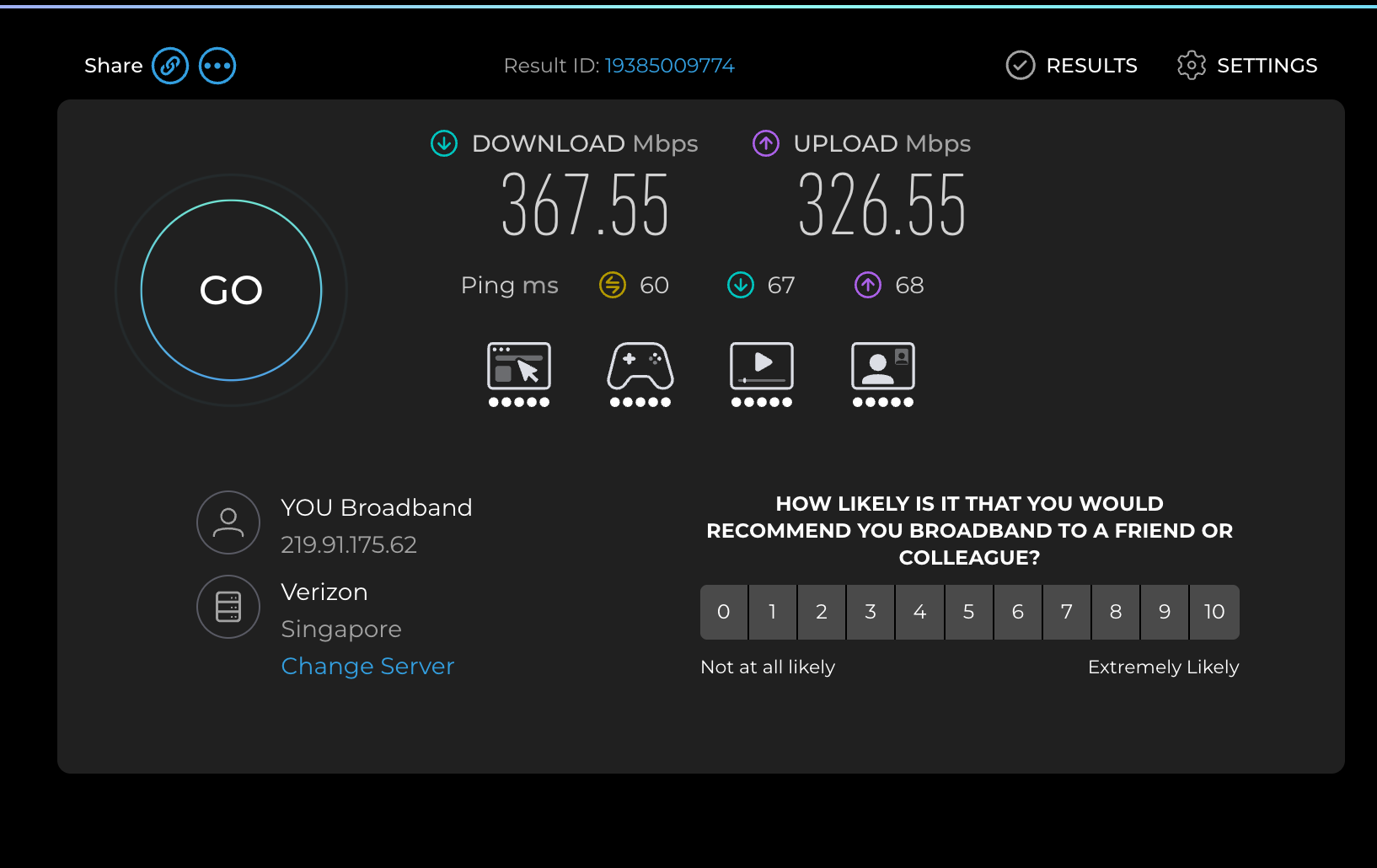
Singapore (Verizon):
- Download: 367.55 Mbps
- Upload: 326.55 Mbps
- Ping: 60 ms unloaded, 67 ms loaded down, 68 ms loaded up
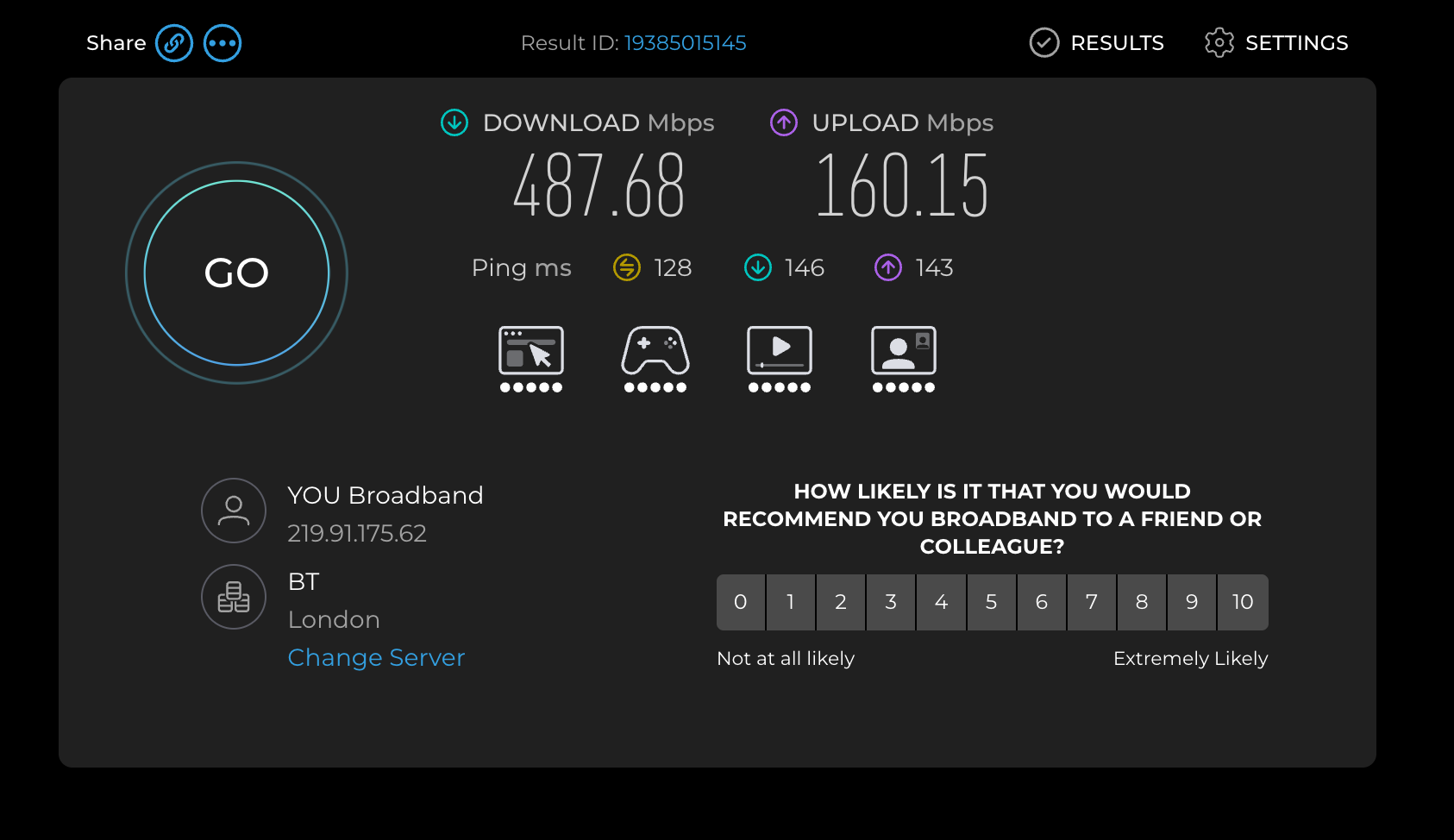
London (BT):
- Download: 487.68 Mbps
- Upload: 160.15 Mbps
- Ping: 128 ms unloaded, 146 ms loaded down, 143 ms loaded up
Local numbers basically hit the plan ceiling even over Wi-Fi on a busy network. International download holds up well too, though upload clearly tapers off on the longer routes, which makes sense given the distance and number of hops involved.
FUP, Is 3.5 TB Enough?
I'm mostly out of the house on office days, so my usage isn't that heavy to begin with. 3.5 TB has been comfortable so far. I've used about 2.4 TB in 40 days without any worry about hitting the cap.Daily Usage
The connection handles:- Multiple 4K TVs running at the same time
- Streaming and general browsing
- Online meetings
- Occasional cloud gaming (Xbox Cloud, xCloud)
Reliability
Had one outage in this period, about 2 hours, caused by a fiber cut. What I appreciated was that it was communicated proactively over email, and the issue was resolved within the TAT that was shared over SMS. Outside of that, uptime has been solid.Customer Support
No complaints here. Support and overall service handling has been good, and the communication during the outage was a nice touch that a lot of ISPs tend to skip.Things I Like
✔ Excellent price to speed ratio (₹3,186 for 500 Mbps is hard to beat)✔ Symmetrical and reliable upload speeds
✔ Fairly low latency, both domestic and international
✔ Proactive communication during outages
Things That Could Be Better
- Would love to see the FUP bumped up for heavier users, even though 3.5 TB works fine for how I use it
- The ISP provided router isn't great, but that's a non issue if you're running your own gear in bridge mode anyway
Overall Verdict
For the price, YOU Broadband's 500 Mbps plan has been solid. Consistent speeds, symmetrical uploads, low latency, and international routing that's noticeably better than I expected. Reliability has been good too, and the one outage I did face was handled transparently. If you're looking for a value for money 500 Mbps FTTH connection and YOU Broadband is available in your area, it's worth considering.Happy to answer any questions if anyone's thinking of switching.


