No internet Airtel PPPoE on Archer C6

  • Thread starter Thread starter gaurishhs
  • Start date Start date
  • Replies Replies 33
  • Views Views 2,313
Messages
31
Location
Delhi
ISP
Airtel (200mbps)
hi! i bought Archer C6 today and had bridge mode enabled on my Airtel router on port 4. The web ui had username and password for PPoE i used that and VLAN ID 100. PPoE was successful, Wifi connection is successful as well but i don't get any connectivity on the clients. I connected the ethernet cable from LAN 4 to WAN of Archer C6, Should i do it on LAN of Archer C6? I followed the TP-Link web ui quick setup. I thought this was a DNS issue but it doesn't look like to be one. It could be a gateway issue or maybe double NAT idk. Also i haven't disabled wifi on the Airtel router. I'm behind CG NAT but have a public dynamic IPv6. Please help me out. I have attached the TP-Link config:
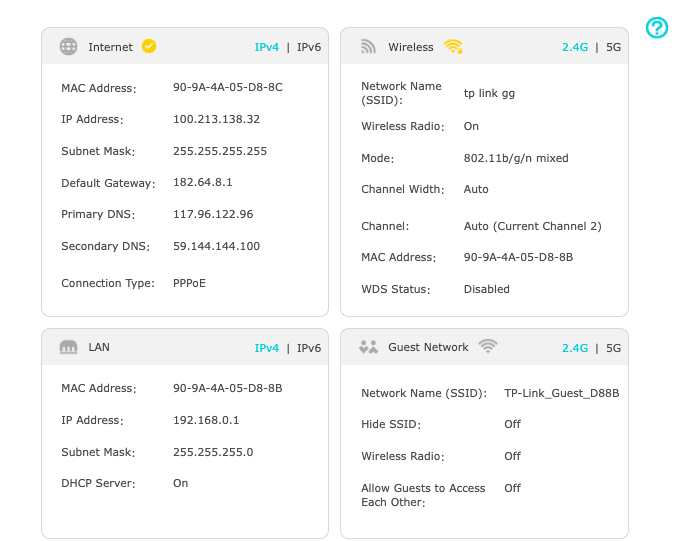
Screenshot-2024-05-27-at-2-41-30-PM.png
 
Last edited:
I contacted TP-Link Tech support, they made check some basic PPPoE stuff then she said to put the cable in the WAN port of Archer C6 to my laptop and check for network and it wasn't having network. Isn't that supposed to happen since i would be connected to the port which isn't in Router mode? One more thing to mention the ping command works on both router and connected devices its just that when i open chrome and go to google.com it won't work.
 
Last edited:
from router diagnose option can you ping to google.com?

check router logs if you can find any error.

from pc try ipconfig/all command and see if dhcp is allotting dns properly.

try changing LAN ip address to different series 172.X or 192.168.X.X

try doing a factory reset.
 
This seems like a MAC address issue with TP-Link devices. Internet connection is established and ping works but no access to webpages or other services. Try cloning the MAC address used previously for PPPoE on Airtel router and check what happens.
 
Last edited:
That in a way defeats the purpose. You can always use it in AP mode. But the primary reason you bought it is to improve your networking and get better features than what ISP ONT router provides.

Generally I find that most consumer routers have a connection wizard and that may not be good enough. You should manually set up the connection rather than using any connection wizards.
Airtel does not (to the best of my knowledge) deploy MAC id auth.
When in bridge, on my own router all I need is pppoe userid & password. No VLAN is needed. Many routers don't even have that option.

Check your firewalls on both routers. Temporarily disable them and check again. It was my observation that when I had F670L from Airtel, many of it's features were still operational including firewall, port forwarding, DHCP etc etc while in Bridge. I had to disable them to ensure that my router is properly front ending WAN.
 
I had already disabled firewall and attack protection to lowest. I bought this for OpenWRT and more range since i was paying 100rs/mo for airtel mesh which is shit. I put this in AP mode and it works much better than those Sercomm ones. I get the speed of my plan whereas those Sercomm ones gave me 1/3 or 1/4th of my plan speed
 
Back