
-
Amazon Deals - ToS - Like us?
You are using an out of date browser. It may not display this or other websites correctly.
You should upgrade or use an alternative browser.
You should upgrade or use an alternative browser.
OPTILINK ONU login credentials
- Thread starter Aditya
- Start date
- Replies 29
- Views 34,752

Solution

Maybe excitel use the same on all their devices? Try... excitel/exc@123.

@rajil.s
i got it working kinda (though i had to "hijack" another gch file to do it)
first you need to mount storage as read write, you can get drive name using "df" command in my case its
mount -o remount,rw /dev/mtdblock8 /
then you need to cd /home/httpd
make a backup of top.gch (cp top.gch top.gch.bak)
then do
rm top.gch
cat > top.gch
paste this
Source
and press ctrl+d to exit
you can then visit 192.168.1.1/top.gch to get stats
idk what else top.gch is used for, but creating my own .gch file didnt seem to work, showed 404 Not Found for some reason
i got it working kinda (though i had to "hijack" another gch file to do it)
first you need to mount storage as read write, you can get drive name using "df" command in my case its
mount -o remount,rw /dev/mtdblock8 /
then you need to cd /home/httpd
make a backup of top.gch (cp top.gch top.gch.bak)
then do
rm top.gch
cat > top.gch
paste this
Source
and press ctrl+d to exit
you can then visit 192.168.1.1/top.gch to get stats
idk what else top.gch is used for, but creating my own .gch file didnt seem to work, showed 404 Not Found for some reason
Upvote
0
@JB701 Thanks, verified it works.
I was mucking around with login_t.gch to make a fixed code each time (change code += selectChar[charIndex] to code="1234")
but the login page stopped working. I was thinking maybe there is some kind of check happening to see that the webpage is not tampered. However, you have completely obliterated top.gch so my theory was wrong.
I added code="1234" to changed login_t.gch,
Now the code is fixed to 1234,
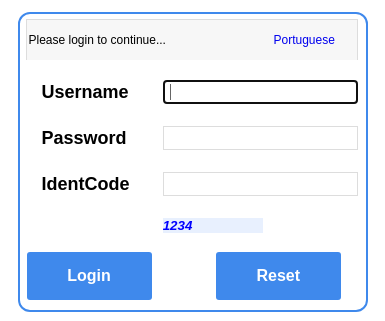
Full page is here.
I was mucking around with login_t.gch to make a fixed code each time (change code += selectChar[charIndex] to code="1234")
but the login page stopped working. I was thinking maybe there is some kind of check happening to see that the webpage is not tampered. However, you have completely obliterated top.gch so my theory was wrong.
I added code="1234" to changed login_t.gch,
Code:
function createCode() {
code = "";
var codeLength = 4;
var checkCode = document.getElementById("checkCode");
var selectChar = new Array(0, 1, 2, 3, 4, 5, 6, 7, 8, 9,'A','B','C','D','E','F','G','H','I','J','K','L','M','N','O','P','Q','R','S','T','U','V','W','X','Y','Z');
for (var i = 0; i < codeLength; i++) {
var charIndex = Math.floor(Math.random() * 36);
code += selectChar[charIndex];
}
code = "1234";
if (checkCode) {
checkCode.className = "code";
checkCode.value = code;
}
}
Now the code is fixed to 1234,
Full page is here.
Last edited:
Upvote
0
Figured it out. You need to insert your filename in /home/httpd/public/index.gch. Following that your custom gch file will work.idk what else top.gch is used for, but creating my own .gch file didnt seem to work, showed 404 Not Found for some reason
Upvote
0
After fixing the captcha to 1234, i am using the following script to write the data out for zabbix.
Code:
# cat /home/zabbix-server/excitelgpon.py
import selenium.webdriver

file1 = open("/tmp/excitelgpon.txt", "w")
driver = selenium.webdriver.PhantomJS(service_log_path='/tmp/ghostdriver.log') # or add to your PATH
driver.get('http://192.168.0.1/')

try:
 usernameElem=driver.find_element_by_id('Frm_Username')
 usernameElem.send_keys('excitel')
 passwordElem=driver.find_element_by_id('Frm_Password')
 passwordElem.send_keys('exc@123')
 identcodeElem=driver.find_element_by_id('Frm_IdentCode')
 identcodeElem.send_keys('1234')
 submitElem=driver.find_element_by_id('LoginId')
 submitElem.click()

except:
 print('notfound')
 sys.exit(0)


driver.get('http://192.168.0.1/getpage.gch?pid=1002&nextpage=pon_status_link_info_t.gch')
rxpowerElem=driver.find_element_by_id('Frm_RxPower')
txpowerElem=driver.find_element_by_id('Frm_TxPower')
voltElem=driver.find_element_by_id('Frm_Volt')
currentElem=driver.find_element_by_id('Frm_Current')
tempElem=driver.find_element_by_id('Frm_Temp')
logoutElem=driver.find_element_by_class_name('help')
logoutElem.click()
file1.write(rxpowerElem.text+" "+txpowerElem.text+" "+ voltElem.text+ " "+currentElem.text+" "+ tempElem.text)
Upvote
0
@Life_Warrior had that type of ont for a while, modifying config file and restoring didn't fix it sadly
@rajil.s
I made the power.gch much smaller
Source
No more js for displaying power (so you won't have you to use selenium, python requests will do).

@rajil.s
I made the power.gch much smaller
Source
No more js for displaying power (so you won't have you to use selenium, python requests will do).
Code:
import requests
from bs4 import BeautifulSoup

#file1 = open("/tmp/excitelgpon.txt", "w")

r=requests.get('http://192.168.171.1/power.gch')
soup=BeautifulSoup(r.text,'html.parser')

rxpower = str(float(soup.find(id = "rxpower").text)/10000)
txpower = str(float(soup.find(id = "txpower").text)/10000)
temp = soup.find(id = "temp").text.strip()
current = soup.find(id = "current").text.strip()
volt = soup.find(id = "volt").text.strip()

#file1.write(rxpower + " " + txpower + " " + volt + " " + current + " "  + temp)
print(rxpower + " " + txpower + " " + volt + " " + current + " "  + temp)
Upvote
0
Hi Guys I am new to this forum
I just got Excitel Broadband connection and I was provided with the media convertor Optilink Model OP-XONT 71000. I would like to disable the DHCP on this ONT device instead I would like to have the DHCP from my Managed switch TP-Link ER605 Multi WAN device .
I tried almost everything but seems like its not working and what I understand that Excitel has the MAC address binding on the ONT device
Hope some one can guide me on this
I just got Excitel Broadband connection and I was provided with the media convertor Optilink Model OP-XONT 71000. I would like to disable the DHCP on this ONT device instead I would like to have the DHCP from my Managed switch TP-Link ER605 Multi WAN device .
I tried almost everything but seems like its not working and what I understand that Excitel has the MAC address binding on the ONT device
Hope some one can guide me on this
Upvote
0
the ont is already in bridge mode, all you need to do is connect the cable from ont to wan port of ER605 and setup TP-Link with pppoe.
you won't have to worry about ont dhcp. MAKE SURE YOU DON'T HAVE PPPOE SETUP IN ONT WITH EXCITEL CREDS OR IT'LL CONFLICT.

then in my.excitel.com portal go to profile and click "reset mac address" and it should connect
you won't have to worry about ont dhcp. MAKE SURE YOU DON'T HAVE PPPOE SETUP IN ONT WITH EXCITEL CREDS OR IT'LL CONFLICT.
then in my.excitel.com portal go to profile and click "reset mac address" and it should connect
Upvote
0
@JB701 I think ONU is detecting changes to its config. I had to replace the ONU recently since the old one died. Once i made the above change to the ONU, it stopped working. The device stopped connecting to the PON, and the webui showed up GPON:Init. Just a theory, but maybe the ONU checks a hash on the files or something when it boots up.
Here are the model details,
I had to replace the new ONU. Wondering whether anybody else has seen this.
Here are the model details,
| Model | OP-XONT71000 |
| Hardware Version | V2.16S |
| Software Version | V6.0.4P1T8 200825094024 |
| Boot Loader Version | V6.0.4P1T8 |
I had to replace the new ONU. Wondering whether anybody else has seen this.
Upvote
0
Similar threads

- Replies
- 7
- Views
- 197

- Replies
- 7
- Views
- 13,087