Schedule Airplane Mode

  • Thread starter Thread starter manu1991
  • Start date Start date
  • Replies Replies 15
  • Views Views 2,829

manu1991

Ancient Philospher
Messages
8,710
Location
London
ISP
Hyperoptic
Not sure if this is the right section for this.

I was wondering if there is any way to automatically turn on airplane mode when wifi is connected.

Basically since i have VoWiFi, calls and messages both work over WiFi so the battery lasts a lot more if Airplane Mode is switched on, specially since the phone doesn't have to hunt for 5g signals.

The only issue is that when leaving my home or office, I sometimes forget to manually turn off Airplane Mode and don't have any network until I remember to do it so was wondering if there is any app that can do this automatically.

The phone is a Samsung S22 Ultra running Android 13
 
That’s a nice feature if Android allows calling services over WiFi in airplane mode.

I’ve been trying to do this on iOS, but I don’t think it supports it. It did work by accident once when I turned the airplane mode on, and the calls were coming over WiFi.
 
iOS support it. Many members confirmed when vowifi arrived on the scene. Android support is limited to few models. My samsung doesn't. At least on my prepaid connection.
 
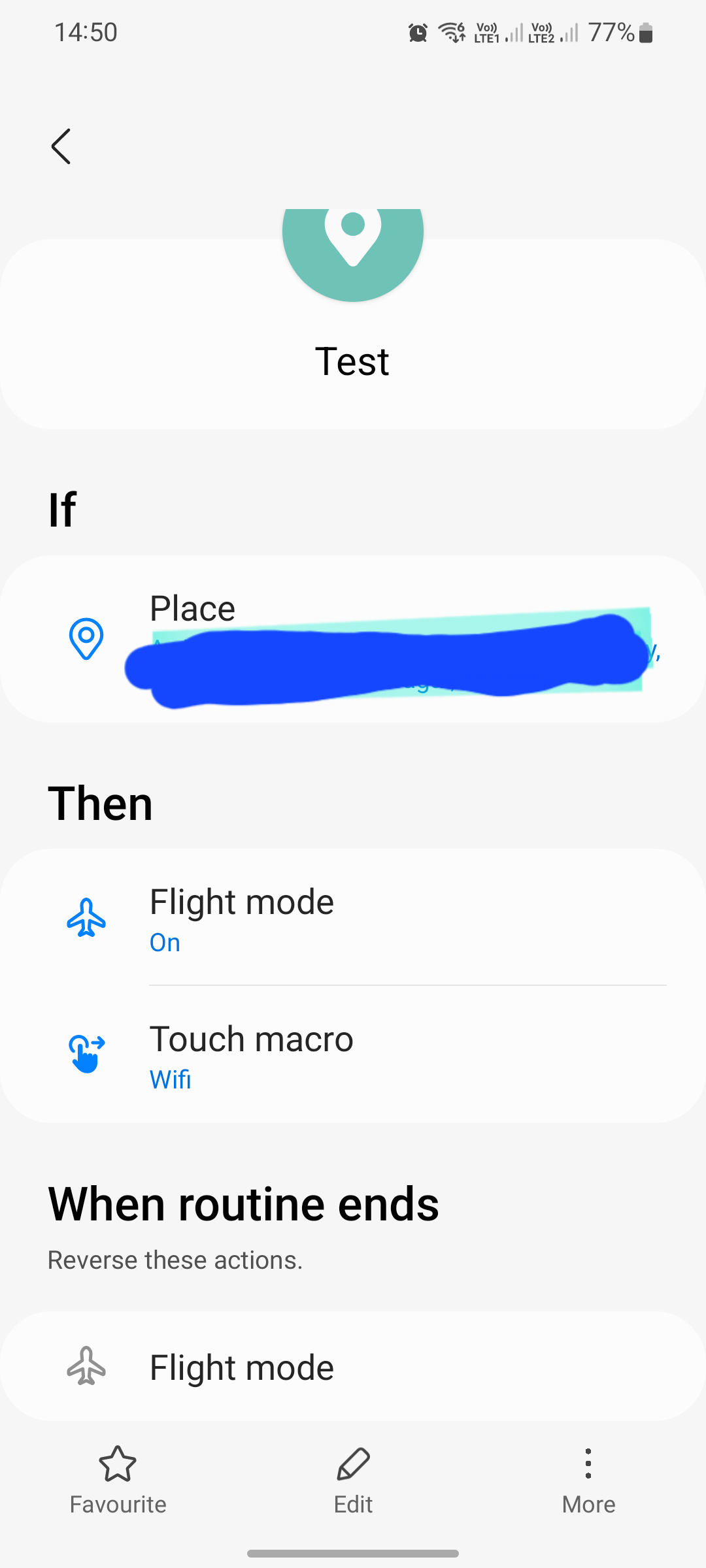
Wow i had no idea about Bixby Routines. I tried setting it up right now. I set the trigger as when connected to my home wifi, switch on Airplane Mode. The issue is that it switched off wifi itself as well. Let me see if I can change this.

Edit - this the closest I could get. Not sure how much battery does 2g only consume but I guess it would be minimal

Source
 
Last edited:
Install Good Lock and then install Routines+ Good Lock module. You can then record a touch macro that would enable WiFi from Settings.

Just tried it and it seems to be working.

SncxrqB.png
 
Thanks that worked. Initially I tried wifi network instead of place for the trigger but that obviously just sends the phone into an infinite loop where it keeps switching wifi on and off. Using place works fine though.

Hopefully the location scanning isn't too battery intensive.
 
right - so the location thing wasn't working too well for me. Firstly the minimum radius is 100m so it remained on airplane mode even when i was outside and close to my house and also location seemed to update very slowly when on airplane mode especially since i took an underground train from close to home so it remained in airplane mode till i reached work.

I followed the below guide and now whenever I switch on airplane mode, it does not switch off wifi. So the routine I am using is, if connected to home/work wifi, turn on airplane mode. Works very well for me,


definitely the biggest advantage of android over iOS - being able to customize stuff like this.
 
oyfb08s.mp4


Well, it seems to remember that it shouldn't turn off Bluetooth and WiFi when I turn the airplane mode on?
 
Back