Sim based Router recommendation for 5G cellular network

  • Thread starter Thread starter _Dexter
  • Start date Start date
  • Replies Replies 405
  • Views Views 52,185
On MacOS, CLAT works great, plug and play. So I can ping IPv4 endpoints by IP address too.

Code:
en7: flags=88e3<UP,BROADCAST,SMART,RUNNING,NOARP,SIMPLEX,MULTICAST> mtu 1500
    options=6467<RXCSUM,TXCSUM,VLAN_MTU,TSO4,TSO6,CHANNEL_IO,PARTIAL_CSUM,ZEROINVERT_CSUM>
    ether f4:6b:8c:xx:xx:xx
    inet6 fe80::ccb:d86a:d9b3:2a3%en7 prefixlen 64 secured scopeid 0x1a
    inet6 2409:40f2:29:231f:43e:6eb2:4999:xxxx prefixlen 64 autoconf secured
    inet6 2409:40f2:29:231f:201d:fd94:a628:xxxx prefixlen 64 autoconf temporary
    inet 192.0.0.2 netmask 0xffffffff broadcast 192.0.0.2
    inet6 2409:40f2:29:231f:14f1:8d44:1923:xxxx prefixlen 64 clat46
    nat64 prefix 64:ff9b:: prefixlen 96
    nd6 options=201<PERFORMNUD,DAD>
    media: autoselect (1000baseT <full-duplex>)
    status: active

Code:
PING 8.8.8.8 (8.8.8.8): 56 data bytes
64 bytes from 8.8.8.8: icmp_seq=0 ttl=54 time=18.545 ms
64 bytes from 8.8.8.8: icmp_seq=1 ttl=54 time=21.472 ms
64 bytes from 8.8.8.8: icmp_seq=2 ttl=54 time=20.438 ms
64 bytes from 8.8.8.8: icmp_seq=3 ttl=54 time=20.672 ms
64 bytes from 8.8.8.8: icmp_seq=4 ttl=54 time=25.737 ms
^C
--- 8.8.8.8 ping statistics ---
5 packets transmitted, 5 packets received, 0.0% packet loss
round-trip min/avg/max/stddev = 18.545/21.373/25.737/2.384 ms


Also, the externally facing public IPv4 address when using 464XLAT add DNS64 / NAT64 is different.

Code:
curl -4 ipv4.icanhazip.com
152.58.209.53
curl ipv4.icanhazip.com
152.58.208.208
 
  • Like
Reactions: C4e
Upvote 0
Thanks @MrGordon, let me know if you are able to put this behind a Router. My use case is using Jio Fiber in Primary WAN and have a 5G CPE as Secondary WAN. This is where I’m struggling with Jio 5G SIM (no problem with AirTel 5G) that being a ip6 only.
 
Upvote 0
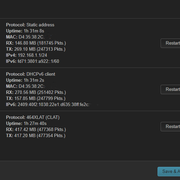
So on OpenWRT was able to get it working but only over IPv4. All I needed was the 464xlat package. This article talks about it a bit.

5G CPE (Bridge Mode) --> OpenWRT Router --> Client Devices


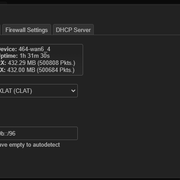
So basically, the WAN interface on OpenWRT is put as a DHCPv6 client and it gets a public IPv6 address as expected. Then with the 464xlat package, CLAT is configured with the prefix 64:ff9b::/96 which is the standard prefix used by most operators including Jio. There appears to be a bug in the 464xlat package in OpenWRT so if you don't specify the prefix it won't work, even though it is supposed to be auto-detected. But just defining it as below will fix the issue.


With this can ping and access any IPv4 website/endpoint from any of the client devices.

Code:
Pinging 1.1.1.1 with 32 bytes of data:
Reply from 1.1.1.1: bytes=32 time=22ms TTL=53
Reply from 1.1.1.1: bytes=32 time=41ms TTL=53
Reply from 1.1.1.1: bytes=32 time=67ms TTL=53
Reply from 1.1.1.1: bytes=32 time=43ms TTL=53

Ping statistics for 1.1.1.1:
    Packets: Sent = 4, Received = 4, Lost = 0 (0% loss),
Approximate round trip times in milli-seconds:
    Minimum = 22ms, Maximum = 67ms, Average = 43ms

From a route table perspective on the OpenWRT router, there is a default route that is added pointed to the 464 interface.

Code:
root@openwrt:~# route
Kernel IP routing table
Destination     Gateway         Genmask         Flags Metric Ref    Use Iface
default         *               0.0.0.0         U     2048   0        0 464-wan6_4

Code:
12: 464-wan6_4: <POINTOPOINT,NOARP,UP,LOWER_UP> mtu 16384 qdisc noqueue state UNKNOWN group default qlen 1000
    link/none
    inet6 fe80::e62c:7570:5e1f:1e76/64 scope link stable-privacy
       valid_lft forever preferred_lft forever

With this you should be able to use this as a secondary WAN easily I think but only IPv4.
 
Upvote 0
@dexter22 - Thank you, quick question? I have a TP-Link MR600 LTE router lying around, I think you shared some screenshots last week that this set up also works. Can you confirm, then I’ll place this between my 5G CPE (bridge) > MR600 > UDM Pro
 
Upvote 0
Back