Sim based Router recommendation for 5G cellular network

  • Thread starter Thread starter _Dexter
  • Start date Start date
  • Replies Replies 405
  • Views Views 52,185
@Kauban off topic question, does udm pro support dual wan with failover and how well does it work ? Also have you tried to setup mesh with ubiquiti access points? If yes how’s the performance, roaming between access points Happen smoothly?

And people in general, what’s the best setup to get excellent seamless mesh network with seamless switch over between access points, I’m ready to spend money on costly hardware also. 2 floors, each floor is about 1000 sqft
 
Upvote 0
@droid - Both Load balancing & Failover works perfectly. The handover is seamless, even my office VPN does not detect it.
My setup is UDM Pro (Primary WAN - Jio Fiber, Failover - AirtTel 5G) > USG 16 Switch > 5 Access Points (seamless roaming)
I have this setup since last 3 years, now all gear is available in Unifi India store
 
Upvote 0
@Kauban thanks for the reply. I and my brother will be primarily using internet in 1st floor and ground floor will be mostly parents. So my plan is 2 wifi 6 lite in each room on top and one long range in hall in bottom floor.

also fast roaming works even when signals overlap ? Like even if there is decent signal from top floor, does it switch to bottom access point if it gets much better signal ?

i will be using 2 Broadband connections in failover

I have hardwired the home by the way, so it will be all connected with cat 6
 
Upvote 0
@droid - The roaming is absolutely seamless, it will always connect to the one with highest power. For stationary devices you can also lock them to access points. The access points will automatically switch to the most efficient channels based on environment scanning.

Sure, we can connect on Telegram and happy to help. Ping me at @kauban_1980
 
Upvote 0
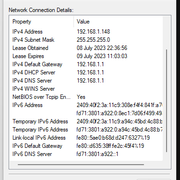
Sorry don't know what DNS64/NAT64 is and how it works 😅 but I connected my CPE directly to my Windows computer just now in bridge mode and ping to 1.1.1.1 works

@dexter22 Ah, I think I understand now. So in the screenshot you shared, the 192.0.0.1/192.0.0.2 IPv4 addresses imply that CLAT (customer side translator) is enabled. So in Windows, CLAT is enabled only for WWAN interfaces, and sure enough this should be a WWAN interface. However for some reason, for me, it is not considered as a WWAN interface so CLAT doesn't get enabled for me.
Since CLAT is enabled, ping to IPv4 by IP address will work.

Yep, so this makes sense, just need to figure out why in my case its not considered as a WWAN interface on Windows. On MacOS it works as it should (although in MacOS, CLAT is enabled for any IPv6 only network (if the appropriate message is sent via DHCP, which Jio does))

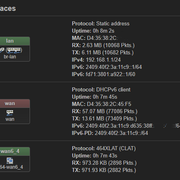
Also regarding IPv6, from the screenshots, your WAN interface on the TP-Link device seem to be doing CLAT, so only IPv4 access for client devices. The IPv6 address that you see is from the private IPv6 range (fe80.xxx), not the public Jio IPv6 addresses.

Are you able to access an IPv6 only endpoint from the client devices connected to the TP-Link device? Or ping say an IPv6 IP address
2001:4860:4860::8888 (Google DNS)
 
Upvote 0
Interestingly, was able to get IPv6 also working on the client devices. There is an undocumented option which need to be set in the OpenWRT config, more details in this thread.

 
Upvote 0
Back