What is the best MTU size for BSNL FTTH connections?

Messages
44
Location
India
ISP
BSNL FTTH
Hello, I have a 30mbps FTTH connection with ONT in bridge mode My router Archer AX53 handle the PPPOE auth.
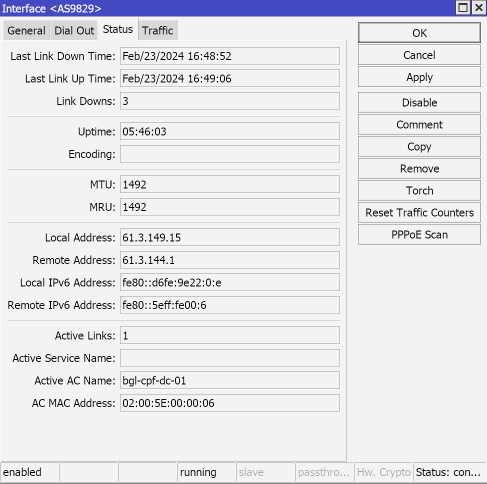
I have set the MTU size as 1460 in my router and it is been the same for few months. Today I noticed something in the PPPOE logs:


Source

Is the BSNL requesting 1492 MTU size? Do I need to modify my MTU to 1492?


My connection is pretty stable but I don't get 30mbps most of the time despite good signal quality
 
Last edited by a moderator:
@WieldyBinkie there is no auto option on my c6. I don't think BSNL's equipment is giving out the right information. I am being offered 1492 so I tested it out.

300 INFO 5days, 22:36:15, [ppp][LCP]TX CONFIGURE_REQUEST
301 INFO 5days, 22:36:15, [ppp][LCP]TX CONFIGURE_ACK[mru=1492, auth=C223/5, magic=4937317B]
302 INFO 5days, 22:36:15, [ppp][LCP]RX CONFIGURE_ACK[mru=1492, magic=01D6043A]

Now speed test or fast.com doesn't even start it just sits there.

1480 works though, but that's just what I found out with ping test. Archer by default was configured with 1480.
Btw it used to be 1460, glad to see they're improving.
 
@Adithya You are being served from new Nokia BNG at TVLA. MTU should 1492. Btw, it was never 1460.

Screenshot-2024-02-24-at-14-25-58.png
 
Last edited:
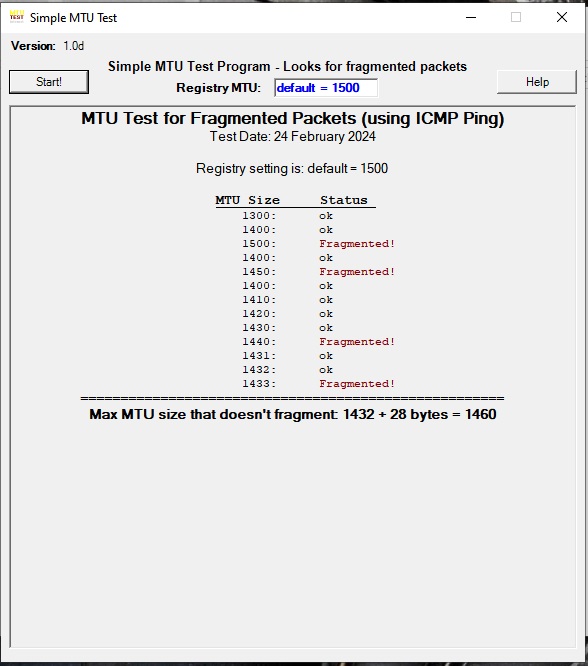
@WieldyBinkie, I have tested with MTU Test app. BSNL FTTH subscribers have had MTU 1460 for a LONG Time.

MTU-Test-01.jpg


Incidentally, smaller fragments than 1460 can also work well. There's not much difference in using the biggest possible MTU size and slightly smaller packets.
 
Last edited by a moderator:
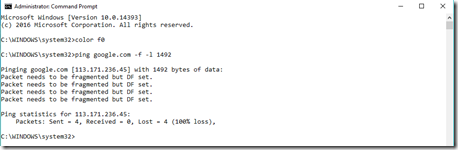
You can follow the steps from the below link and check which MTU size works for your connection. I've seen a person with 1460 MTU as well in Kolkata so you should test it out for yourself and set it accordingly.

 
Back