Have Bsnl also implement the NAT in their FTTH service in any area like jioFiber or any news that they are going to implement the NAT in near upcoming days?
Can you please provide me the screen shots of your router configuration. I am still not getting any primary or secondary DNS address even after changing to google ipv6 dns.
@philip have no idea about your circle . But i contacted my circle technician(palakkad) and have told me they have disabled the ipv6 due to lot of complaints . This is because there are still sites using just ipv4 and there is lot of delay during fallback to ipv4 .
he told over here its disabled and if there is an option to manually enter google or opendns then check it, i guess @varkey can do it in his modem but our Ont doesn't allow it i guess.
We can manually enter google ipv6 dns address isn't it ,?there is an option available in router and I have entered Google ipv6 address also, but no luck
You don't necessarily need IPv6 DNS resolvers. IPv4 resolvers can return AAAA records too without issues. I'm actually using DNS over TLS and it is pointed to the IPv4 Google DNS addresses.
@varkey So are u still getting ipv6 or is it ipv4 now,because I can still see ipv6 addresses in ipv6 configuration field altough its dns field is empty in router page.
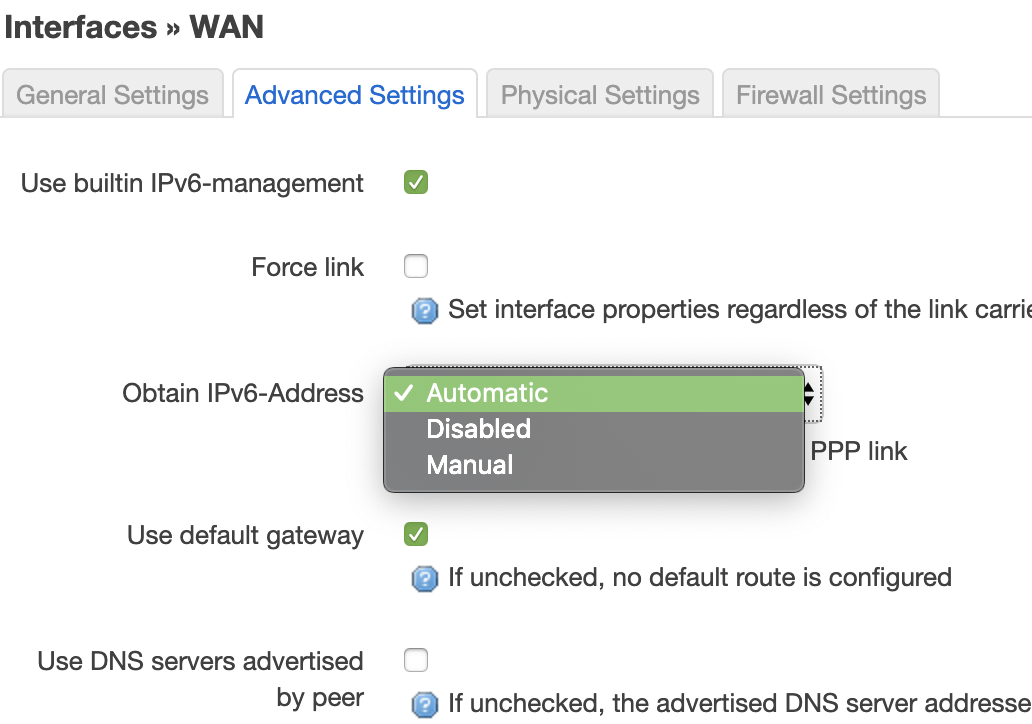
Ran into another issue the other day (most probably just OpenWRT specific), I had initially put the IPv6 mode as "Manual", this meant that I needed to create a separate interface with the type DHCPv6 Client and pointed to the PPPoE interface. This worked the first time post a reboot, but say the PPPoE connection gets reset (link loss or the daily nightly disconnection), the IPv6 interface failed to come up automatically.
I now switched to "Automatic" mode and it seems to work better. In automatic mode, the the IPv6 interface gets created dynamically. There's more details on this in the link below.
@varkey So are u still getting ipv6 or is it ipv4 now,because I can still see ipv6 addresses in ipv6 configuration field altough its dns field is empty in router page.
This website uses affiliate links. This means that if you click on a link and make a purchase, we may receive a commission. This does not affect the price you pay for the product.
This site uses cookies to help personalise content, tailor your experience and to keep you logged in if you register.
By continuing to use this site, you are consenting to our use of cookies.