Reliance Jio Fiber : How to get High Speed through Wifi (Gold/Silver Plan)?

  • Thread starter Thread starter rahul_15
  • Start date Start date
  • Replies Replies 7
  • Views Views 13,455
Messages
24
Location
Kolkata
ISP
Tikona
I have subscribed to the monthly Gold plan ( upgraded from the Silver plan which i was using for the past 3 months).I have the white dual band Jio hub.The speed which i am getting through my LAN on my desktop is around 230Mbps but the speed falls drastically over wifi...The speed on the 5Ghz network is around 140 Mbps but the range is limited to only the room where the router is installed.The more feasible 2.4Ghz network has been locked by Jio at 50 Mbps so the max speed obtained at a small distance from the router is around 30-40Mbps. max. I connected my old Asus router(N14UHP) via lan and tried to use it as an access point , the wifi speed through the router increased marginally to around 60-70 Mbps but not more ... So what is the best way in which i can increase the speed via wifi ....Will adding 2 new 5Ghz routers in the other rooms and connecting them via long LAN connections help so that uniform wifi speed is maintained? Is there any other way in which i can use my older routers ( i have 2 N300 routers) to increase the wifi speed...
Please suggest.
 
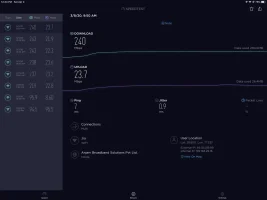
I had the gold plan last month as well. I found the white JCO500 to be alright. I consistently got around 230 to 240 Mbps with WiFi and the speeds were fine even 3 rooms away behind closed doors. I used to get around 190 even when I was far from the ONT. The 2.4Ghz does provide lesser speeds but it is not locked to 50Mbps as some assume.I used to think the same as my Xiaomi Mi Max and other tablets and laptops got just around 50 on the 2.4Ghz band. Then I tested on my ipad pro 12.9 and found it was getting near 150Mbps on the 2.4 band. I assumed Apple had some superior MIMO as it was an expensive device. However later I got a new Huawei Mate 20x and I get same high speeds on the 2.4Ghz band on it. So I think it depends on the client device as well. Here is a soeed test done via WiFi.
 

Attachments

  • D53E15AE-FCF0-4C0F-8286-8A4F017FB6A3.webp
    D53E15AE-FCF0-4C0F-8286-8A4F017FB6A3.webp
    33.4 KB · Views: 800
  • D7E2E801-0976-4E52-B21B-C92229EE8C21.webp
    D7E2E801-0976-4E52-B21B-C92229EE8C21.webp
    32.1 KB · Views: 577
Upvote 0
I had the gold plan last month as well. I found the white JCO500 to be alright. I consistently got around 230 to 240 Mbps with WiFi and the speeds were fine even 3 rooms away behind closed doors. I used to get around 190 even when I was far from the ONT. The 2.4Ghz does provide lesser speeds but it is not locked to 50Mbps as some assume.I used to think the same as my Xiaomi Mi Max and other tablets and laptops got just around 50 on the 2.4Ghz band. Then I tested on my ipad pro 12.9 and found it was getting near 150Mbps on the 2.4 band. I assumed Apple had some superior MIMO as it was an expensive device. However later I got a new Huawei Mate 20x and I get same high speeds on the 2.4Ghz band on it. So I think it depends on the client device as well. Here is a soeed test done via WiFi.
Its quite surprising..i too have the same JCO500 but the wifi speeds are pathetic in adjacent rooms (say a distance of 12 feet)...Also i am consistently getting less than 50 Mbps speed on the 2.4 Ghz band while browsing thru my OnePlus 7T Pro...I have also checked the same with with 2 other Oneplus devices (6Ts)...Will test it out on my Ipad Air and post the results...
 
Upvote 0
i tested my Ipad Air over the 2.4 Ghz wifi but the results were the same...speeds in the range of 35-45 Mbps...
Can anybody else confirm what speed they are getting over wifi on 2.4Ghz & 5Ghz networks with the white JCO500 Jio router.
i do not think that it is an issue with the connected devices ( OnePlus 7t Pro,Ipad Air ,etc.. as they are all relatively newer devices ) but with the speed capped router...
Please comment.
 
Upvote 0
Maybe channel width is set to 20Mhz only in jio fiber ONT. And many phones are programmed to select 20Mhz width because 40Mhz causes interference.
 
Upvote 0
i tried to find the channel width settings for the wifi...but they are not present in the ONT device settings ..Looks like its a totally locked ecosystem...As you rightly said, they want us to spend more for their Mesh system....its a shame..
 
Upvote 0
Back