IPv6 being issued by BSNL Broadband!

  • Thread starter Thread starter Ameen
  • Start date Start date
  • Replies Replies 346
  • Views Views 63,489
As you mentioned about VOIP today, set it up on my phone (soft sip client) again and it's still working great. @vu3knb

Looks like it has become more stable as compared to last year when I tried it last.
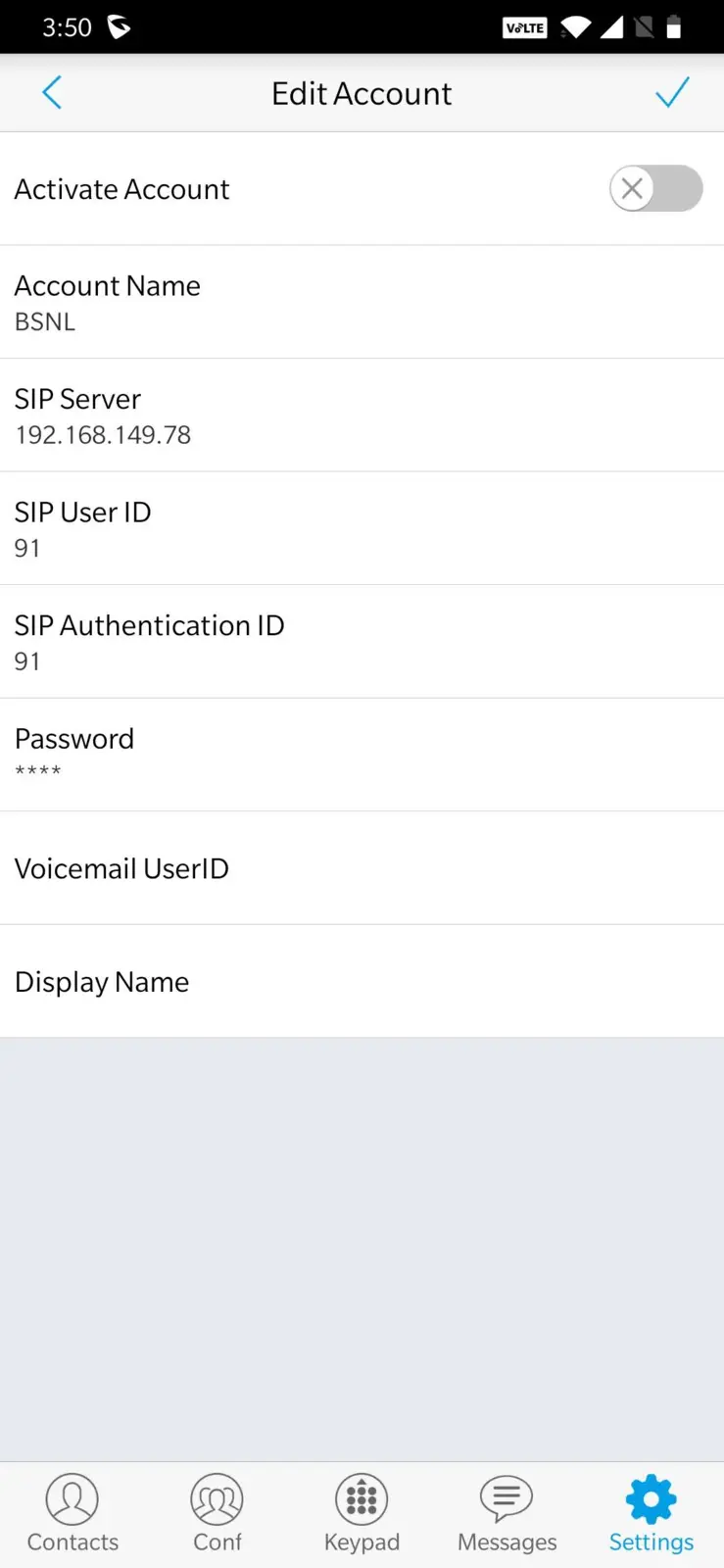

The 192.168.149.78 appears to be the SIP server in CDOT Delhi which was originally used by everybody. Welcome to CDOT FTTH BSNL helpline

The newer SIP server seem to be the local one in Kerala. Perhaps they'd slowly migrate users over time.
 
Cool. Nice to know that @varkey

I have one Grandstream HT801 adapter which I basically use with BSNL Wings. Can I use that for BSNL FTTH VoIP?
 
@varkey
I was just curious to know that can you get full speed from both your connection after vlan tagging?
And i gonna get TP-Link archer c6 after this lockdown. So,i want to use both as-341wt as well as tplink while tplink being primary router.i mean that auth should be handled by c6 and onu should also work as wifi by another port....it got two port fe and ge.
Any possible way?
 
@Kick933 Both connections meaning?

Yes, that should be fine, it would work as a dumb AP. Just ensure the DHCP server is disabled on the ONT and the second port is not tagged to any WAN.

And assign an IP address in the same range as that of your LAN network of the C6 (making sure there is no IP address conflict though). You'd then be able to access the ONT management UI as well.
 
@vu3knb Yeah it should work, but then you already have a SIP ATA in the ONT right. Unless you want to connect the phone at a different location, it would be more or less the same right? 🤔

I would like to keep the FTTH VoIP phone in a different location ( say location A ) My Netlink router is in some other location (location B). I tried to use approx 10m RJ11 telephone cable between B to A , but that won't work. I think there will be lot of signal loss in this 10m telephone cable , hence if I keep the phone at A , it won't work , no dial tone as well.

But I have a lan port at A , so I can connect HT801 to this LAN and keep the phone just next to the adapter.

Few days before I simply gave the BSNL provided SIP address and credentials in HT801 , that didn't help. Looks like the voice profile from Netlink should be diverted separately to the LAN port at location A ?
 
@varkey
I would configure the GE port of ONT to bridge mode and auth would be handled by C6.Then,i would take lan cable out of c6 and connect to ONT on FE port.I am really clueless after that...do i need port binding only for wlan.
Actual the problem is ,i am not very clear about what to do after bridge mode on c6.
 
I would like to keep the FTTH VoIP phone in a different location ( say location A ) My Netlink router is in some other location (location B). I tried to use approx 10m RJ11 telephone cable between B to A , but that won't work. I think there will be lot of signal loss in this 10m telephone cable , hence if I keep the phone at A , it won't work , no dial tone as well.

But I have a lan port at A , so I can connect HT801 to this LAN and keep the phone just next to the adapter.

Few days before I simply gave the BSNL provided SIP address and credentials in HT801 , that didn't help. Looks like the voice profile from Netlink should be diverted separately to the LAN port at location A ?

Interesting, perhaps the RJ11 port from the ONT ATA is at very low signal levels. I'm surprised that it doesn't even let you extend it for 10 m. Strange.

Yes you'd need to put voice interface in bridge mode, and then configure the VoIP interface and static IP address on the other ATA directly. You could configure it as a non voice interface, and bind it to the other ethernet port on the ONT. Then run a separate ethernet cable to the ATA.
 
@varkey
I would configure the GE port of ONT to bridge mode and auth would be handled by C6.Then,i would take lan cable out of c6 and connect to ONT on FE port.I am really clueless after that...do i need port binding only for wlan.
Actual the problem is ,i am not very clear about what to do after bridge mode on c6.

You don't need to do anything after that, connect cable from C6 to ONT. Then configure the wireless part as you want. No binding or anything required, there wouldn't be any WAN profiles etc. Ensure the DHCP server is disabled.
 
Back