Change your IP DHCP pool 192.168.10.1 - 192.168.10.100 then

-
Amazon Deals - ToS - Like us?
You are using an out of date browser. It may not display this or other websites correctly.
You should upgrade or use an alternative browser.
You should upgrade or use an alternative browser.
Unknown devices from someone else's network showing up on LAN - Netlink hg323rgw
- Thread starter Adithya
- Start date
- Replies 30
- Views 3,804

Change your IP DHCP pool 192.168.10.1 - 192.168.10.100 then
Changed IP and DHCP pool and restarted. It rebooted with old 192.168.1.1 as IP.
Tried it again, logged into the new IP and clicked save and reboot. It again rebooted with old 192.168.1.1 as IP.

Log into BSNL CUSTOMER CARE & check unbilled usage. If the usage is abnormal.
Also if needed download WeeNet App in android phone & scan network.
Also if needed download WeeNet App in android phone & scan network.
Log into BSNL CUSTOMER CARE & check unbilled usage. If the usage is abnormal.
Also if needed download WeeNet App in android phone & scan network.
Unbilled usage is 27GB, it's only been 3 days. Seems normal, this connection is used heavily here by 4 phones and a TV.
WeeNet also shows the same results as fing. 40 Devices connected. But only 4 of our own devices on the modem.
There is now another TV on the network.
Attachments
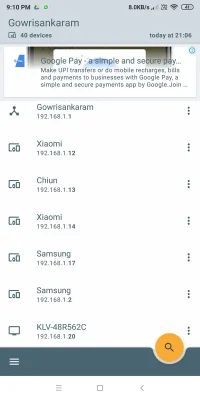
Last edited:
@Adithya Thats very strange. For me only the connected devices are shown on both Fing & WeeNet. Maybe there is some configuration issue with the Switch where BSNL takes the cable.
Have you tried to ping the ip ?
Better contact BSNL.
All of them responds to ping, some high some low. Going to bsnl seems to be the only option but not sure how I'm going to convince them that this is an issue. My friend who's also on BSNL FTTH but on a different LCO doesn't have this issue.

Because of ip address conflict it will not work or will be very unstable.Then there's nothing to be worried about. You're seeing them because they're in the same IP subnet of 192.168.1.x and the scanner showing everything in your IP range.
Op what is your WAN public ip you get in your router?

