Unknown devices from someone else's network showing up on LAN - Netlink hg323rgw

  • Thread starter Thread starter Adithya
  • Start date Start date
  • Replies Replies 30
  • Views Views 3,804
The BSNL engineer set up my modem WAN with "Turn off LAN DHCP" ticked. I've turned it off but it made no difference.

can you show screenshot of this option
 
Above port binding. I got a PDF on configuring Netlink for BSNL from here Source
that says never tick that box and always bind ports. When I did that yesterday all the other devices dissappeared but today some of them came back without me changing anything.

When I bind ports, instead of 40 devices, fing sees 13 but still only 6 of them are mine.

So far fing recognised 63 unique devices on my LAN and I have no idea where they are.
 

Attachments

  • Annotation 2020-08-20 174118.webp
    Annotation 2020-08-20 174118.webp
    18 KB · Views: 275
Last edited:
Fixed it finally (atleast from my end).

Changed my IP and DHCP pool to something other than 192.168.1.1 as @PranjalT suggested (I picked 192.168.2.1) and now I can't ping those external devices and they don't show up in scan as well. I tried it before but the IP was turning back to 192.168.1.1 on restart.

Turned out I enabled logging on the modem which filled up the storage and the settings I was changing weren't saved when it restarts, thanks to this post from @varkey (seriously such a huge problem from a simple logging function 😅 ) its finally saved.

But still there are a lot of networks on this line just leaking their LAN on to WAN. A lot of improperly configured modems (disabling lan dhcp, they've set 802.1p value as null for voip and 7 for internet, its the other way around).
Should I inform BSNL? Would they even care? Or would they blame me?

Thankyou @Smh @mahadevan_iyer
 
Last edited:
hmm weird may be some BSNL engineer ticked that Turn LAN DHCP option on for other people too, because those ip ranges should not be routable from your network.
 
I haven't tested but from my understanding, the Turn off LAN DHCP feature simply disables DHCP for devices on that particular interface. And combining it with Port binding option disables DHCP for that port only. It could not have created the issues @Adithya was facing.

Someone may have exposed their network to the VLAN and Fing was picking it up during Scan erroneously.
 
I haven't tested but from my understanding, the Turn off LAN DHCP feature simply disables DHCP for devices on that particular interface. And combining it with Port binding option disables DHCP for that port only. It could not have created the issues @Adithya was facing.

Someone may have exposed their network to the VLAN and Fing was picking it up during Scan erroneously.

That was my initial thought as well, but I'm seeing their private addresses instead of public as if they're from my same LAN. The number of devices shown (over 60) could mean it's not a single misconfigured network either. Ping time to some TVs where 160-1000ms, they could'nt even be from the same district I'm in.

If it was only shown in scans, then it would've been fine. They started popping up everywhere. TVs inside the youtube app and screencast, PCs and Laptop's in solid explorer and windows file shares. It's crazy I can play youtube on somebody's tv.

My real concern was if this was a Netlink router issue and people could connect to my tv or network share as well.

Even weirdly I could not use dhcp reservation inside my network. If I do, most of the devices can't access the internet because someone else is having the same private IP address.
 
But he's connecting to WAN using PPPoE. How could it be exposed to upstream? This is so bizarre.
 
disconnect PPPoE and see if you're still seeing them

I kind of "fixed" my side already by changing to a different IP for my modem and DHCP. To test this I'd have to go back to 192.168.1.1. Maybe later when no one's using.
 
Last edited:
But he's connecting to WAN using PPPoE. How could it be exposed to upstream? This is so bizarre.
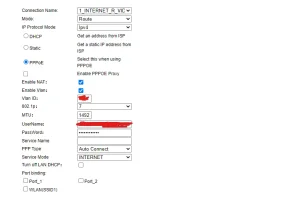
If some of those modems are set to connect through DHCP from ISP instead of PPPoE would they come through?
 
Back