
Enabled.Is DHCPv6 configured on your G2425?? I believe it supports DHCPv6 with Prefix Delegation

-
Amazon Deals - ToS - Like us?
You are using an out of date browser. It may not display this or other websites correctly.
You should upgrade or use an alternative browser.
You should upgrade or use an alternative browser.
Airtel Xstream Broadband has switched to CG Nat
- Thread starter Styler
- Start date
- Replies 205
- Views 56,640
-
- Tags
- airtel airtel xstream cgnat
I am surprised that you are not getting any IPv6. It looks like they have enabled it by default for everyone except Static IP customers. In some cases CPE change is needed but yours is a pretty recent one
I am on static IP, but to test I changed back to PPPoE and authenticated myself and I do get IPv6 address with prefix delegation
I am on static IP, but to test I changed back to PPPoE and authenticated myself and I do get IPv6 address with prefix delegation
Code:
alpha@314-GI-SRX320> show dhcpv6 client binding detail

Client Interface/Id: pp0.1
     Hardware Address:             f4:bf:a8:52:13:ca
     State:                        BOUND(DHCPV6_CLIENT_STATE_BOUND)
     ClientType:                   STATEFUL
     Lease Expires:                2021-07-04 14:39:46 IST
     Lease Expires in:             84082 seconds
     Lease Start:                  2021-07-03 14:39:46 IST
     Bind Type:                    IA_PD
     Preferred prefix length       0
     Sub prefix length             64
     Client DUID:                  LL0x29-f4:bf:a8:52:1e:ca
     Rapid Commit:                 Off
     Server Identifier:            fe80::5a00:bbff:fe06:4812
     Update Server                 Yes
     Client IP Prefix:             2401:4900:1f30:58db::/64

DHCP options:
    Name: server-identifier, Value: VENDOR0x00000583-0x34343a63
    Name: dns-recursive-server, Value: 2401:4900:50:9::9,2401:4900:50:9::39,2404:a800:0:14::1:1010,2404:a800:0:14::1:1011

Update RA interfaces:
     Interface: irb.114
            RA Prefix:      2401:4900:1f30:58db::/64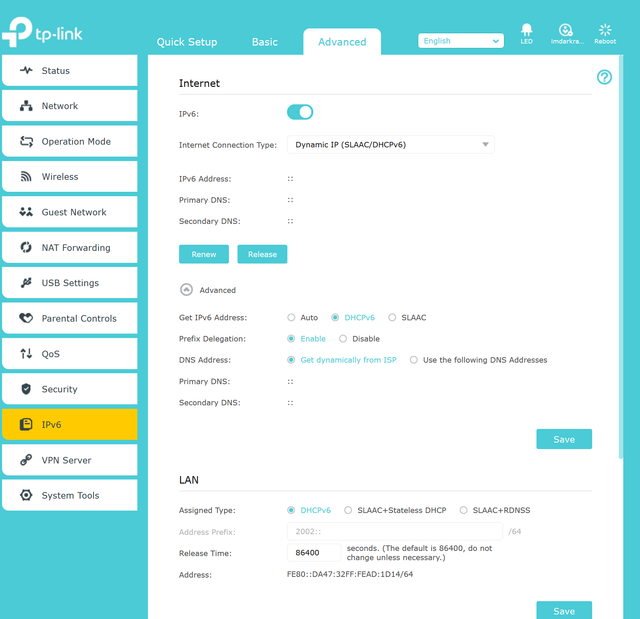
I also need this info as even i was not able to get Ipv6 working with my tplink working on ppoe bridge with Airtel router

Yup. That’s pretty much it when it comes to DHCPv6. If they activate from backend, it should show up there. Maybe you can give Customer Care a call and ask them to enable IPv6 from their end.

imdarkray
n00b
- Messages
- 806
- Location
- Patna, Bihar
- ISP
- Airtel Xstream, Jio Fiber, Railwire, Siti, Airtel 4G, Jio 4G, VI
@tatyasky Finally, I was able to get the ipv6 address in the router. But the internet doesn't work on that.
Seems the same mac cannot dial another PPPoE and hence, it was not connecting earlier. I had to use the same Ipv4 session. then I get IP but not the Gateway. If I just dial ipv6 (no IPv4), I get the gateway but still internet doesn't work. It's may be because I have public IPv4?
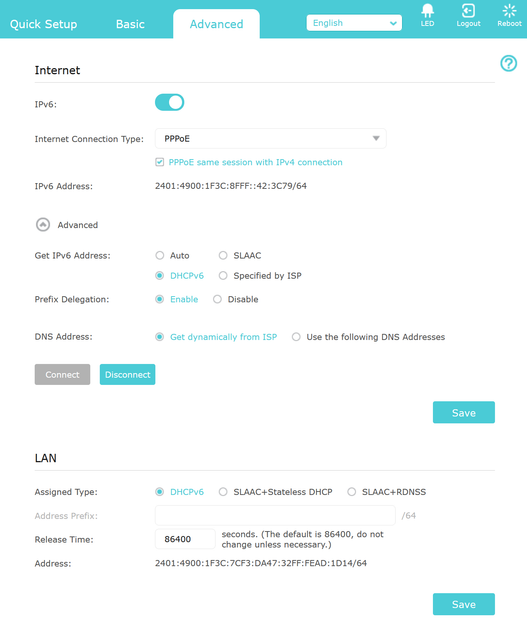
Seems the same mac cannot dial another PPPoE and hence, it was not connecting earlier. I had to use the same Ipv4 session. then I get IP but not the Gateway. If I just dial ipv6 (no IPv4), I get the gateway but still internet doesn't work. It's may be because I have public IPv4?
Similar threads
- Replies
- 3
- Views
- 1,060


- Replies
- 7
- Views
- 6,926