Internet light not blinking in i Ball ADSL +2 router

Messages
28
Location
NA
ISP
Bsnl Broadband
I am having a BSNL postpaid broadband connection and I am having a i ball wired ADSL 2+ router , product code:iB-LR6111A

I got my bill yester day and the due date is 27 December.I decided to insert setup CD of I ball and I opened the easy setup wizard.As I clicked next in setupwizard the internet light was off.
Now I can't access to internet.My username and password is correct.I type 192.168.1.1 in address bar and i click status.I see this
PVC0 -0/35- 0.0.0.0- 0.0.0.0- 0.0.0.0- 0.0.0.0. -PPPoE -Down
 
Post some screenshots of the interface available at 192.168.1.1
I guess the CD setup didn't work and you need to configure the settings, enter username+pass manually in the modem interface...
 
Post some screenshots of the interface available at 192.168.1.1
I guess the CD setup didn't work and you need to configure the settings, enter username+pass manually in the modem interface...
I can't send a screenshot.I actually have configured the modem 1 month ago and internet was working for 1 month.I decided to enter CD and start setupwizard then the internet light went off .When I come to step 3 of setupwizard then I have fill this information
Username,Password and service name.I have n't not filled the two information that are -'use Static IP','Dial on Demand'.when I come to step 4 then wizard has configured router but it fails to verify router settings.It says please check the WAN connection and parameters or please check your network connectivity and retry.

Does this problem occurred due to CD?Will my ISP be able to fix this problem?

I have complained in office and 1 person will come tomorrow to fix this problem.
 
Last edited:
This is from iB-LR6111A v5 pdf manual available at: ADSL2+ Router (Ver 5.0.0) | iBall

Check image below and follow the steps:
-- dead tinypic image removed --

Does this problem occurred due to CD?

Did you use the CD the 1st time your internet worked or configured it manually through 192.168.1.1 ?

Will my ISP be able to fix this problem?

Depends. The service person if capable enough will most probably reset your modem and configure it manually...
 
Last edited:
This is from iB-LR6111A v5 pdf manual available at: ADSL2+ Router (Ver 5.0.0) | iBall

Check image below and follow the steps:
-- dead tinypic image removed --


Did you use the CD the 1st time your internet worked or configured it manually through 192.168.1.1 ?


Depends. The service person if capable enough will most probably reset your modem and configure it manually...
Ihis setting is actually configured.My internet was working for 1 month.Yesterday I inserted the CD for 1st time and when I click start in easy setup wizard the internet light went off and never come.
 
1. Backup your current settings from modem interface (save the file... would be useful in case you need to restore it later):

-- dead tinypic image removed --

2. Reset your modem to factory default:


-- dead tinypic image removed --


3. Configure the modem manually as mentioned in my previous post:


-- dead tinypic image removed --
 
1. Backup your current settings from modem interface (save the file... would be useful in case you need to restore it later):

-- dead tinypic image removed --

2. Reset your modem to factory default:


-- dead tinypic image removed --


3. Configure the modem manually as mentioned in my previous post:
I have reset my modem to factory settings and then configured it manually as given but still the internet is not working.ADSL ,LAN and power light are working but internet light doesn't flash.My led in router is also okay.

Is there any way that my ISP will fix this problem?
 
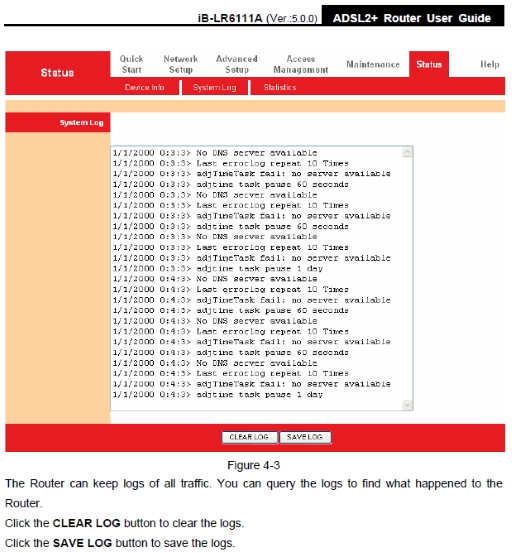
Can you post the current modem system log?
zuq08HJ.jpg


======================================

One last thing you can try is bridge mode instead of PPPoA/E mode...

Bridge mode (dialing through your OS instead of the modem):

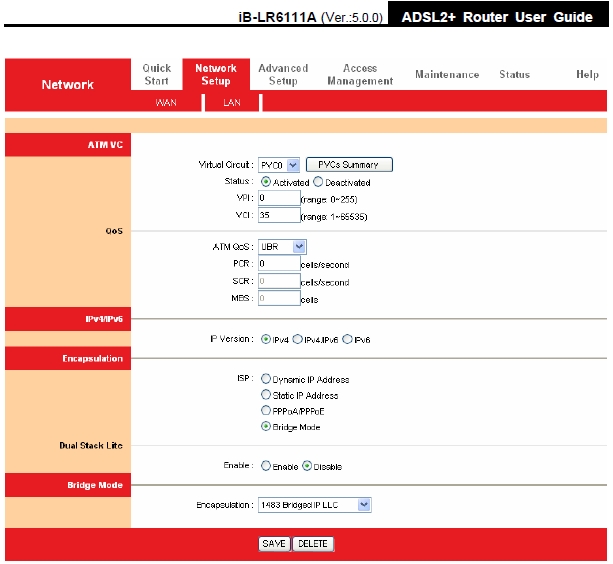
1. Configure as shown below, save & reboot:
7I00ujE.jpg


2. Add pppoe dialer to windows, follow images in the links provided below:

For WinXP:
Configuring PPPoE Dialer in Windows XP

For Win7:
PPPoE Dialer Setup in Windows 7

For Win8:
Configure Windows 8 PPPoE Internet Settings

3. Check if you can connect through the dialer created in step 2. Post error code if you can't.

Is there any way that my ISP will fix this problem?
Everything depends on the ISP service guy.
 
Last edited:
Maybe you bricked it. But that would only happen if a firmware update was botched.
 
1/1/2000 0:8:36>Last errorlog repeat 1 times
1/1/2000 0:8:36> login to remote failed;please check your user/pswd
1/1/2000 0:8:37>netmakechanndial:err=3000 rn_p=80534488

This is the I log i am getting by using both PPPoE and Bridge mode.My username and password are correct.The problem occurred due to CD.I inserted CD and run easy setup wizard while the router settings was already configured manually .
 
Back