
After recent update, Airtel removed disconnect and connect button from 707GR1 dragon path router's status home page...which I was using for quickly get new dynamic public IP address, but now I have to restart the router which takes long time to boot... Is there any internal ways to get that disconnect button or any other quick solution to get new public IP without restarting the router…?

-
Amazon Deals - ToS - Like us?
You are using an out of date browser. It may not display this or other websites correctly.
You should upgrade or use an alternative browser.
You should upgrade or use an alternative browser.
[Airtel Xstream fiber][707GR1] get new ip without restaring it
- Thread starter kicksss
- Start date
- Replies 11
- Views 1,811
You may disconnect the WAN cable & reconnect again. Bit harsh but it will terminate the session. After you reconnect, it will attempt to acquire new IP.
The only issue is the time it will take to get a new IP may be uncertain. It can happen in just a few seconds or may take even 2 mins as your earlier session did not gracefully disconnect. So give it a try but I am not much hopeful!!
BTW do you get public IPv4?
The only issue is the time it will take to get a new IP may be uncertain. It can happen in just a few seconds or may take even 2 mins as your earlier session did not gracefully disconnect. So give it a try but I am not much hopeful!!
BTW do you get public IPv4?
@rohitks
I tried pulling out my fiber cable and plugin back immediately, and I got new IP. It is definitely a lot faster, took less than 10 seconds to come back up from loss of signal state; rather than full 2 minutes boot cycle.
The nice thing about the disconnect button was I could trigger it remotely, and it was instant. It was just an HTTP form submission to the router, I'm sure the interface is still there, they just removed it from the admin UI. I tried to look through browser's caches for button's attributes, but they were gone.
If you work in the industry, do u have any idea how to get hold of these routers' firmware source codes as I might figure out some stuffs; as in this router's case a part from sticking in their logo and disabling some stuff from the UI they have hardly done anything it just looks off the shelf chines router they got to have their firmware source somewhere...
As per my given IPs, both v4 and v6 are public, they aren't CGNATed...
I tried pulling out my fiber cable and plugin back immediately, and I got new IP. It is definitely a lot faster, took less than 10 seconds to come back up from loss of signal state; rather than full 2 minutes boot cycle.
The nice thing about the disconnect button was I could trigger it remotely, and it was instant. It was just an HTTP form submission to the router, I'm sure the interface is still there, they just removed it from the admin UI. I tried to look through browser's caches for button's attributes, but they were gone.
If you work in the industry, do u have any idea how to get hold of these routers' firmware source codes as I might figure out some stuffs; as in this router's case a part from sticking in their logo and disabling some stuff from the UI they have hardly done anything it just looks off the shelf chines router they got to have their firmware source somewhere...
As per my given IPs, both v4 and v6 are public, they aren't CGNATed...

Certainly I assumed that it's just an infrequent event.
However another solution is to buy your own router and put ISP's ONTRouter in Bridge mode (You may need to contact NOC team) and manage and control full WAN for Internet connection on your own from the control of your own router.
Airtel is moving to CGNAT is a phase-wise manner as they are getting exhausted of IPv4s. So soon you could get put behind CGNAT. Go for static IP if you need one.
However another solution is to buy your own router and put ISP's ONTRouter in Bridge mode (You may need to contact NOC team) and manage and control full WAN for Internet connection on your own from the control of your own router.
Airtel is moving to CGNAT is a phase-wise manner as they are getting exhausted of IPv4s. So soon you could get put behind CGNAT. Go for static IP if you need one.
Last edited:

anmolbhard004
Resonating
Yes, simply by knowing your WAN IP you will come to know if you receive a public IP or or you behind CGNAT.
The list of Private IPv4 is known in the IPv4 spread and you can even google it.

 www.arin.net
 en.wikipedia.org
To know your WAN IP you can look into your router's web interface for Internet/WAN/Status etc or simply test it on What Is My IP?
The list of Private IPv4 is known in the IPv4 spread and you can even google it.
IPv4 Private Address Space and Filtering
A list of IPv4 address ranges that have been reserved by the IANA for private internets, and are not publicly routable on the global Internet.
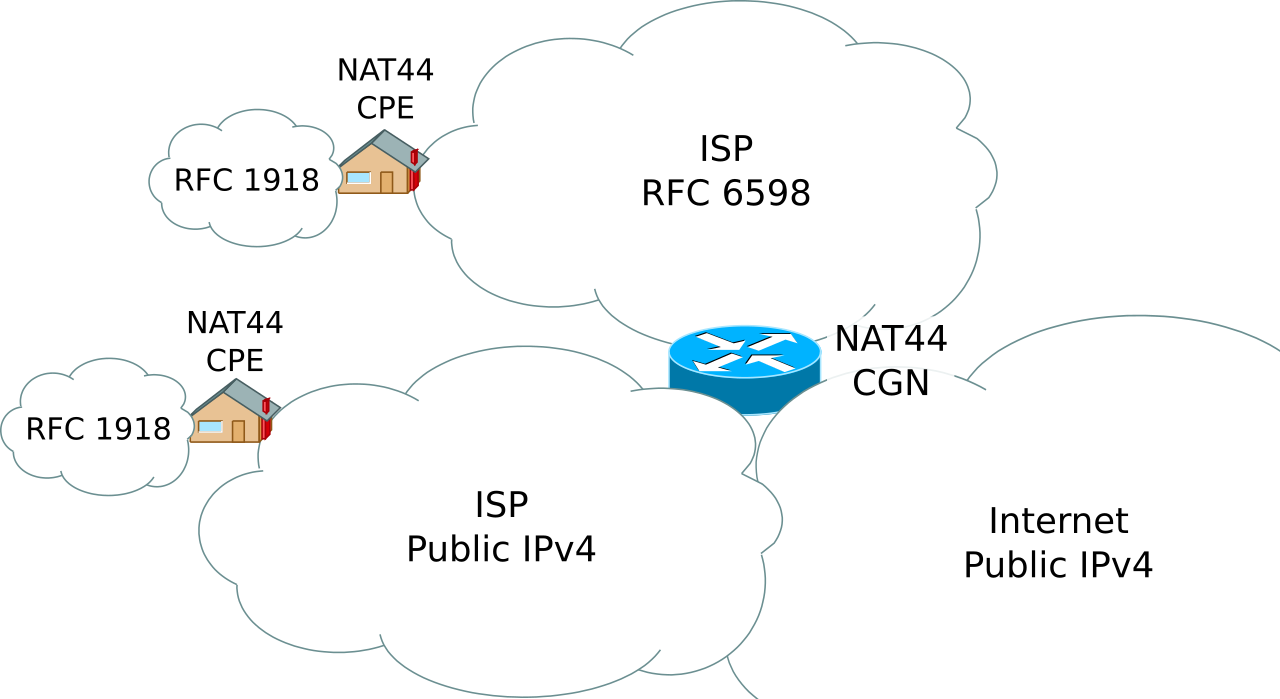
Carrier-grade NAT - Wikipedia
To know your WAN IP you can look into your router's web interface for Internet/WAN/Status etc or simply test it on What Is My IP?
anmolbhard004
Resonating
one is 122.180.201.5
and the other is 223.235.232.8
[digits are changed except the starting ones.]
so 122 is behind cgnat?
one shows patna other shows agra why?
@imdarkray whats ip range is yours?
and the other is 223.235.232.8
[digits are changed except the starting ones.]
so 122 is behind cgnat?
one shows patna other shows agra why?
@imdarkray whats ip range is yours?
D
Deleted member 83050
@anmolbhard004 both your IPs are public. CG-NAT starts with 100.xx
A simple way to check if you are behind CG-NAT is to ping your own IP. If you see hops in between then you are behind CG-NAT.
A simple way to check if you are behind CG-NAT is to ping your own IP. If you see hops in between then you are behind CG-NAT.