Anyone facing slow speed on International servers??

  • Thread starter Thread starter deltaechov
  • Start date Start date
  • Replies Replies 102
  • Views Views 10,738
Messages
73
Location
Jalgaon
ISP
Airtel, BSNL, Tata FIber
Currently on 100Mbps 750GB plan, for Mumbai Server I am getting around 90Mbps. However issue start when I want to download from the International server, for example, right now I am downloading PyTorch with a max speed of 2MegaBytes instead of ~9MegaBytes. If I do a speed test to Singapore server same thing Download speed is around 20-30Mbps while the upload is going till 86Mbps. Is it just I or everyone is facing this issue?

And can someone suggest good ONT (preferably non-Chinese)
Will BSNL change it for free without any reason(upgrade to gigabit ethernet, maybe)? (it's on rent)


 
I think you'll be better off buying your own ONT. Sounds like a physical issue. ONT or the fiber cable.
 
Last edited:
Upvote 0
Lemme share my traceroutes, I have high latency to my gateway but still I'm getting the promised speeds.


Tracing route to one.one.one.one [1.1.1.1]
over a maximum of 30 hops:

1 <1 ms <1 ms <1 ms 192.168.2.1
2 27 ms 96 ms 73 ms 117.251.56.1
3 254 ms 54 ms 9 ms 218.248.170.131
4 389 ms 89 ms 866 ms static.ill.218.248.61.66/24.bsnl.in [218.248.61.66]
5 * * * Request timed out.
6 * * * Request timed out.
7 * 95 ms 82 ms 117.216.202.218
8 165 ms 166 ms 250 ms 125.17.212.249
9 758 ms 923 ms 351 ms 182.79.141.34
10 95 ms 179 ms 668 ms 182.79.161.171
11 * * * Request timed out.
12 * * * Request timed out.
13 * * * Request timed out.
14 * * * Request timed out.
15 * * * Request timed out.
16 * * * Request timed out.
17 * * * Request timed out.
18 * * * Request timed out.
19 * * * Request timed out.
20 * * * Request timed out.
21 * * * Request timed out.
22 * * * Request timed out.
23 * * * Request timed out.
24 * * * Request timed out.
25 * * * Request timed out.
26 * * * Request timed out.
27 * * * Request timed out.
28 * * * Request timed out.
29 * * * Request timed out.
30 * * * Request timed out.

Trace complete.

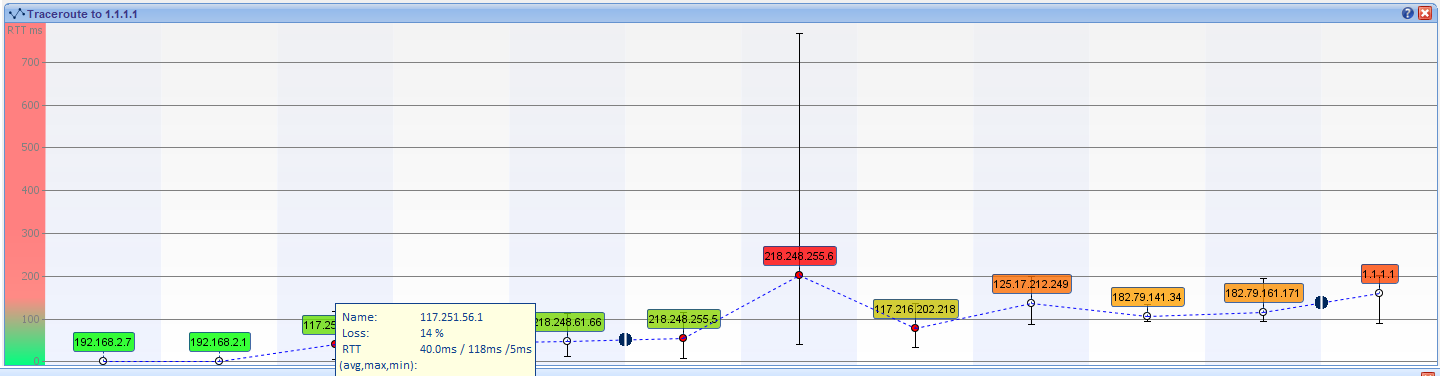
Some firewall on BSNL's network is blocking ICMP and it times out till the 30th hop. (or maybe it's the censorship things, dnsdiag says that's the case).

Visualroute can find it though, those half broken circles are the point where windows tracert times out. (I don't know how to use this thing but yeah)

i5ALxsx.png
 
Last edited:
Upvote 0
@Adithya Visualroute doesn't run on my PC. Java issues.

y62spsz.jpg


@deltaechov So you have no way of knowing PON info. At least they gave you bridge mode. I wonder if they will let you change ONT to a different one.
 
Last edited:
Upvote 0
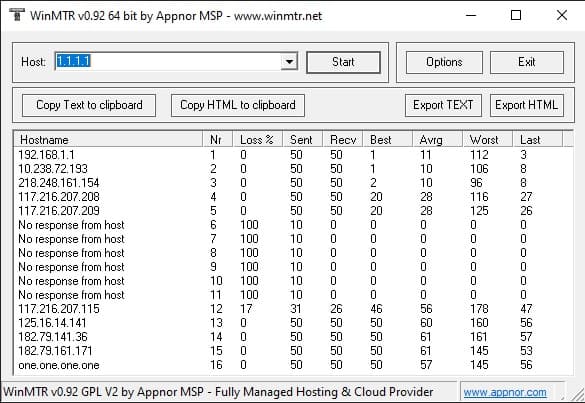
Ah yes I remember I do have WinMTR, could've used that.

@deltaechov I think you should get your own ONT, if they do mac binding, you can ask them to add your one to their whitelist. All BSNL offices here allows us to use our own ONT. They don't have any anyway. How much is the rent by the way?
 
Upvote 0
@Adithya rent is 90Rs + tax. There is no mac binding now, however, ONT binding might be there.

As I said earlier because of the ONT compatibility issue not going that route and it is cheaper to pay 90Rs. If anything happens to ONT they'll just replace it for free. After 36 months(been using FTTH for 3 years now), the rent cost is equal to a brand new ONT(approx 3800Rs).
 
Upvote 0
Maybe you can try to get an ONT from a friend or temporarily from a store for checking if it can connect properly. My WiFi GE FE ONT cost only 2400 btw, since you have a router, you can get those small single lan port ONT. They are even cheaper.
 
Last edited:
Upvote 0
Today, tracert to google.com and 8.8.8.8 is way better(can't get any better), however, speed still is around 50mbps on bsnl speedtest(I won't take speedtest.net into consideration, because it keeps fluctuating). 1.1.1.1 still sucks though for a fiber connection.

Tracing route to one.one.one.one [1.1.1.1]
over a maximum of 30 hops:

1 1 ms <1 ms <1 ms TheOracle.home [192.168.2.1]
2 6 ms 4 ms 4 ms 59.96.84.1
3 5 ms 5 ms 5 ms 218.248.174.1
4 16 ms 5 ms 5 ms static.ill.218.248.57.190/24.bsnl.in [218.248.57.190]
5 17 ms 17 ms * 218.248.235.133
6 * * * Request timed out.
7 44 ms 43 ms * 117.216.207.115
8 42 ms 43 ms 60 ms 125.16.14.141
9 42 ms 41 ms 41 ms 182.79.208.200
10 42 ms 47 ms 53 ms 182.79.161.171
11 47 ms 46 ms 46 ms one.one.one.one [1.1.1.1]

Tracing route to google.com [172.217.160.206]
over a maximum of 30 hops:

1 1 ms 1 ms 1 ms TheOracle.home [192.168.2.1]
2 5 ms 4 ms 4 ms 59.96.84.1
3 5 ms 7 ms 5 ms 218.248.174.1
4 69 ms 25 ms 5 ms static.ill.218.248.106.102/24.bsnl.in [218.248.106.102]
5 * 18 ms * 218.248.235.197
6 * * * Request timed out.
7 18 ms 18 ms 18 ms 74.125.48.138
8 18 ms 18 ms 17 ms 209.85.246.11
9 18 ms 19 ms 18 ms 216.239.47.151
10 17 ms 17 ms 17 ms bom07s16-in-f14.1e100.net [172.217.160.206]

Tracing route to dns.google [8.8.8.8]
over a maximum of 30 hops:

1 1 ms <1 ms <1 ms TheOracle.home [192.168.2.1]
2 6 ms 5 ms 5 ms 59.96.84.1
3 5 ms 5 ms 5 ms 218.248.174.1
4 6 ms 5 ms 6 ms static.ill.218.248.57.190/24.bsnl.in [218.248.57.190]
5 * 18 ms * 218.248.235.197
6 * * * Request timed out.
7 18 ms 17 ms 17 ms 74.125.48.138
8 18 ms 18 ms 18 ms 209.85.246.11
9 19 ms 18 ms 17 ms 216.239.47.151
10 18 ms 17 ms 17 ms dns.google [8.8.8.8]
 
Upvote 0
Your latency looks much better today. Have you tried downloading a large file?

Code:
PING 1.1.1.1 (1.1.1.1): 56 data bytes
64 bytes from 1.1.1.1: seq=0 ttl=57 time=50.000 ms
64 bytes from 1.1.1.1: seq=1 ttl=57 time=40.000 ms
64 bytes from 1.1.1.1: seq=2 ttl=57 time=50.000 ms
64 bytes from 1.1.1.1: seq=3 ttl=57 time=40.000 ms

--- 1.1.1.1 ping statistics ---
4 packets transmitted, 4 packets received, 0% packet loss
round-trip min/avg/max = 40.000/45.000/50.000 ms

Code:
PING 8.8.8.8 (8.8.8.8): 56 data bytes
64 bytes from 8.8.8.8: seq=0 ttl=117 time=50.000 ms
64 bytes from 8.8.8.8: seq=1 ttl=117 time=40.000 ms
64 bytes from 8.8.8.8: seq=2 ttl=117 time=40.000 ms
64 bytes from 8.8.8.8: seq=3 ttl=117 time=40.000 ms

--- 8.8.8.8 ping statistics ---
4 packets transmitted, 4 packets received, 0% packet loss
round-trip min/avg/max = 40.000/42.500/50.000 ms

Straight from ONU diagnose tab. This is the best I get.
 
Upvote 0
Back