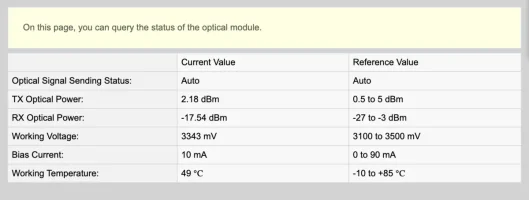
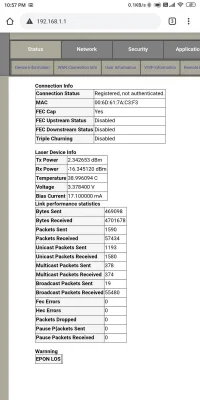
I am facing the Heating issue a lot and during noon time the temperature of the optical module raises to 80 and because of this my download speed gets reduced from 50mbps to just 10mbps, upload speed is not affected by this.
Take a look at the temperature of the optical module

So I added a small cooling fan near the vents of the modem and after turning the fan on and within 5 min temperature is now constant at 55

Result

So are you guys facing this issue too or there is something wrong with my modem?
Take a look at the temperature of the optical module
So I added a small cooling fan near the vents of the modem and after turning the fan on and within 5 min temperature is now constant at 55
Result
So are you guys facing this issue too or there is something wrong with my modem?
Last edited: