
-
Amazon Deals - ToS - Like us?
You are using an out of date browser. It may not display this or other websites correctly.
You should upgrade or use an alternative browser.
You should upgrade or use an alternative browser.
Excitel Broadband: Slow Internet Speeds to Many Servers and Locations

D
Deleted member 63558
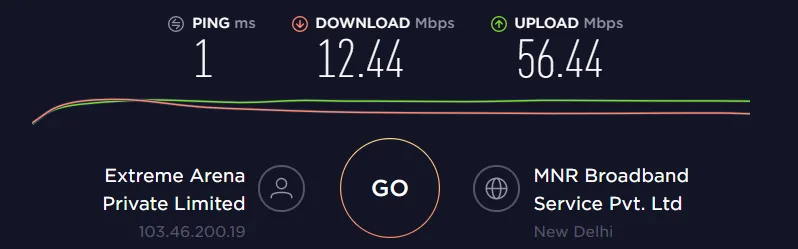
MNR Broadband:
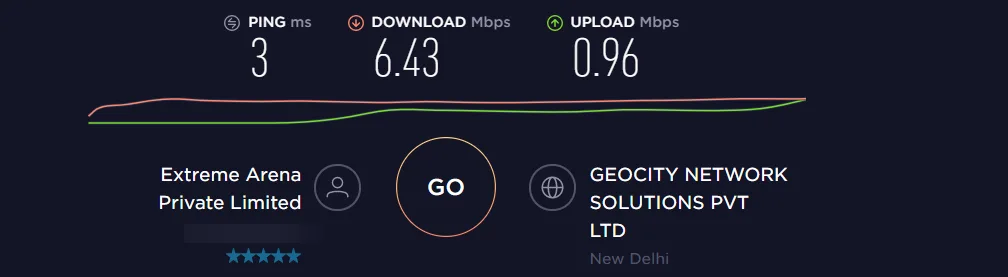
GEOCity Broadband:
@JB700 Facebook is loading very slow.
@achaudhary997 Are you facing such issue?
GEOCity Broadband:
@JB700 Facebook is loading very slow.
@achaudhary997 Are you facing such issue?
Last edited by a moderator:
D
Deleted member 63558
Yes, It's Excitel only issue since everything is loading fine on the Airtel Broadband. (Checked multiple locations including outside of India)
Secondly, my speed test from JioFi to multiple locations (not just India) are fine too.
Excitel is having routing / over-congested / bandwidth / peering issue which they can only fix.
Is there something I can do about it? Since, a lot of Excitel Users on this Forum aren't coming forward. Other guy who was on thread @GUNNYJEE messaged me that he's facing ditto same problems as I'm with this meanwhile he lives totally different location of Delhi.
Third, What ISP do you use?
Would be awesome if @achaudhary997 comes forward and share some screenshots since he's good technical guy too.
Secondly, my speed test from JioFi to multiple locations (not just India) are fine too.
Excitel is having routing / over-congested / bandwidth / peering issue which they can only fix.
Is there something I can do about it? Since, a lot of Excitel Users on this Forum aren't coming forward.
Other guy who was on thread @GUNNYJEE messaged me that he's facing ditto same problems as I'm with this meanwhile he lives totally different location of Delhi.Third, What ISP do you use?
Would be awesome if @achaudhary997 comes forward and share some screenshots since he's good technical guy too.
I have "Precious Netcomm" (LCO: VNet) I had Excitel (LCO: Spectrum) until February but non-peering traffic was so slow , even IPVanish and PIA were slow even though they have servers in Delhi.
So I moved to my current LCO. Its way less congested and I get decent speeds (30-40Mbit) to New York servers and close to 90-95 on peered servers. But they too began overselling bandwidth and now non-peering traffic has slowed to >5 Mbit. Its becoming the same thing as Excitel with slow international speeds. Even VPNs are slow now.
So I moved to my current LCO. Its way less congested and I get decent speeds (30-40Mbit) to New York servers and close to 90-95 on peered servers. But they too began overselling bandwidth and now non-peering traffic has slowed to >5 Mbit. Its becoming the same thing as Excitel with slow international speeds. Even VPNs are slow now.
D
Deleted member 63558
^ That the reason I mentioned FUP is much better. Since people exploit unmeterred connection which makes whole system congested.
Not many understands this.
You can have Fiber or anything, but if the data bandwidth is being congested, technology won't help since the medium through which the data is traveling has some limits too.
It's not the case with Airtel though since each customer has it's own line (nothing is shared). So I am getting fine speeds on all the servers and locations doesn't matter if it's peered or not.
Same is the issue with Hathway (though, Excitel's issue is much worse at this point) but network congestion is one of the reason, Hathway has become bad since last year. They are over-selling but doesn't upgrade.
Do you live somewhere near Noida?
Last edited by a moderator:
D
Deleted member 63558
12 PM
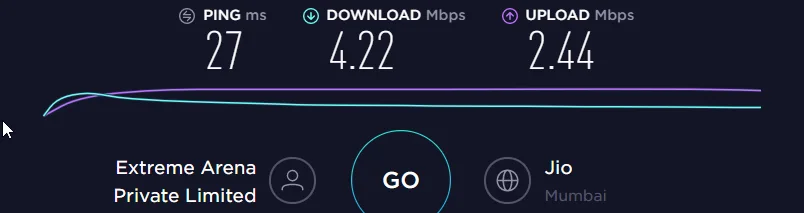

It is already much worse as compared to 11 AM Results.
And, it will get worse with time now until mid-night.
It is already much worse as compared to 11 AM Results.
D
Deleted member 63558
@Navjot Singh Paaji, Can you confirm if the issue with Netflix is also happening in the same pattern? (Don't have active Netflix Subscription anymore with me)
Like works fine in the mid-night around 1 AM but stops working fine in morning / noon / night (peak time)?
Since, I've tested more than 30-40 servers at this point and I'm getting this pattern. Speedtest to the locations in Delhi, All India, Outside India.
Like works fine in the mid-night around 1 AM but stops working fine in morning / noon / night (peak time)?
Since, I've tested more than 30-40 servers at this point and I'm getting this pattern. Speedtest to the locations in Delhi, All India, Outside India.
^ That the reason I mentioned FUP is much better. Since people exploit unmeterred connection which makes whole system congested.
Not many understands this.
You can have Fiber or anything, but if the data bandwidth is being congested, technology won't help since the medium through which the data is traveling has some limits too.
It's not the case with Airtel though since each customer has it's own line (nothing is shared). So I am getting fine speeds on all the servers and locations doesn't matter if it's peered or not.
Same is the issue with Hathway (though, Excitel's issue is much worse at this point) but network congestion is one of the reason, Hathway has become bad since last year. They are over-selling but doesn't upgrade.
Do you live somewhere near Noida?
I live in West Delhi (Janakpuri area).
Here are some speedtest results on VNet.
Airtel Delhi: Traceroute goes through VSNL
MNR Broadband: Traceroute goes through Extreme IX
Speedtest NYC: Goes through VSNL
.....................................................
Speedtest NYC: On Google Cloud (Mumbai) Ovpn server - Showing precious netcomm because ip failed to refresh
Speedtest NYC: On IPVanish (HostDime) VPN - Showing precious netcomm because ip failed to refresh
.....................................................
Excitel support once said that all ISPs have bad speeds to international servers. Here are the speeds on my secondary ISP (DEN Boomband):
MNR Broadband: Goes through VSNL
Airtel Delhi: Goes through VSNL
Speedtest NYC: Goes through VSNL
Neither of the LCO do anything about the speeds because most people aren't affected by low non-peering speeds and because speedtest shows full speeds.
I don't think FUP is needed if the LCOs didn't oversell bandwidth but they do so .....
Kinda offtopic but I have very good experience with DEN in terms of speed and international routing. The only thing that prevents me from using them full time is 4Mbps upload speed and higher ping . DEN for some reason goes through a ton of hops within their servers.
Tracerroute to 1.1.1.1 on DEN
Tracing route to one.one.one.one [1.1.1.1]
over a maximum of 30 hops:
1 1 ms 1 ms <1 ms 192.168.5.1
2 1 ms <1 ms <1 ms 192.168.20.1
3 8 ms 8 ms 5 ms 10.9.64.1
4 13 ms 9 ms 7 ms 192.168.21.133
5 8 ms 7 ms 7 ms 192.168.21.213
6 7 ms 8 ms 7 ms 192.168.21.189
7 8 ms 6 ms 7 ms 192.168.5.193
8 13 ms 9 ms 16 ms 192.168.5.217
9 9 ms 7 ms 10 ms 14.142.187.61.static-delhi.vsnl.net.in [14.142.187.61]
10 41 ms 40 ms 40 ms 172.31.180.57
11 43 ms 42 ms 41 ms ix-ae-4-2.tcore1.cxr-chennai.as6453.net [180.87.36.9]
12 85 ms 84 ms 87 ms if-ae-34-2.tcore1.svq-singapore.as6453.net [180.87.36.41]
13 84 ms 76 ms 74 ms 120.29.215.101
14 74 ms 72 ms 74 ms one.one.one.one [1.1.1.1]
Last edited:
D
Deleted member 63558
True, Finally someone with true knowledge here.
Yes, Speedtest shows very virtual speeds but the reality is totally different and 99% worse.
It's not true to be honest what Excitel Support says. Since, if your routing is good, the speed to the international servers specially Europe and Singapore must be good.
I actually talked to the DEN but then I didn't go further with them since they don't have Upload Speeds (which is the same case as Hathway).
I didn't get your Higher Ping part related to DEN.
Let me know, I can trace-route too. Just let me know the IPs and submit the data here so that you can see, what could be the issue with Excitel?
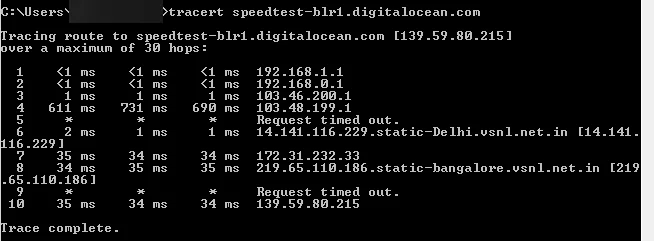
I tracert 1.1.1.1 on Excitel and my is going via. VSNL too.
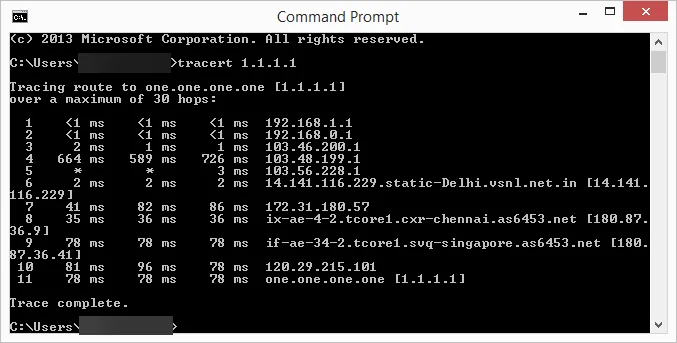
tracert to banglore DigitalOcean:
tracert to Mumbai AWS:
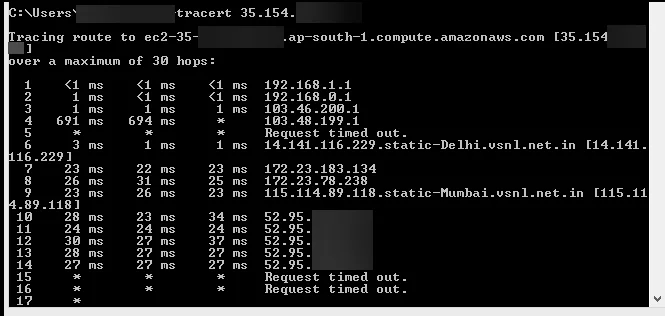
All the traffic is being routed via. VSNL only :O
Provide me the IP for the other speedtest.net nodes such as MNR or others?
Yes, Speedtest shows very virtual speeds but the reality is totally different and 99% worse.
It's not true to be honest what Excitel Support says. Since, if your routing is good, the speed to the international servers specially Europe and Singapore must be good.
I actually talked to the DEN but then I didn't go further with them since they don't have Upload Speeds (which is the same case as Hathway).
I didn't get your Higher Ping part related to DEN.
Let me know, I can trace-route too. Just let me know the IPs and submit the data here so that you can see, what could be the issue with Excitel?
I tracert 1.1.1.1 on Excitel and my is going via. VSNL too.
tracert to banglore DigitalOcean:
tracert to Mumbai AWS:
All the traffic is being routed via. VSNL only :O
Provide me the IP for the other speedtest.net nodes such as MNR or others?
Last edited by a moderator: