


A more helpful Google Assistant for your every day
At CES, we’re announcing new features that make the Assistant more helpful throughout your day when you’re at home, in the car or on your phone.
When you set up your smart device through the manufacturer’s app, you’ll receive a notification on your Android phone or see a “suggestion button” when you open up the Google Home app that will prompt you to connect the device with your Assistant. You’ll then be able to easily complete set-up in just a few taps without needing to re-enter your account credentials.
With a new feature called Scheduled Actions coming out later this year, you will be able to ask the Assistant to turn on/off or start/stop a compatible smart device at the time of your choosing. For example, you can say, “Hey Google, run the coffee maker at 6 a.m.” And from within the Google Home app, you can control more than 20 new devices, including AC units, air purifiers, bathtubs, coffee makers, vacuums and more, all from one place.
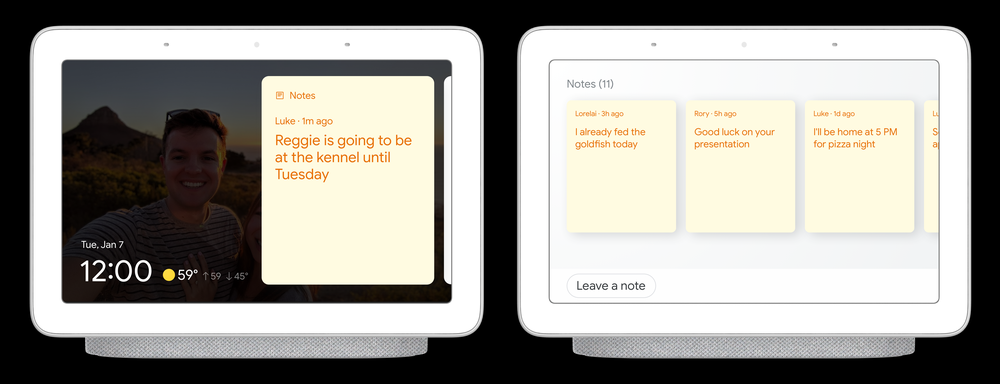
With household notes, you will soon be able to clear out the clutter of paper notes around the house and ensure notes are seen in one central location by creating digital sticky notes with the Assistant on your Smart Display. Anyone at home can create or view these notes without needing to sign in. For example, as you head out the door in the morning, you can leave a note informing other household members that you already fed your pet. Simply say, “Hey Google, leave a note that says I already fed Max breakfast.”
You can also put your most important contacts on “speed dial” with household contacts, so that anyone at home can quickly and easily make calls on your speakers and Smart Displays. Once set up, anyone can dial your neighbor Sarah by saying "Hey Google, call Sarah" or by tapping on Sarah's name on your Smart Display's household contacts list. Both features will be rolling out later this year.
Unlike traditional screen readers, this experience is built on new voice datasets to create more expressive and more natural sounding voices, so it’s easier to listen for a longer period of time. There are many potential ways in which this can be helpful, but one area we’re exploring is reading webpages with long-form content on your phone—like a news article, blog or short story—out loud. From your Android device, just say “Hey Google, read it” or “Hey Google, read this page” when you’re viewing an article. The content can be translated into 42 languages, such as Hindi, German or Spanish. We’re also looking to include auto-scroll and text highlighting capabilities that help users read the text as it’s being read aloud.
Interpreter mode, a real-time translation feature for your phone, Smart Display or smart speaker, allows people to have free-flowing conversations with each other—even if they don’t speak the same language. Starting today, businesses around the world can bring interpreter mode to their guests through our partners Volara and SONIFI. As part of this new solution, we’re expanding the technology to new Hotels, airports, sports stadiums, organizations aiding humanitarian efforts and more.
At CES, we also announced we’re adding two new voice actions for people to easily control their privacy, such as “Hey Google, that wasn’t for you,” which lets you tell the Assistant to forget what it heard if an unintended activation occurs. You can also ask “Hey Google, are you saving my audio data?” to learn about your privacy controls and go directly into the settings screen to change your preferences.
Source


