Hosting a RIPE Atlas probe on your network

Have you heard about Ripe Atlas project ?
RIPE Atlas
RIPE NCC is running an excellent project called RIPE Atlas from few years. This is one of the largest distributed network measurement projects where thousands of users host small devices called RIPE Atlas Probes on their networks, home connections, data centers etc. These probes do measurement under both public and private category and make that data available publicly for use by network engineers and helps in optimising routing.

These can help other users to run ping, trace route etc from other networks to detect latency, routing issues.

I have been hosting few of these and wanted to check with other users in India if they can host some devices.
It does not have any major requirements and just need USB power, uses 4-5kbps internet for tests and be available online 24/7.

I have 2 devices which I can share at this time.

To setup new device will need your email(invite and account for accessing online tools) and ISP details(ASN) to set it up.

Some more explaining how Ripe Atlas works and can help Network users/teams
RIPE Atlas - Wikipedia
RIPE ATLAS and Benefits of Hosting it in your Indian ISP Network | Mumbai IX Blogs
RIPE Atlas Probe Stats
RIPE Atlas Measurements
 
Sure you can get one if you like. Another fun option can be to run that Pi 24x7 and run docker on it. You can run this docker image on it.
A key advantage you can have in running it on raspberry pi would be an option to put additional container say with Smokeping where you define key targets like your ISP's router, DNS server you are using, latency within LAN if you have multiple devices, remote content servers etc. That gives a much better view of your provider as well as the internal home network.
 
@Nitin No, it will be absolutely fine on behind CGNAT. It triggers connects from inside network towards outside destinations and hence NAT is not an issue.
 
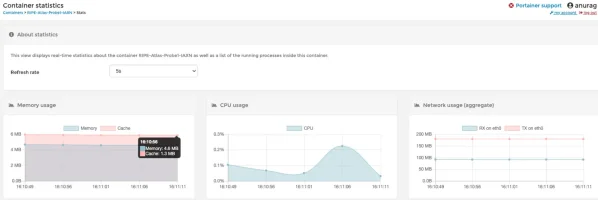
On a related note for anyone interested in the software probe - I am running two software probes on my Raspberry Pi 3b+ and each docker probe is taking around 4.6MB of ram.
 

Attachments

  • Screenshot 2020-07-11 at 4.11.14 PM.webp
    Screenshot 2020-07-11 at 4.11.14 PM.webp
    20.9 KB · Views: 302
OK - let's check this. I will use RIPE Atlas to trigger traceroute to www.google.co.in, Hotstar etc via Jio AS55836. Let's see if traces give anything useful. Right now there are 5 active probes on AS55836. 3 out of these 5 probes are on IPv6.


IPv4 trace to Google: RIPE Atlas
IPv6 trace to Google: RIPE Atlas
IPv4 trace to Hotstar: RIPE Atlas


So as you can make out from these traces they are still useful.


Traceroute to www.google.co.in (2404:6800:4002:80f::2003), 48 byte packets

1 2405:201:6c02:6f0f::c0a8:1d01 AS55836 1.624ms 1.236ms 1.242ms
2 * * *
3 * * 2405:200:1602:1739::3 AS55836 16.425ms
4 2001:4860:1:1::a6c AS15169 16.927ms 17.439ms 15.906ms
5 2001:4860:0:9e::1 AS15169 18.391ms 17.404ms 17.66ms
6 2001:4860:0:1::3061 AS15169 16.681ms 16.769ms 16.727ms
7 2404:6800:4002:80f::2003 del11s04-in-x03.1e100.net AS15169 19.215ms 19.589ms 19.475ms


Traceroute to www.hotstar.com (49.44.117.66), 48 byte packets

1 192.168.29.1 1.32ms 0.965ms *
2 100.122.132.1 5.135ms 3.198ms 3.157ms
3 172.25.115.26 4.193ms 4.077ms 3.997ms
4 172.25.115.26 3.972ms 3.374ms 3.556ms
5 172.17.115.238 2.636ms 2.829ms 3.033ms
6 * * *
7 * * *
8 * * *
9 * * *
10 49.44.117.1 AS55836 4.444ms 5.097ms 9.401ms
11 49.44.117.66 AS55836 5.619ms 4.989ms 4.897ms


And even for some location like say he.net server far off and not connected in India, I still get reasonable and useful traces from this measurement.

Traceroute to 216.218.236.2 (216.218.236.2), 48 byte packets

1 192.168.0.1 0.814ms 0.818ms 0.8ms
2 100.125.228.1 2.898ms 2.413ms 2.163ms
3 172.26.29.107 21.783ms 20.429ms 20.816ms
4 172.26.29.107 20.58ms 20.662ms 20.522ms
5 172.17.114.34 17.818ms 17.661ms 172.17.114.38 19.205ms
6 * * *
7 103.198.140.170 AS64049 23.818ms 42.852ms 40.753ms
8 103.198.140.17 AS64049 56.873ms 57.103ms 57.936ms
9 103.198.140.17 AS64049 56.064ms 56.163ms 55.834ms
10 27.111.228.81 6939.sgw.equinix.com 58.598ms 52.074ms 51.925ms
11 184.105.64.254 100ge16-2.core1.tyo1.he.net AS6939 117.777ms 116.114ms 123.821ms
12 184.104.194.37 100ge12-2.core1.sjc2.he.net AS6939 236.971ms 222.662ms 236.466ms
13 72.52.92.57 100ge8-2.core3.fmt1.he.net AS6939 235.04ms 235.16ms 235.057ms
14 216.218.236.2 he.net AS6939 227.52ms 227.136ms 227.385ms

Thus I do not agree that CGNAT is making traces useless. The only issue with CGNAT and too many internal hops and no rDNS PTR record hide the internal flow of traffic. So in the above trace, I don't know what path it took before Equinix SGW - Singapore before handing off traffic to us.

Note: Anyone interested in these traces can host probe, earn credits and trigger these measurements via RIPE Atlas web UI or CLI. In case you don't want to host a probe and still would like to do these, let me know. I can provide you with credit to play around for months/years with this measurement.
 
@Anurag Bhatia View attachment 2789
He said that it won't work, that's why i asked you.
I am really sorry if I was not clear.
I was talking about internal network.
Most of the times,the first hop outside the network is shown.We just get limited stats which limits ability to watch internal congestion of a network and the internal bottleneck.
Moreover,I was wrong for assuming that the connection is intiated from outside of the network.
Really sorry about that....😔
I had wrong assumption.
 
@Kick933 Just going to chime in to answer your question.

Note that the RIPE Atlas platform is not limited to just traceroute measurements. One can run other measurements such as ping, DNS, NTP, SSL.

The other point which I'd like to specifically make is the fact that there is roughly 75-80 probes connected at any point of time within India. This is a very low number considering the breadth and depth of India. @Anurag Bhatia and I have been working towards getting probes from different parts within India.

The benefit of having more probes is twofold for engineers and researchers alike. Else, any measurement/research activity is limited due to law of small numbers. i.e a small sample size will produce incorrect observations/inference.

Having said that, this doesn't imply one installs more than a single probe inside their network :) The bottom line, if you have access to a network (for the lack of a better word - last mile) of friends/family which doesn't have a probe, good idea to install a probe. Please feel free to reach out if you need any help in installing the software probe.
 
I just setup a probe on my raspberrypi, got activated a few hours ago. Lets see what measurements or logs I get in a few days.

PS: I am running a direct install on raspbian, not a docker image. Not sure if it will cause any issues.
 
Last edited by a moderator:
Back