Microsoft Outlook Updates

Outlook.com—out of preview and better than ever - Office Blogs

GIPHY

Make your emails fun and expressive by adding GIFs from GIPHY, the world’s largest and most powerful GIF library—without leaving your Outlook inbox. You can use GIFs to celebrate birthdays and anniversaries, congratulate people on achievements, give thanks to friends and family and more!

Outlook-Giphy

Yelp

Planning your weekend dinner or shopping experience? Use the Yelp add-in in Outlook to quickly find and suggest great restaurants, shopping destinations and other local businesses. The add-in provides Yelp pictures, reviews and contact information and inserts these details directly into the body of your message or meeting invite.

Outlook-Yelp

Wunderlist

We all receive emails that are more tasks than conversations, such as: “Could you buy the cake?” or “Would you be able to pick up Amy from school?” Wouldn’t it be wonderful to move these emails straight to a to-do list that you can track? Well, your wish is our command with the Wunderlist add-in. The add-in helps you move “task-centric” emails straight to your to-do list so you can quickly and easily plan your tasks for the day without having to leave Outlook. Additionally, you can also share your to-do lists via email—whether it’s your vacation plans or a grocery list.
 

Source

Outlook Customer Manager provides small businesses the tools they need to track & grow customer relationships. Now included at no extra cost in the Office 365 Business Premium plan, Outlook Customer Manager is a cloud-powered solution designed especially for small businesses.
 
Last edited:
Redesigned navigation, conversations and search in Outlook for iOS and Android - Office Blogs

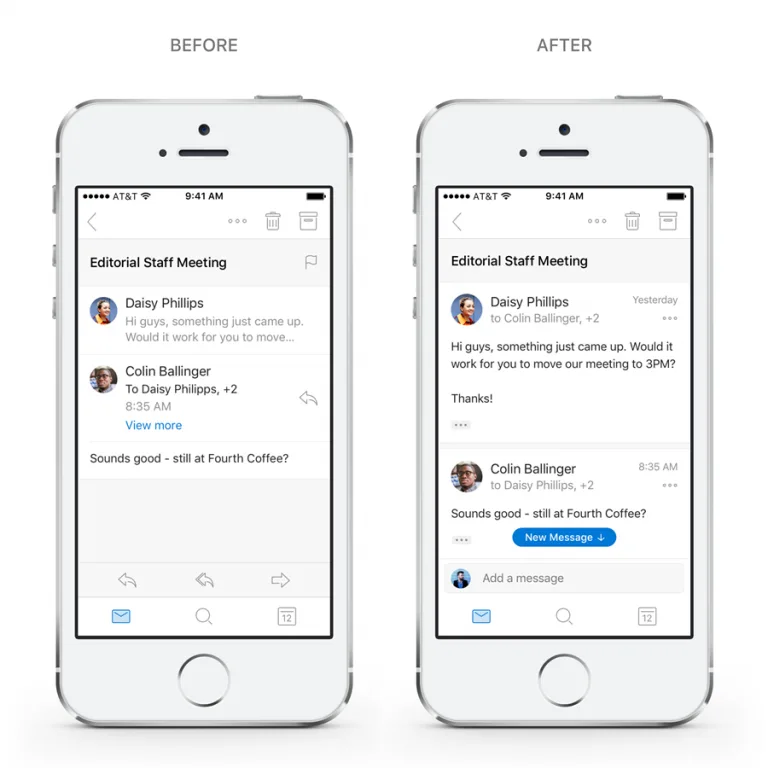
Today, we’re launching exciting new changes to Outlook on iOS and Android. It’s the Outlook you know and love, with a redesigned conversation experience and the ability to quickly switch between accounts and browse folders. In addition, new intelligent search capabilities, powered by Microsoft Graph, are coming soon.
Conversations—email that’s fast and interactive
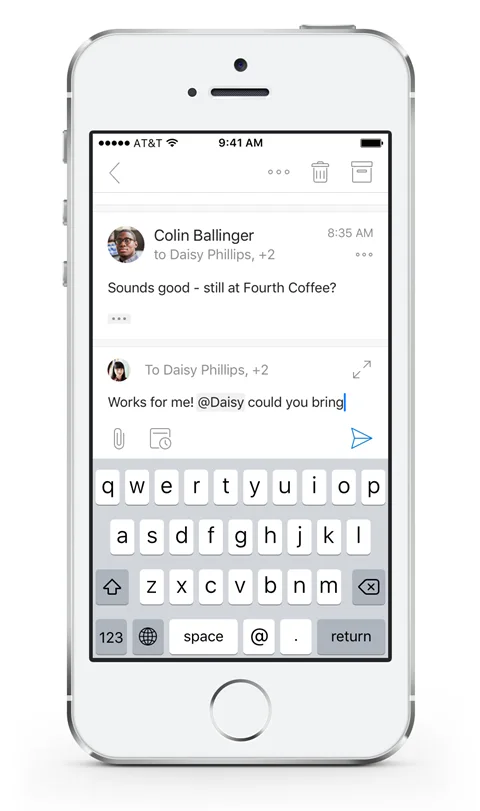
The redesigned conversation experience makes it easy to stay on top of discussions, whether you’re talking to friends and family, classmates, colleagues or with your groups.
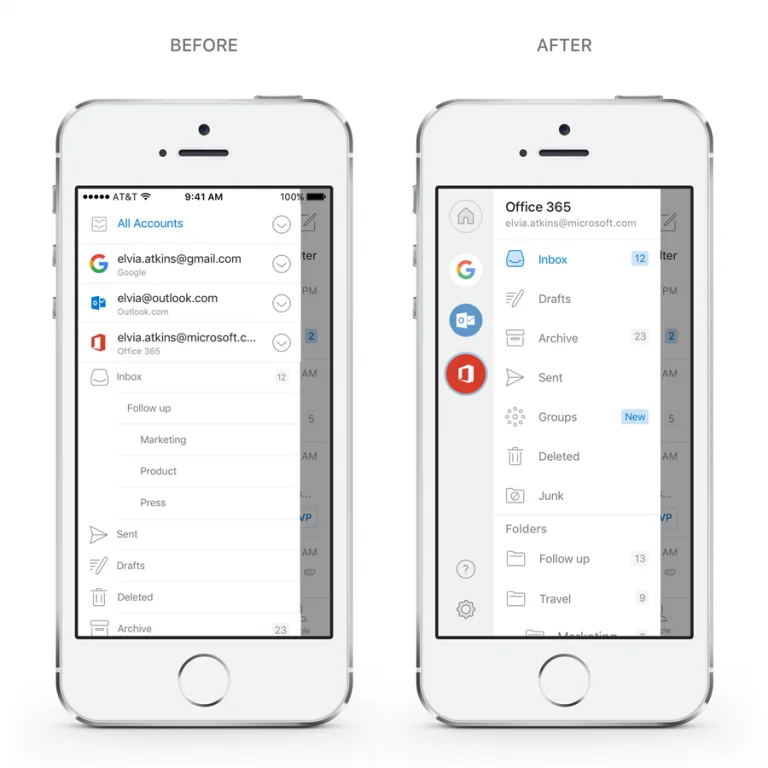
Navigation—quickly switch between accounts and folders
Outlook works with all your accounts—from Office 365 to Outlook.com and Gmail. We’ve heard from many people that they wanted a quicker way to switch between accounts or browse folders.
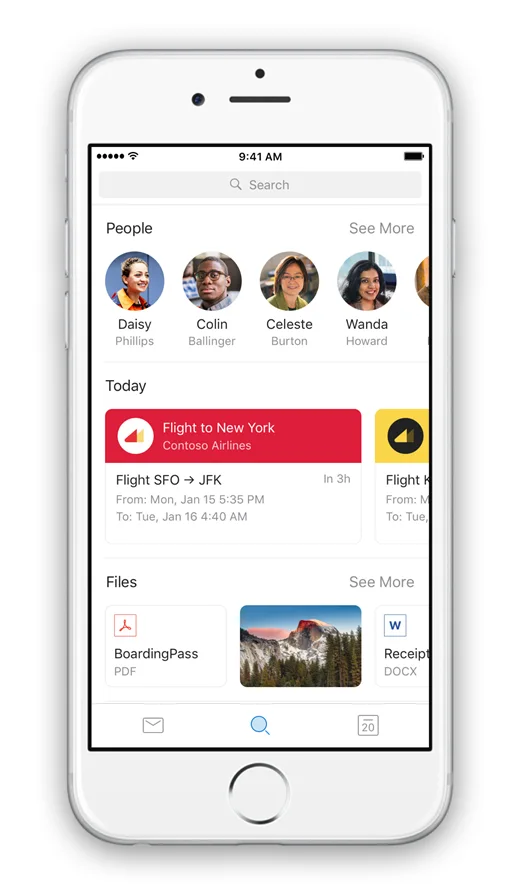
Search will be front and center in the app’s simplified tab bar. No matter where you are, the new search will be a tap away. Our goal is to bring more proactive and contextual information to your fingertips without even needing to type in a search box.
People and Files will be seamlessly integrated as part of the search experience. There’s a section for People and Files—both with proactive suggestions.
When typing a name in the search box, it will instantly display suggestions from your most frequent contacts. Tapping on a person provides one-tap access to the new People card announced a few weeks ago.


kCmcHWf.webp

p0KnOb4.webp

zWnijjW.webp

1aeGRpG.webp
 
Last edited:
Your favorite apps—now available in Outlook on Android

Earlier this year, we launched add-ins for Outlook on iOS—bringing your favorite apps right in Outlook—so you can get more done on the go. We are now rolling out add-ins to Outlook on Android customers with Outlook.com and Office 365 commercial email accounts. Additionally, we’ll be bringing add-ins to Gmail customers on iOS and Android soon.
This launch will bring some of the most loved Outlook add-ins from iOS to Android, including Evernote, Microsoft Dynamics 365, Microsoft Translator, Nimble, OnePlaceMail, Outlook Customer Manager, Smartsheet, and Trello. We will also be launching several new add-ins for Outlook—including Wrike, JIRA, MeisterTask, Gfycat, and MojiLala. These add-ins will be available for Outlook customers across the web, Windows, Mac, iOS, and Android.

Add-ins help you accomplish tasks quickly—right from Outlook. Whether you want to save an email to your customer relationship management app, quickly add email content to your project board, translate emails on the fly, or add a bit of flair and personality to emails—add-ins have you covered. There is no need to switch back and forth between apps or copy/paste email information. With add-ins, your favorite apps are just a tap away in Outlook.
 
Enabling a more inclusive web with support for email addresses in Indian languages – The Microsoft India Blog

Microsoft products are compatible with 22 Indian languages. However, email addresses and top-level domain names (TLDs) are based on international protocols which support 15 Indian languages at present. Internationalized domain names (IDNs) in Indian languages are given by NIXI (National Internet Exchange of India). Indian users can register their local language email address with a third-party providers such as XgenPlus, a Microsoft partner. Here’s an example of an email address in Hindi: भाषा@माइक्रोसॉफ्ट.भारत

Such email addresses in the Devanagari script are now fully integrated with most of our platforms, including Office 365, Outlook 2016 client, Outlook apps on Android and iOS, Outlook.com, Exchange Online, and Exchange Online Protection (EOP).
 
Back