Sim based Router recommendation for 5G cellular network

  • Thread starter Thread starter _Dexter
  • Start date Start date
  • Replies Replies 405
  • Views Views 52,185
@dexter22 yes, it was unlimited. My plan was yearly plan, so not sure about others. Till i recharged with 61, i never got welcome offer. Even now my plan is 3GB/day yearly plan (4199), still i had to recharge for 61, But this was not the case for another jio sim, automatically got welcome offer. Only had problem with ported sim.
 
Upvote 0
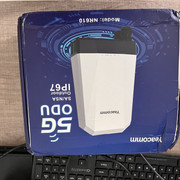
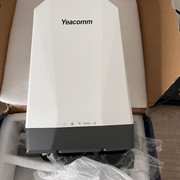
So I received the Yeacomm NR610 earlier today. Grand Slam did a decent job I felt, customs clearance completed on 6th in Delhi and I had it in my hands in Bangalore on 8th morning.

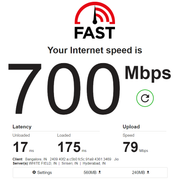
Plugged in my new Jio 5G sim, and it worked out of the box, no configuration / apn etc were required to be manually entered. In router mode when I did the speedtest the first time, looks like the device crashed when it reached only 350 Mbps😅 Switched to Bridge mode and seemed to work great. With the device inside the house and on my desk, I am consistently getting around 700 Mbps down / 60-80 Mbps Up. However in bridge mode 464XLAT doesn't seem to be working, might need some config changes, so I am able to access only IPv6 destinations.
 
Upvote 0
@MrGordon
I am consistently getting around 700 Mbps down / 60-80 Mbps Up
Those are some good numbers. When you get chance send me screenshot of network information page (signal strength, SINR etc).
Also try inserting two Jio 5G sim and aggregate internet from both SIM. You might get more than 1.4Gbps (700Mbps+700Mbps) ?
 
Upvote 0
Sure. It doesn’t support dual sim active at the same time. You can only choose one at a time, it’s more like a backup sim. If sim 1 has no signal you can set it to use sim 2.

Does the ZTE device support dual sim active at same time?

Also, since Jio 5G is IPv6 only, need to see how I can have multiple clients. I don’t think Jio delegates an IPv6 prefix, so how does each client get a unique IPv6 address?
 
Upvote 0
Apparently Windows doesn't support CLAT for non WWAN interfaces, so when in bridge mode and directly connected, I cannot access IPv4 endpoints over IP, so can't ping say 1.1.1.1. However, now I switched to a DNS64 resolver, and I can access IPv4 only websites just fine. Note that this is when in bridge mode, if I use router mode, the CPE device handles all this automatically.

I'll try on a Mac device if it supports CLAT out of the box for LAN interfaces, from what I read, it does support.

Now the question that remains is, how to put the 5G CPE behind a router and have multiple clients.
 
Upvote 0
Back