Strict nat on Airtel ZTE f670L router

  • Thread starter Thread starter rxuser
  • Start date Start date
  • Replies Replies 14
  • Views Views 6,047
Messages
43
Location
NA
ISP
Excitel
Hello I have been having issues while directly communicating with devices using zerotier and from the diagnostics I did, I found that airtel is running on symmetric nat which I tested using this NAT Test: Am I behind a Symmetric or Normal NAT?

This hinders p2p connectivity using zerotier, so is there a way to get a normal nat instead of this ?? I am using ZTE f670l ont provided by them and have enabled upnp and dmz but the status is the same
 
mine also has strict with same router,i even complained on customer care but employ had no knowledge about this and when i told him that my previous isp didnt had problem like this then the local technician just said dont recharge after 3 month and now i dont use their network and on previous isp
 
Upvote 0
I am a noob when it comes to networking terminologies. So sorry if I am asking something irrelevant! Does this remote test have anything to do with public ip & private ip? i.e. for same router I see some getting strict NAT while I am getting Normal
I am currently so far still getting public ip from airtel on f670L and the test shows normal nat in my case.

If this is a feature of the router, what if you consider putting F670L in bridge and using your own high end router that supports this asymmetric NAT? Just a guess.
What I am asking is if you are on public IP your router directly faces WAN but when you are on private IP your router faces another CG-NAT at ISP end so is this remote test penetrating upto your router or does it see ISP's CG-NAT?

Edit ------------

I went on my mobile Internet hotspot which puts my phone behind CG-NAT, I still get Normal NAT. Now my router is not in picture but phone works as a router I suppose.
 
Last edited:
Upvote 0
am also behind cgnat on different isp and i get normal nat and can be opened when used dmz but when using airtel,it has strict nat type even my friend from haryana with different router have same problem
 
Upvote 0
@rxuser
Do you receive public IP or are you behind CGNAT.
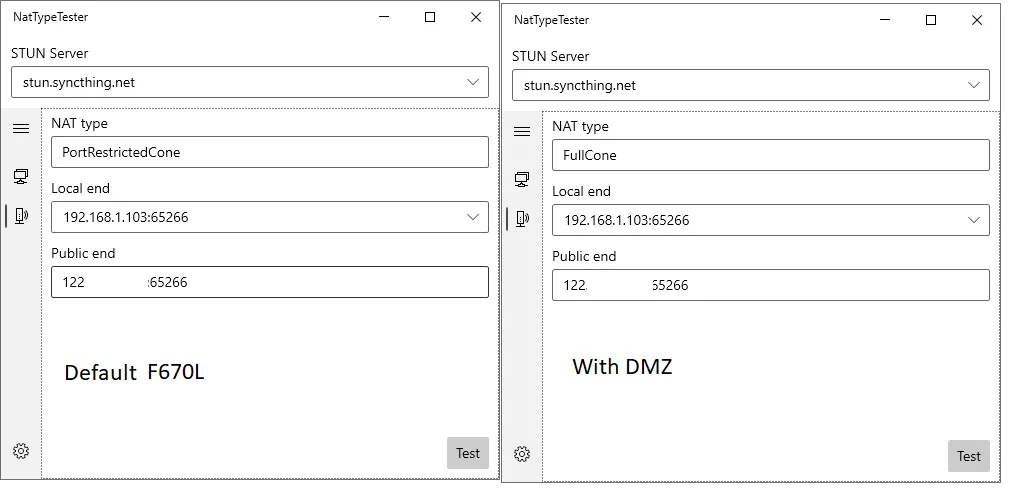
I carried out specific tests using another NAT tester tool available on github. It's windows exe file and it goes into details of NAT type.

I get public IP on airtel. By default F670L V9.0.10P1N12A is operating in port restricted cone and as soon as I put the client laptop in DMZ the test result changes to Full Cone as expected.

So it's possible that if you could be behind cgnat that overrides your nat type? And will a static IP help? Just guessing.

66rtbb1.webp


send a mail to [email protected] and ask for a specific tech support from backend networking expert, not field engineer
 
Last edited by a moderator:
Upvote 0
@rohitks So I have been researching this for a while now and pretty much drilled down that symmertic nat is happening due to me having CGNAT with airtel as I don't get a public IP.

Although CGNAT is not usually a issue and we still get Full Cone/Normal NAT in other providers case (Excitel, ACT both had full cone NAT), it is the way airtel has configured it in their case that we CGNAT users are getting Symmetric NAT. This cannot be overriden by our routers as their own routers before us are configured in such a way.

Now the problem is due to Symmetric NAT being there, direct p2p connections using software such as zerotier and games are difficult-to-impossible as NAT traversal does not work with symmetric NAT.

I talked to airtel regarding this and as usual they are being clueless and it has been difficult to reach someone who actually knows/can configure this thing. They suggest getting a static ip which will surely fix this but shelling out 250 extra to solve a problem which should not have been there and is avoidable if they fix their shit feels stupid to me.

There is another stupid thing that airtel has configured into their NAT. If you ever check your NAT type using a STUN server running at a standard port 3478/3479, airtel's NAT behaves as if its a full cone/Normal NAT but if the target STUN server runs at an non standard port such as 10000 or something else, it behaves as a symmetric NAT.

My Guess ?? Gamers must have complained about NAT warnings in games and they simply changed the behaviour for Ports 3478/3479 which are standard ports for STUN servers which are used by games and other stuff to check whether the clients are behind Normal NAT or not.

Now when the game checks the NAT, it should find that it is behind a normal NAT because of airtel's configuration but the moment those clients try to connect to each other they fail or error out or use an high latency relay or something.

I can confirm this through Parsec by trying to connect to my gaming PC using excitel or Jio. Parsec does not detect an improper symmetric nat but fails when I try to connect to my PC which is connected to airtel.

Is there a way to contact someone sensible for this ?? due to this config, any games that require p2p connections will have poor experience and a static ip would need to be purchased. I have never seen an ISP giving symmetric NAT and that too configured as such a mess as airtel.
 
Upvote 0
Back