Hi !
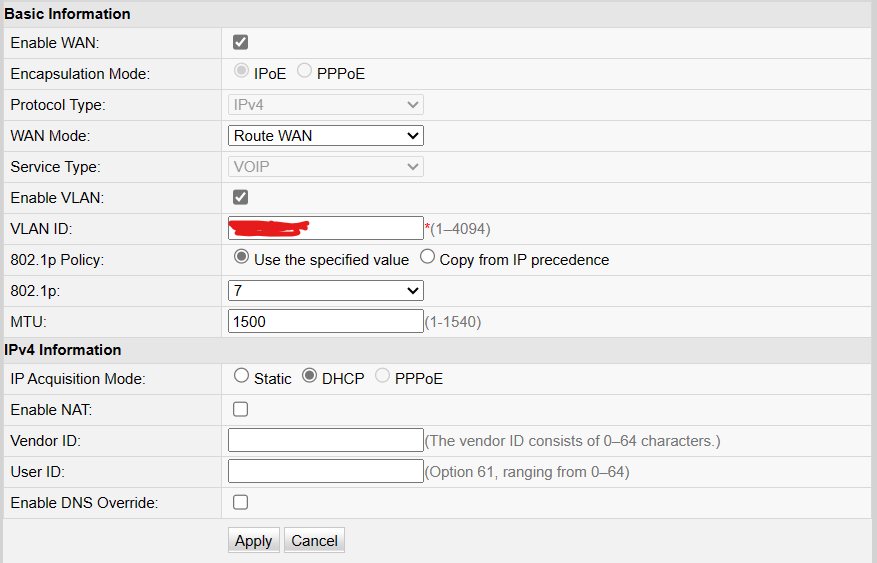
I have BSNL air fibre Connection ( on cambium epmp 1000 using Huawei HG8145V5 Router ) and I configured my router for VoIP (using DHCP). my router has got the IP address and DNS server via specific VLAN 1830 ( my landline number series is 297 and from UP east). For data connectivity I didn’t have to use my data vlan ( whenever I use my data vlan port the connection goes off and it doesn’t connect again so I had to remove data vlan to connect to Internet.)
Problem:- The problem is that in this Huawei router there is option for IMS SIP or H.234 config for voice and I am using IMS sip profile (not H.234) , SIP server 192.168.149.78 or upe.ftthvoip.bsnl.in provided by LCO to me . And I entered my user details in format (91542297****) and password (sent by bsnl to me in sms) .When I cheque the status it show 401 unauthorised access .
I referered every video that I could on internet all of them used Syrotech router and in the voice config they selected softswitch sip but this option is not in my router. Second all of them used data vlan I’d provided to them by bsnl. And using these all of them have registered voice .
I wanted to know what I can do to fix my voip issue ?
Is softswitch sip necessary ?
Is data vlan id necessary to use VoIP ?
I have BSNL air fibre Connection ( on cambium epmp 1000 using Huawei HG8145V5 Router ) and I configured my router for VoIP (using DHCP). my router has got the IP address and DNS server via specific VLAN 1830 ( my landline number series is 297 and from UP east). For data connectivity I didn’t have to use my data vlan ( whenever I use my data vlan port the connection goes off and it doesn’t connect again so I had to remove data vlan to connect to Internet.)
Problem:- The problem is that in this Huawei router there is option for IMS SIP or H.234 config for voice and I am using IMS sip profile (not H.234) , SIP server 192.168.149.78 or upe.ftthvoip.bsnl.in provided by LCO to me . And I entered my user details in format (91542297****) and password (sent by bsnl to me in sms) .When I cheque the status it show 401 unauthorised access .
I referered every video that I could on internet all of them used Syrotech router and in the voice config they selected softswitch sip but this option is not in my router. Second all of them used data vlan I’d provided to them by bsnl. And using these all of them have registered voice .
I wanted to know what I can do to fix my voip issue ?
Is softswitch sip necessary ?
Is data vlan id necessary to use VoIP ?