Windows 10

Thanks.

BTW you are right that it probably isn't a wise idea to remove an application which is so deeply integrated into the system. Any way by which I can just remove it from the left bar of Explorer? :)
 
Try this out. Since it is a registry edit, you can revert back easily.

Code:
Open the Windows registry editor and navigate to:

{HKEY_CLASSES_ROOT\CLSID\{018D5C66-4533-4307-9B53-224DE2ED1FE6}.

In the subkey System.IsPinnedToNameSpaceTree change the DWORD from 1 to 0.

I found that I also had to do this at:

{HKEY_CLASSES_ROOT\Wow6432Node\CLSID\{018D5C66-4533-4307-9B53-224DE2ED1FE6}.

Update: I cannot even find it. Not sure if this is connected to it missing already from the Explorer.
 
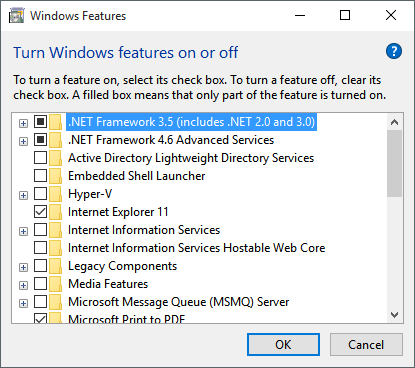
meanwhile i just uninstalled internet exploder 11.

UWVRfdf.png
 
Man, this Windows 10 thing is making me curious.

I'm in love with this new multiple desktop option. Is there any keyboard shortcut to add/remove/switch desktops (not the tasks inside the desktops but an entire desktop)?
 
Back