You WTF 100 Plan - Chennai

  • Thread starter Thread starter georgemp
  • Start date Start date
  • Replies Replies 52
  • Views Views 27,288
I automatically like you because not only do you know the difference, you were smart enough to use a linux iso for the torrent...

I guess, one possibility MIGHT be that the torrents don't have enough seeds, or there are too many people downloading at once. For speeds upto 10mbps you don't really notice anything, but at 100mbps others are probably unable to upload that fast, so you feel lag. Or maybe You Broadband is doing some shit on their end, can't say.

Try a popular (Y*FY) torrent with lots of seeds and check speed.
 
Hi poiasd,

I totally understand the difference between Mbps and MBps. Let me rephrase my question.
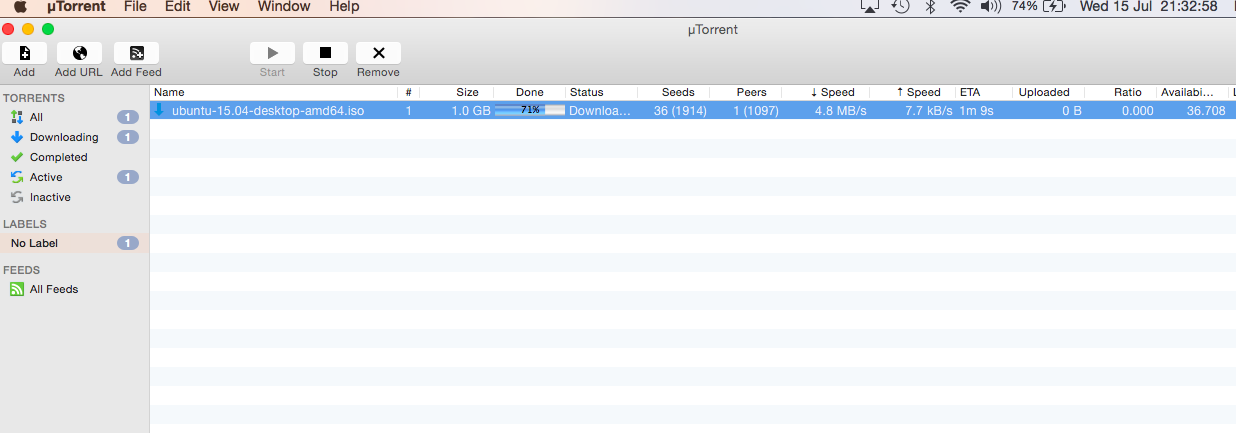
I get around 93 mbps/11.625 MBps in speedtest.net, but i only get around 30 mbps/3.75 MBps while downloading torrents. Why such a big difference between speedtest.net and actual downloading and if anyone else on this plan is facing similar problems.

speedtest.net results

Mb/s


In torrent downloading it was around 38.4 mbps/4.8MBps.

IewseaD.png


Are the SpeedTests you are doing done with a direct connection while the downloads are via WiFi?
WiFi will never give 100 MBPS WAN to LAN speed unless you are running a very high powered router.

More info here: DD-WRT Forum :: View topic - 100 MBPS internet plan but E1200 gives 10-20 MBPS.
 
My computer connection to my router is only via wifi. I do all my tests and downloads via Wifi.

I have a MacBook Air as my primary computer. I have an Airport Extreme (Tower Model with AC wifi) as my router. I connect to my router via WiFi (5Ghz Band), so there is no question of any bottlenecks.

Anyways my download speeds keep fluctuating. Sometimes it is 15 mbps/ 1.87 MBps or sometimes it goes as high as 65 mbps/ 8.5 MBps. But my speedtest results are always the same at around 93 mbps / 11.6 MBps.

I just wanted to know why the difference between speedtest and actual downloads.
 
speedtest results are bound to change from one server to another. are you picking a server hosted by your own isp? :D
plus... isps have been known to provide better connectivity with speedtest servers because it is such a simple scam to get away with.
 
I never select any server, but it keeps juggling between MTNL, Reliance Jio and their own server.
I feel your are right regarding ISP's better connectivity with speedtest servers, this way they can easily market higher speeds.
 
Anyways my download speeds keep fluctuating. Sometimes it is 15 mbps/ 1.87 MBps or sometimes it goes as high as 65 mbps/ 8.5 MBps. But my speedtest results are always the same at around 93 mbps / 11.6 MBps.

I just wanted to know why the difference between speedtest and actual downloads.

that is pretty normal when downloading torrents, esp public ones. Try direct download links from some server which can match your connection speed or a private tracker with many seeders. Anyway from my experience torrent download speeds fluctuate a lot.
 
Actually I don't download a lot. Just to check their speed claims i did a few tests. My primary use of this connection is to stream content. I have no problems viewing 4K content on Netflix on my TV, even YouTube 4K streams are handled very easily, and the 200 GB limit is more than enough for me.
 
Back