Bsnl as backup

  • Thread starter Thread starter Nifty
  • Start date Start date
  • Replies Replies 42
  • Views Views 4,316
Dude. The cost is Rs. 3500. And from my understanding you do not have to use two separate modems for the two connections so you just have one device to manage. And you can merge the two bandwidths or use one purely as backup as Nishant mentioned above. I am not sure what the confusion is! A regular modem costs around Rs 800-1000 so this is actually not a bad idea.

I would have bought the TP-Link device myself but the problem in my case is that Reliance has a fucking captive portal which means that it requires manual login which makes it hard to use a load balancing router.
 
Merging is not easy. The lowest cost you will find for a Dual WAN router is 7K. As for using BSNL as a backup, see how BSNL performs in your area. I hope you understand that support is almost non existent in BSNL's case. Personally, I would check if there is any 3rd option available.

I am not too technical about it

But this post got me thinking

Do I need load balance router plus dual wan router both?
 
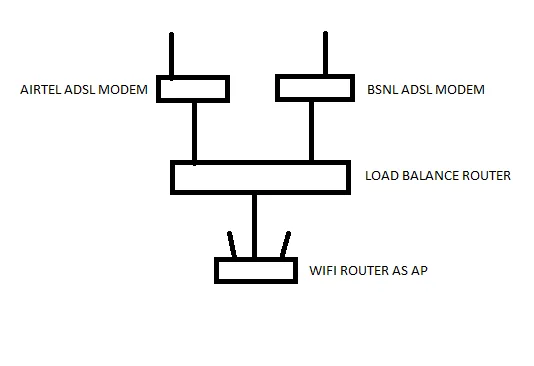
hmm. just realizing that you would still need two modems for individual connections. the lan cable from those modems would go to the TP-Link device. from which you can take a lan cable to a wireless router for wireless devices and lan cable to wired devices. so basically an extra device between the modems and the wireless routers. and you cannot use a combo device for obvious reasons.

dual wan routers and load balancing routers are the same thing. they take more than one input and give a single output.
 
uLr5RG.jpg


as you can see from here... there is a dedicated wan port. and three lan/wan ports. so you can essentially combine as many as four internet connections for a single stream that comes out of the lan port. for two connections, you use the dedicated wan port and one lan/wan port. which would leave you three lan ports to use with your devices.
 
Back