
-
Amazon Deals - ToS - Like us?
You are using an out of date browser. It may not display this or other websites correctly.
You should upgrade or use an alternative browser.
You should upgrade or use an alternative browser.
Airtel V-Fiber (VDSL) - Link Drop & Other Issues [HELP]
D
Deleted member 63558
I get between 12-13 mbps

Don't worry about the errors is all I can say, look at my statistics. On 40mbps plan.
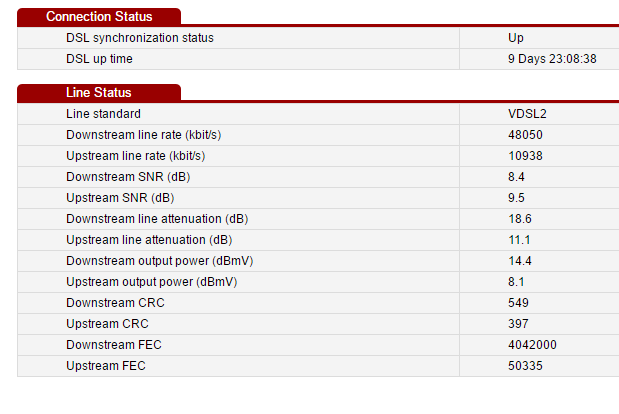
Upload maxes at around 5 to 6mbps even though my line rate is more than 10. Reliability I believe is very similar to ADSL2+ even though I've had random disconnections during the start of the plan. Seems to have settled down for now however.
Upload maxes at around 5 to 6mbps even though my line rate is more than 10. Reliability I believe is very similar to ADSL2+ even though I've had random disconnections during the start of the plan. Seems to have settled down for now however.
D
Deleted member 63558
@AgentX @igloo @waterloo_sunset @manojrk
Okay. My VDSL is installed (2 hours ago from now). It's a new connection. I am mentioning some information so that you can answer me properly.
I am going to use my own router for better WiFi so I am not concerned about the Wireless of the modem. I am concerned strictly about the speed, stability (frequent disconnection) and errors.
Modem: Beetel 777VR1
Plan: 40 MBPS VDSL 50 GB
Modem Stats and Parameters Screenshot are below all the questions.
1. Which is better modem: Huawei HG630A or Beetel 777VR1? (I am concerned about the errors, speed drops and frequent disconnection)
2. Since connection is new, line from the Bluebox (Road Box to DP to Modem) to my Home is newly installed. But I am facing frequent disconnection. What to do?
3. Please give me certain advices to improve the stability of my connection so that I won't face disconnection and speed drops


Okay. My VDSL is installed (2 hours ago from now). It's a new connection. I am mentioning some information so that you can answer me properly.
I am going to use my own router for better WiFi so I am not concerned about the Wireless of the modem. I am concerned strictly about the speed, stability (frequent disconnection) and errors.
Modem: Beetel 777VR1
Plan: 40 MBPS VDSL 50 GB
Modem Stats and Parameters Screenshot are below all the questions.
1. Which is better modem: Huawei HG630A or Beetel 777VR1? (I am concerned about the errors, speed drops and frequent disconnection)
2. Since connection is new, line from the Bluebox (Road Box to DP to Modem) to my Home is newly installed. But I am facing frequent disconnection. What to do?
3. Please give me certain advices to improve the stability of my connection so that I won't face disconnection and speed drops
Last edited by a moderator:

warpspeed
To Infinity and Beyond!
Huawei seems to be better at keeping the connection stable. Some IBF members are facing similar issue with Beetel 777VR1. I would recommend you to try change it with Huawei if possible.
I have a bazillion more amount of errors than you do and I'm synced for 10 days straight (probably explains why the errors are so much) - 0 disconnection whatsoever. There are blips of packet loss randomly but I don't think its VDSL issue, rather the whole internet gateway.
I recommend pushing CC to swap your modem with Huawei. The exchange equipment is also powered by Huawei (if the engineer is correct) which might explain why this specific modem seems to be working decently so far. Only time will reveal if there are any further issues.
Edit : Also, the modem actually changes the downstream/upstream values dynamically depending on how much SNR you get. I was surprised to see this change as it wasn't common on ADSL2+ before.
i.e, my initial sync rates were 55000ish downstream and 19000ish upstream. It has since gone down (as seen on screenshot earlier) but without a disconnection. SNR during initial connection was 6.x and now its 8.x (probably why the rates are lower).
I recommend pushing CC to swap your modem with Huawei. The exchange equipment is also powered by Huawei (if the engineer is correct) which might explain why this specific modem seems to be working decently so far. Only time will reveal if there are any further issues.
Edit : Also, the modem actually changes the downstream/upstream values dynamically depending on how much SNR you get. I was surprised to see this change as it wasn't common on ADSL2+ before.
i.e, my initial sync rates were 55000ish downstream and 19000ish upstream. It has since gone down (as seen on screenshot earlier) but without a disconnection. SNR during initial connection was 6.x and now its 8.x (probably why the rates are lower).
@Adidam When you say frequent disconnection, does the router lose the DSL sync or is it just intermittent packet loss. Does the public ip change after disconnection? Try removing the splitter and inserting the main line directly into the modem and see if it helps.
Like the others have said, give it a day or so for the sync to settle down. I don't see anything wrong with the stats as such.
Like the others have said, give it a day or so for the sync to settle down. I don't see anything wrong with the stats as such.
D
Deleted member 63558
Huawei seems to be better at keeping the connection stable. Some IBF members are facing similar issue with Beetel 777VR1. I would recommend you to try change it with Huawei if possible.
Okay. I will talk to the Airtel Rep and Airtel 121 and let you know if I get it changed.
I have a bazillion more amount of errors than you do and I'm synced for 10 days straight (probably explains why the errors are so much) - 0 disconnection whatsoever. There are blips of packet loss randomly but I don't think its VDSL issue, rather the whole internet gateway.
I recommend pushing CC to swap your modem with Huawei. The exchange equipment is also powered by Huawei (if the engineer is correct) which might explain why this specific modem seems to be working decently so far. Only time will reveal if there are any further issues.
Edit : Also, the modem actually changes the downstream/upstream values dynamically depending on how much SNR you get. I was surprised to see this change as it wasn't common on ADSL2+ before.
i.e, my initial sync rates were 55000ish downstream and 19000ish upstream. It has since gone down (as seen on screenshot earlier) but without a disconnection. SNR during initial connection was 6.x and now its 8.x (probably why the rates are lower).
Okay, I will tell the CC to get it changed and let you know if something happens.
My SNR drops as well and changes.
`
It disconnects and then connects. (Lights goes except Power and WiFi).@Adidam When you say frequent disconnection, does the router lose the DSL sync or is it just intermittent packet loss. Does the public ip change after disconnection? Try removing the splitter and inserting the main line directly into the modem and see if it helps.
Like the others have said, give it a day or so for the sync to settle down. I don't see anything wrong with the stats as such.
Main line is connected with a peach colored box to make it jackable. Because main wire isn't having jack..
So main-line -- >> Peach colored box ----> RJ 11 to Splitter ---> RJ 11 to Modem.
Similar threads
- Replies
- 9
- Views
- 8,585