

-
Amazon Deals - ToS - Like us?
You are using an out of date browser. It may not display this or other websites correctly.
You should upgrade or use an alternative browser.
You should upgrade or use an alternative browser.
BSNL Fiber FTTH Jammu and Kashmir Circle
- Thread starter prithu mahajan
- Start date
- Replies 46
- Views 5,971


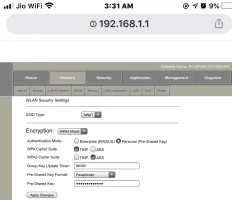
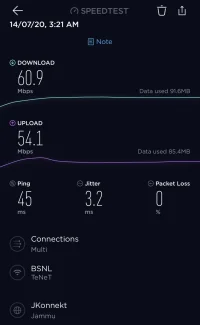
Hi , I am also from Jammu and have BSNL fibre since last 1 month (Plan:50MBps), I used to get 50-55Mbps when connected via Lan cable . Modem is Syrotech, but on Wifi i used to get maximum speed of 30Mbps (on iPhone) on some other devices it was usually around 15Mbps. I assumed its issue with chinese ONT devices, but that that proved to be wrong, i was searching for latest firmware update on syrotech website and on top of that website (Syrotech) i saw floating banner for Security guidance for BSNL, i was just casually reading that PDF file, Network: WLAN security : I changed as per PDF to WPA2 Mixed and as its shown in screenshot in that PDF, i believe this was the only change i did, i had to input wifi password again in my mobiles , but that changed wifi speed drastically. I am now getting 40-55Mbps on wifi network, You guys can also try thisInternet speed on LAN is around 50-60 Mbps it's the wifi that i don't get much speed, mostly between 15-20 Mbps.
I actually need help with VOIP configuration for Jammu, if anyone has done that and can share screenshots that should be helpful, My LCO told me to keep DHCP for voice and i believe issue is with password for landline, i entered 911912XXXXXX and same as password , some say its 0000, and some say its whole landline no. without std code.
I don't think so, mine is already WPA2 Mixed and the kind of speed I'm getting Syrotech is pathetic. I have tried using the other router and speed increases significantly.Hi , I am also from Jammu and have BSNL fibre since last 1 month (Plan:50MBps), I used to get 50-55Mbps when connected via Lan cable . Modem is Syrotech, but on Wifi i used to get maximum speed of 30Mbps (on iPhone) on some other devices it was usually around 15Mbps. I assumed its issue with chinese ONT devices, but that that proved to be wrong, i was searching for latest firmware update on syrotech website and on top of that website (Syrotech) i saw floating banner for Security guidance for BSNL, i was just casually reading that PDF file, Network: WLAN security : I changed as per PDF to WPA2 Mixed and as its shown in screenshot in that PDF, i believe this was the only change i did, i had to input wifi password again in my mobiles , but that changed wifi speed drastically. I am now getting 40-55Mbps on wifi network, You guys can also try this
Last edited:
Also, how to update to the latest firmware and do we need to configure the modem again after updating to the latest firmware?Hi , I am also from Jammu and have BSNL fibre since last 1 month (Plan:50MBps), I used to get 50-55Mbps when connected via Lan cable . Modem is Syrotech, but on Wifi i used to get maximum speed of 30Mbps (on iPhone) on some other devices it was usually around 15Mbps. I assumed its issue with chinese ONT devices, but that that proved to be wrong, i was searching for latest firmware update on syrotech website and on top of that website (Syrotech) i saw floating banner for Security guidance for BSNL, i was just casually reading that PDF file, Network: WLAN security : I changed as per PDF to WPA2 Mixed and as its shown in screenshot in that PDF, i believe this was the only change i did, i had to input wifi password again in my mobiles , but that changed wifi speed drastically. I am now getting 40-55Mbps on wifi network, You guys can also try this
I think this should help, i did nothing else , its not peak time right now so maybe speed is better , but the fact i wanted to highlight was that I never to to get better speed on wifi. Also for firmware , my version is 1.26..... something , I found 1.30 by google search but you have to risk to download from unknown source , file was around 8Mb, usually TP-Link used to keep all latest firmware download link on official website , for Syrotech i read somewhere that you need to mail them support@syrotech.... something that id is mentioned on website and ask for latest firmware , maybe they either provide file or link. I am not sure. And it may reset the device n all settings also device needs to be connected on power during updates
Attachments
Similar threads
- Replies
- 0
- Views
- 609
- Replies
- 4
- Views
- 1,174