
power_8383
Newbie
Hello guys,
I'm using BSNL 500GB CUL plan. (Rs. 777)
Couple of days ago, I saw a popup on BSNL portal, saying I have exhausted my allotted high speed GBs i.e. 500gb data.
As soon as I saw that popup, I was in utter shock, because I was out of town for some days, so no one could have used this much of a data.
And secondly, even if I was at home, even then I couldn't have exahausted 500gbs myself.
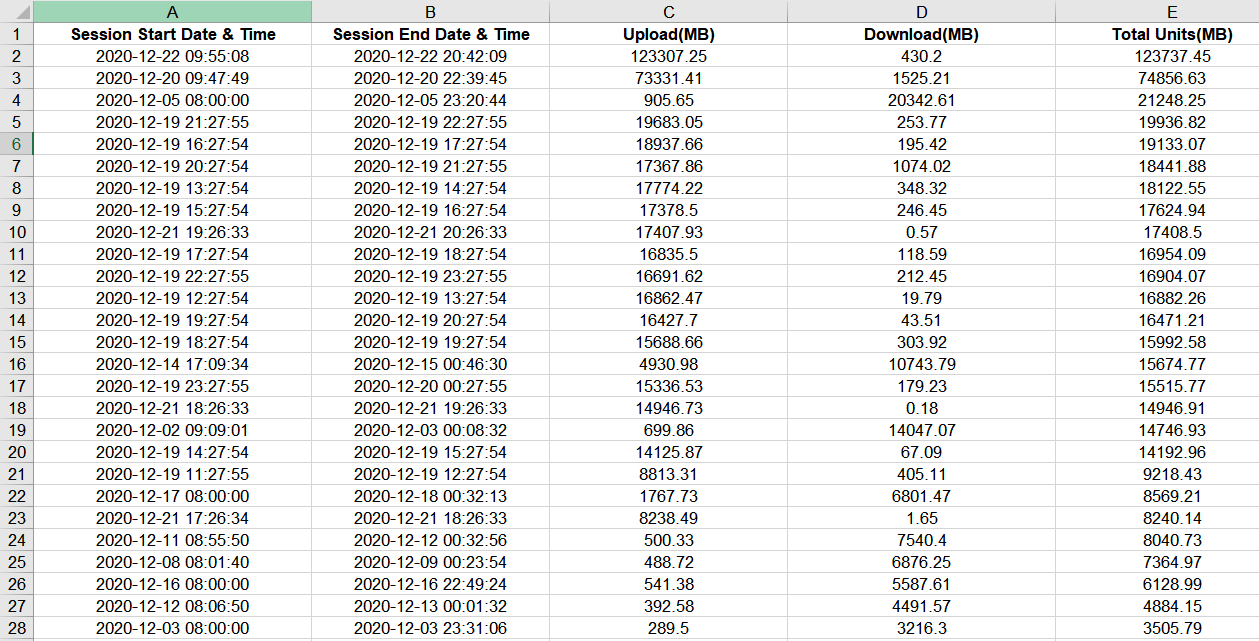
So, to check what has happened, I headed over to selfcare portal and downloaded the session usage details.
Please see the attached photo.
I have sorted the data usage from high to low.
If you see the first entry, it says I used total of 120gb data on 22nd December. (Download 430mb & Upload 120gb)
The funny part is, I was not at home for the whole day.
And I don't even have 120gb of data to 'upload' to any cloud service. (If you see closely, you can see that my upload usage is far more than the download usage. I never torrent anything.)
So my main question is, WTF IS HAPPENING???
And no, I don't think anyone has hacked my wifi password, as I keep checking the connected devices intermittently.
Should I change my BSNL Fiber account password? (not wifi password)
Is my LCO being mischievous here?
Please help!
I'm using BSNL 500GB CUL plan. (Rs. 777)
Couple of days ago, I saw a popup on BSNL portal, saying I have exhausted my allotted high speed GBs i.e. 500gb data.
As soon as I saw that popup, I was in utter shock, because I was out of town for some days, so no one could have used this much of a data.
And secondly, even if I was at home, even then I couldn't have exahausted 500gbs myself.
So, to check what has happened, I headed over to selfcare portal and downloaded the session usage details.
Please see the attached photo.
I have sorted the data usage from high to low.
If you see the first entry, it says I used total of 120gb data on 22nd December. (Download 430mb & Upload 120gb)
The funny part is, I was not at home for the whole day.
And I don't even have 120gb of data to 'upload' to any cloud service. (If you see closely, you can see that my upload usage is far more than the download usage. I never torrent anything.)
So my main question is, WTF IS HAPPENING???
And no, I don't think anyone has hacked my wifi password, as I keep checking the connected devices intermittently.
Should I change my BSNL Fiber account password? (not wifi password)
Is my LCO being mischievous here?
Please help!

 Airtel Xstream Fiber
 .
.
