
-
Amazon Deals - ToS - Like us?
You are using an out of date browser. It may not display this or other websites correctly.
You should upgrade or use an alternative browser.
You should upgrade or use an alternative browser.
Airtel V-Fiber (VDSL) - Link Drop & Other Issues [HELP]
D
Deleted member 63558
@waterloo_sunset could you screenshot your stats?

D
Deleted member 63558
@igloo if you could check the previous messages and recommend something? Your advice is important as other's 
Thank you.
@waterloo_sunset I know an engg. he told me about the fault of Beetel first hand only. Beetel's VDSL Modem is infamously having "LINK DROP" issue.
Thank you.
@waterloo_sunset I know an engg. he told me about the fault of Beetel first hand only. Beetel's VDSL Modem is infamously having "LINK DROP" issue.
D
Deleted member 63558
@waterloo_sunset @manojrk @AgentX
Since last night, I have seen myself just one time link drop. (I Slept after discussing here last night). After that, I don't know if it went down after morning or not?
Below are the latest stats:


Below I have quoted the last night's stats. You can check.
Upstream SNR, Upstream, Upstream Attainable Rate and Upstream Speed is dropped a lot.
Since last night, I have seen myself just one time link drop. (I Slept after discussing here last night). After that, I don't know if it went down after morning or not?
Below are the latest stats:
Below I have quoted the last night's stats. You can check.


Upstream SNR, Upstream, Upstream Attainable Rate and Upstream Speed is dropped a lot.
Last edited by a moderator:
D
Deleted member 63558
Just now link was dropped and connected again. (disconnected)

I also have Beetel 777VR1 ..... had same issue with this modem when i enabled G.INP
can u check if G.INP is enabled or disabled on your modem ?.. (to check if enabled or disabled click on setup -->WAN-->DSL--> DSL Modulation: G.INP ) .... if enabled try to disable it and check if u can get stable connection ?
and also enable logs so u can know why its getting disconnected and how many times your WAN got disconnected ( to enable logs click on maintenance --> Log ->Log-> check Error and Notice than click apply changes )
can u check if G.INP is enabled or disabled on your modem ?.. (to check if enabled or disabled click on setup -->WAN-->DSL--> DSL Modulation: G.INP ) .... if enabled try to disable it and check if u can get stable connection ?
and also enable logs so u can know why its getting disconnected and how many times your WAN got disconnected ( to enable logs click on maintenance --> Log ->Log-> check Error and Notice than click apply changes )
D
Deleted member 63558
Okay. Well, engg is not changing the modem.why not register a complaint with 198 and let Airtel handle it first?
Suggest them a modem change when engineer visit.
Stats looks good to me.
D
Deleted member 63558
I also have Beetel 777VR1 ..... had same issue with this modem when i enabled G.INP
can u check if G.INP is enabled or disabled on your modem ?.. (to check if enabled or disabled click on setup -->WAN-->DSL--> DSL Modulation: G.INP ) .... if enabled try to disable it and check if u can get stable connection ?
and also enable logs so u can know why its getting disconnected and how many times your WAN got disconnected ( to enable logs click on maintenance --> Log ->Log-> check Error and Notice than click apply changes )
Hi,
Do you have stable connection (no link drop at once) after disabling G.INP?
My G.INP is already disabled.
Below are the settings of DSL Page.
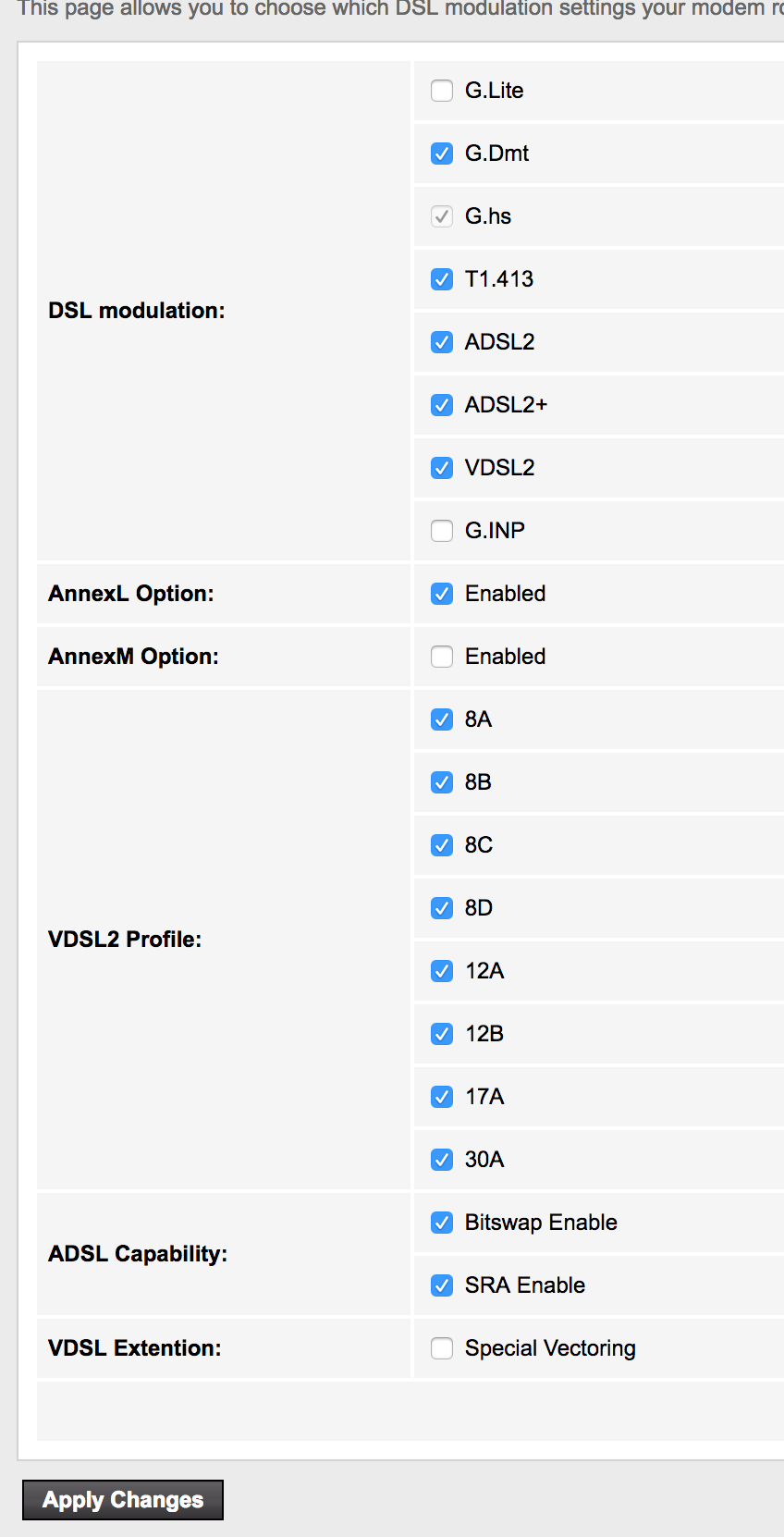
Okay, I have enabled the log as well.
Similar threads
- Replies
- 9
- Views
- 8,585