
-
Amazon Deals - ToS - Like us?
You are using an out of date browser. It may not display this or other websites correctly.
You should upgrade or use an alternative browser.
You should upgrade or use an alternative browser.
Airtel V-Fiber (VDSL) - Link Drop & Other Issues [HELP]
I have Airtel VFiber as well. I am at a distance of around 1.5 Km from the DSL switch. This distance was verified and tested by a special Airtel troubleshooting team.
I have the Huawei modem and the connection has not had any issues for the past 2 months. My SNR ranges from 6.5 to 8 and is mostly around the 6.5 mark for both downstream and upstream. The downstream sync rates I get are between 26 to 28k while the upstream fluctuates between 2 to 4k. Max speed I get is around 28 Mbps down and 3-4 Mbps up. Most of the time, my speed hovers around 26 Mbps mark.
Even though I am disappointed not to be getting the full 40 Mbps speed, it is still a great improvement over the 16 Mbps ADSL. The pings are much faster at 4 to 7 ms and they sometimes go as low as 1 ms. I am really jealous of people with 100k sync speeds here!
I have the Huawei modem and the connection has not had any issues for the past 2 months. My SNR ranges from 6.5 to 8 and is mostly around the 6.5 mark for both downstream and upstream. The downstream sync rates I get are between 26 to 28k while the upstream fluctuates between 2 to 4k. Max speed I get is around 28 Mbps down and 3-4 Mbps up. Most of the time, my speed hovers around 26 Mbps mark.
Even though I am disappointed not to be getting the full 40 Mbps speed, it is still a great improvement over the 16 Mbps ADSL. The pings are much faster at 4 to 7 ms and they sometimes go as low as 1 ms. I am really jealous of people with 100k sync speeds here!
D
Deleted member 63558
G.INP is vectoring (noise cancellation) and it is enabled by default for me. That explains why you're syncing at 60 Mbps even though loop length is <500.
According to Google Maps (by road) from Exchange to My home it's less than 500 m (walking distance from multiple paths. (though I am doubtful if the loop length shown in the modem's stat page is correct).
If it's 500 m or less than then why it's 60K sync?
Okay, On your advice I have enabled G.INP. My modem is connected right now. I don't know how it would perform in future.
I am noticing one very stupid thing since I have VDSL installed is that, Upstream parameters (SNR, Speed, Attainable Rate) are high when link is established first time....but over the time it would drop too much.
You can check stats over here: Airtel V-Fiber (VDSL) - Link Drop & Other Issues [HELP]
By the way, After enabling G.INP here are my stats:


Update: Upstream SNR is dropped from 6.2 to 4.7 and Max attainable Up is dropped from 26K to 24K in few minutes after restart.
I don't know, Why it is dropping too much.
Could you share your full settings and full stats and info?
Last edited by a moderator:
D
Deleted member 63558
Update 2: Upstream SNR: 3.3 and Max. attainable Up: 22182 (After 13 minutes of restart).
D
Deleted member 63558
Update 3: Upstream SNR: 2.6 and Max. attainable Up: 21397 (After 23 minutes of restart).

warpspeed
To Infinity and Beyond!
I think its enabled on backend by default and if its causing you any trouble then disable it. Anyway here is my complete line status:
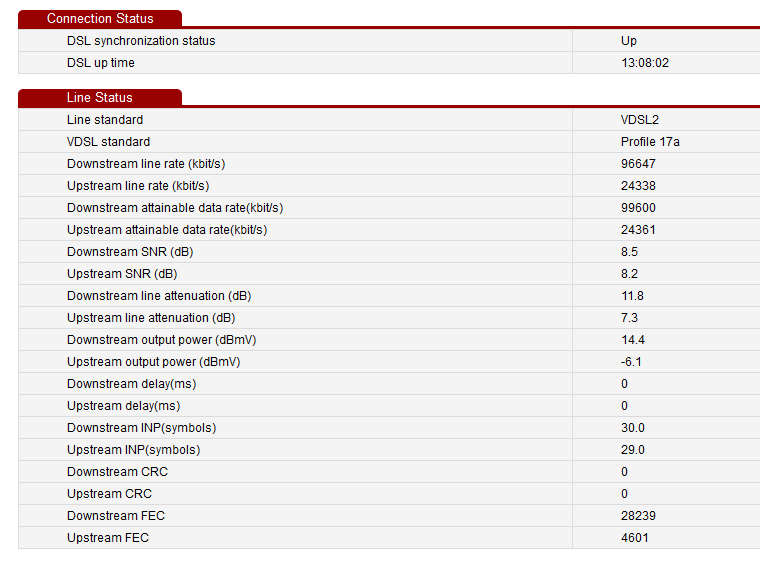
IDK why some of these settings were hidden by default. I guess its Airtel's doing.
IDK why some of these settings were hidden by default. I guess its Airtel's doing.
D
Deleted member 63558
@manojrk I think it is enabled on backend by default? (What do you mean here)?
Could you show the settings of DSL page?
Since I have enabled G.INP.
I have noticed improvement in Ping ms for all the nearby servers
But I can see a link down here and then established again 4-5 mins back.
Though there is a little bit improvement in downstream attainable rate...in modem page.
I am still not sure if link down (Frequent disconnection) is because of modem or it happened because of upstream poor SNR or G.inp or any other X Y Z.
Beetel is having frequent disconnection issue I guess... Wish I could check with Huawei.. Do you know any work around?
I tried talking to the engg. came to install VDSL and even the sales manager. Both of them told me that Airtel has stopped providing Huawei Modem.
P.S.: I have not paid any charges for the VDSL. It's a new connection and new wiring and they gave me beetel modem. All I have to pay is the plan charges + tax (according to them).
Could you show the settings of DSL page?
Since I have enabled G.INP.
I have noticed improvement in Ping ms for all the nearby servers
But I can see a link down here and then established again 4-5 mins back.
Though there is a little bit improvement in downstream attainable rate...in modem page.
I am still not sure if link down (Frequent disconnection) is because of modem or it happened because of upstream poor SNR or G.inp or any other X Y Z.
Beetel is having frequent disconnection issue I guess... Wish I could check with Huawei.. Do you know any work around?
I tried talking to the engg. came to install VDSL and even the sales manager. Both of them told me that Airtel has stopped providing Huawei Modem.
P.S.: I have not paid any charges for the VDSL. It's a new connection and new wiring and they gave me beetel modem. All I have to pay is the plan charges + tax (according to them).
Last edited by a moderator:

warpspeed
To Infinity and Beyond!
Similar threads
- Replies
- 9
- Views
- 8,585