All international "Gift" packages now liable for customs duty @ 77%(?)

  • Thread starter Thread starter varkey
  • Start date Start date
  • Featured
  • Replies Replies 423
  • Views Views 67,953
Can you explain the use-cases for layman and why one should not get EdgeRouter or Microtik?

1 reason - they are closed source proprietary systems. And you sometimes have to pay for upgrades to the OS and/or for signatures. That said, they are generally easier to set up and use for non-geeky home users.

@varkey I believe pfSense is better, easier to configure and has the right controls at your fingertips via the web configurator. As @vignesh_venkatesan said it can be installed on a SD or MMC card too. You could have bought the RAM and SSD here to pay lower duties. I bought a Transcend 128 GB SSD in India for pfSense and use the built-in (soldered on) 32 GB MMC for OPNSense. The latter acts as a backup only, the box is set to boot to pfSense by default.

Good you didn't choose wi-fi. It is better you separate these functions to higher quality routers than a plug in card. Too many points of failure in one box. If pfSense box ever goes down, I just switch over to my Asus AC3200, the only problem is it has dual WAN capabilities. So the Airtel connection will have to use their supplied 777VR1 VDSL modem router in WiFi mode.
 
@gomfi I decided to go with the freeware route because I simply cannot justify the $$ outlay for a proprietary scalable router OS + IDS/IPS at home. Plus I love the freedom that I get without getting locked into one type of solution. Therefore I dual boot to OPNSense and check and update that OS too. Try that with a proprietary system. :D

I will always prefer pfSense, 2nd option is OPNSense. Once you set one of these up on your router box I'll point you to articles that can help you setup dual or more WAN connections. Setting up dual WANs and then configuring for automatic fail forward and fall back + load balancing isn't all that easy. And then you have to separately configure Snort or Suricata IDS/IPS + pfblocker NG. Typing out lengthy instructional messages isn't my forte, sorry bro. :) Just come back here and post again for any clarifications you need and I'll be happy to help. I prefer this over a DM/PM so any future prospective pfSense/OPNSense user can read the message and derive whatever help they need from it. pfSense and OPNsense are pretty similar to set up. If you get the hang of one, you can easily configure the other.

PS - there are TONs of YT vids, forum posts, blogs on how to set these up. It may seem complex at first but there's lots of help available. Don't be disheartened. The only prerequisite is you need to know your networking terms and fundas properly.
 
@varkey I believe pfSense is better, easier to configure and has the right controls at your fingertips via the web configurator. As @vignesh_venkatesan said it can be installed on a SD or MMC card too. You could have bought the RAM and SSD here to pay lower duties. I bought a Transcend 128 GB SSD in India for pfSense and use the built-in (soldered on) 32 GB MMC for OPNSense. The latter acts as a backup only, the box is set to boot to pfSense by default.

Good you didn't choose wi-fi. It is better you separate these functions to higher quality routers than a plug in card. Too many points of failure in one box. If pfSense box ever goes down, I just switch over to my Asus AC3200, the only problem is it has dual WAN capabilities. So the Airtel connection will have to use their supplied 777VR1 VDSL modem router in WiFi mode.

Yep, will test out both! :) I bought the mini pc barebone, I had an extra 4 GB RAM module lying around, so thought will use that. The 64 GB mSata SSD was 1k on AliExpress, here in India it appeared to cost more. Since it would fit in a small envelope, I am hoping for it to come duty free, would know in couple of days.

I got this just to explore and try out, a hobby! ;) Yeah, the inbuilt wifi would be useful just to use a wireless client, as an AP it wouldn't be that great. Thought would save few dollars in skipping the wireless module and would be using separate APs anyway. Looks like it comes with a SIM slot (ofcourse need to get a separate LTE module to make use of it)
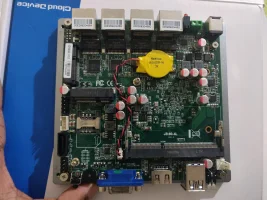
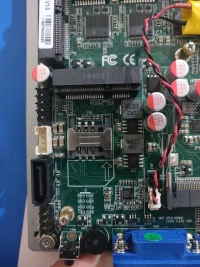
IMG_20200310_220328.webpIMG_20200310_220346.webp

So I installed the RAM and connected the device to the TV, only to realise I don't have a keyboard handy to navigate the initial installation screens. :LOL: This model doesn't have a serial console either.
 
@gomfi Yep, mostly with just failover though.

Currently with my OpenWRT device, I have 3 WANs, Jio 4G, BSNL and Kerala Vision (last two come over the same fiber link and cable, just different VLANs)
 
@varkey I truly wouldn't recommend an outdoor CPE or extensive outdoor WiFi coverage via repeaters or mesh setups for security reasons. Drive-by hackers and all that. :) I limit the output power of all my APs to about 40-55% (depending on their placement) of max so that the coverage doesn't really extend too far beyond the periphery (balconies) of my home.
 
The outdoor CPE is only for 4G/LTE for better signal reception ie lets you mount it on a pole on the terrace for example. It doesn't do wireless, and is powered by passive POE. 😅

Hehe, as of now my APs aren't that high powered that I don't get any signal outside my premises. But good point regarding drive by hackers. 👌🏻
 
Back