Hello all wanted to know is there any VOIP settings for AIRTEL xtreme fiber users if so how to access same using SIP settings ..thx

-
Amazon Deals - ToS - Like us?
You are using an out of date browser. It may not display this or other websites correctly.
You should upgrade or use an alternative browser.
You should upgrade or use an alternative browser.
Are VoIP Services or SIP Settings available in Airtel Xstream Fiber Broadband?
- Thread starter Arunesh Dutta
- Start date
- Replies 446
- Views 166,710

G-2425G-A is trash . Each and every settings is blocked. Tried all combinations of configs shown on this thread. One thing that i can point is that i cant ping ims.airtel.in from my Laptop... but can ping it from router diagnostics page
G-2425G-A has two different profiles one for internet and other for V660.
when i try to ping ims.airtel.in from internet profile it gives 100 % packet loss but using the v660 profile i can ping rightaway
when my laptop is connected to router i think it is connected to the TR069 V100 that is why i am unable to ping it from laptop
Maybe newer models of Nokia ONT blocked these settings so that it can only be registered from the telephone devices and not the softphones
Upvote
0

@rajil.s and @tellanand Request you to please guide me on setting up my Huwaei ONT(HG8145V) where I have both LAN ports disabled to untag while deleting and creating WAN bridge for Voice Profile for my downstream DD-WRT router also VLAN binding configuration disabled. Looking badly on how to pass through Voice from ONT to downstream router.My setup is as follows:
Huawei HG8145V5 > pfSense router> Linux server running FreeSwitch.
The Huawei modem is set to pass both Internet and VOIP traffic on the same port using VLANS. Here are the relevant screenshots. Notice, I am not binding the LAN in the WAN profiles instead using VLAN Binding on LAN1 port. These tagged ports are untagged on the pfSense router.
Internet WAN profile, INTERNET_B_VID_100
VOIP profile, OTHER_B_VID_660
VLAN Binding Configuration
Any help on connecting to Voice VLAN bridge from ONT on DD-WRT(which is already setup as a repeater) to devices for internet connectivity.
Thanks a lot in advance for your support and guidance!
Last edited:
Upvote
0
Upvote
0
@Raji.s I just figured out that I had to enable LAN2 port Under LAN tab -> LAN port work mode on my ONT which then enabled me to tag VOICE VLAN 660 to LAN2.
But, the next problem I see when I try to create the static route I do not see WAN 660 bridge profile? Is this expected and static route to be created on INTERNET WAN but not VOICE WAN?
Also, request you to share your contact details or means to interact with you to share screen and understand how it is setup in OpenWRT to interpret the same for my DD-WRT?
Thanks in Advance!
Pavan
Last edited:
Upvote
0

Passwords can be seen in the logs.sip username is of the form +91XXXXXXXXXX @ims.airtel.in The sip server is 10.232.139.146
But the password is more closely guarded secret than the educational certificates of some politicians
Upvote
0


@rajil.s Did you set any firewall routes on pf/opnsense?
My current topology is, Huawei Router (Bridge mode) -> Pfsense -> Pc
Was running just the internet in bridged till now.
First I tried setting up just VOIP in bridge(with Internet bridging disabled on Huawei) just to check if everything works.
Setup the wan on Pfsense to the ip from the VOIP profile (deleted it before setting up the bridge profile).
Set the static routes to the proxy server with the VOIP gateway.
Setup MicroSIP with the details I got from Voice tab on the Huawei but kept getting Request Timeout.
Edit: Well it connects now but getting an error on MicroSIP for Incorrect Password. I'm using the same "Huawei@1" password as everyone here.
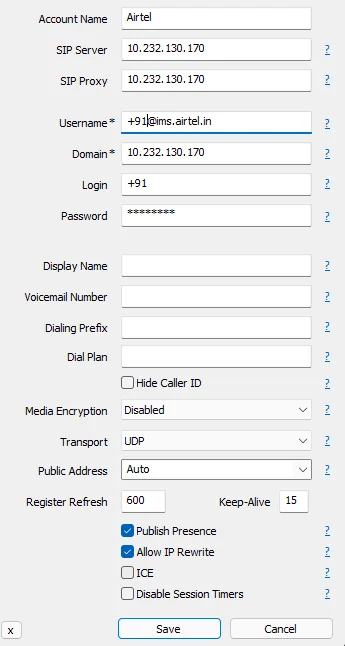
Also was unable to enable Internet WAN Interface alongside VOIP Interface without Internet being in accessible on LAN
My current topology is, Huawei Router (Bridge mode) -> Pfsense -> Pc
Was running just the internet in bridged till now.
First I tried setting up just VOIP in bridge(with Internet bridging disabled on Huawei) just to check if everything works.
Setup the wan on Pfsense to the ip from the VOIP profile (deleted it before setting up the bridge profile).
Set the static routes to the proxy server with the VOIP gateway.
Setup MicroSIP with the details I got from Voice tab on the Huawei but kept getting Request Timeout.
Edit: Well it connects now but getting an error on MicroSIP for Incorrect Password. I'm using the same "Huawei@1" password as everyone here.
Also was unable to enable Internet WAN Interface alongside VOIP Interface without Internet being in accessible on LAN
Last edited:
Upvote
0
Your procedure looks fine to me. However, you have to be very careful with Airtel's proxy. If it sees traffic coming from a place which it doesnt expect it blocks the access. If this happens you should reconfigure your ONT for VOIP (default Airtel settings), and check if ONT is able to register. If it does not, then call up Airtel and tell your landline is not working. They will then unblock you.
Since you are using pfsense, what i suggest is to have a separate VLAN for your device (say a raspberry pi, a laptop or SIP ATA) and VOIP bridge. That way nothing else can go on the network. Once you have made sure everything the client is able to register than you can increase the network complexity by introducing your main PC.
Since you are using pfsense, what i suggest is to have a separate VLAN for your device (say a raspberry pi, a laptop or SIP ATA) and VOIP bridge. That way nothing else can go on the network. Once you have made sure everything the client is able to register than you can increase the network complexity by introducing your main PC.
Upvote
0