Hello all wanted to know is there any VOIP settings for AIRTEL xtreme fiber users if so how to access same using SIP settings ..thx

-
Amazon Deals - ToS - Like us?
You are using an out of date browser. It may not display this or other websites correctly.
You should upgrade or use an alternative browser.
Are VoIP Services or SIP Settings available in Airtel Xstream Fiber Broadband?
- Thread starter Arunesh Dutta
- Start date
- Replies 446
- Views 166,710


@tellanand i am using airtel static ip with bridge mode in that case do i need to set VLAN 660 on my windows machine ? my voip range is coming 10.235.183.X range in that case do i need to add route route add 10.235.0.0 mask 255.255.255.0 10.235.183.1 and my gateway is 10.235.183.1
Upvote
0
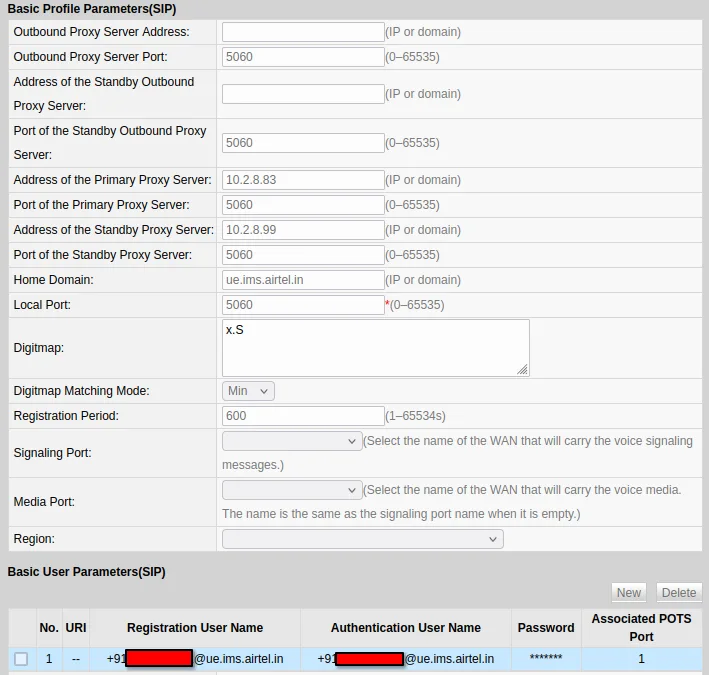
can anyone explain what is the use of VOIP or SIP on home routers. just finished the migration of our office phone from PRI to SIP, the PRI copper line had got cut and Airtel said to migrate to SIP. From an existing leased line airtel modem they configured other port for SIP and multiple technical parameters were involved and had to check the settings so every call goes from the Airtel Modem to SBC to PABX to our IP Phones on desk, hence this was major project. But how does this work on normal homes, how exactly will this voip be useful for individual ? Cant you connect a normal phone to Airtel Modem just like i did at home to make / receive calls?
Upvote
0
Hey @rajil.s, I have set up my FusionPBX server and I'm able to make outgoing calls but I'm having a problem with incoming calls.
I believe my Gateway configuration is correct (I referred to one of your older messages),
Going through the logs I notice this:
<incoming phone number>@nowhere instead of <incoming phone number>@ims.airtel.in
Which means the server is seeing the incoming call, but something is not configured correctly. I was wondering if you could help me out with this. Thanks a lot
Last edited:
Upvote
0
Turns out I did not configure my ACLs correctly. Just wanted to let everyone know everything is working properly now.
Upvote
0

Hi all ,
I am using Airtel in Delhi.
I have attached my Microsip settings I am using Huwaei router, I am using Huawei@1 password but i am unable to get the connection working can you please guide.
Here is log from my router
Dec 26 18:55:44 (none) kern.warn kernel: Call-ID: wffNoEO 14:22:21.021 sip_endpoint.c Response msg 200/OPTIONS/cseq=15404 (rdata0xa76b54) from 10.232.130.170:5060 was dropped/unhandled by any modules
Dec 26 18:55:44 (none) kern.warn kernel: Via: SIP/2.0/UDP 100.98.153.107:5060;branch=z9hG4bKPjreaB-Fwp3LmMj9NZsqAyPJQp0CG3XVjT;rport=5060^M
Dec 26 18:55:44 (none) kern.warn kernel: SIP/2.0 200 OK^M
Dec 26 18:55:44 (none) kern.warn kernel: Via: SIP/2.0/UDP 100.98.153.107:5060;rport;branch=z9hG4bKPjreaB-Fwp3LmMj9NZsqAyPJQp0CG3X 14:22:21.020 pjsua_core.c RX 495 bytes Response msg 200/OPTIONS/cseq=15404 (rdata0xa76b54) from UDP 10.232.130.170:5060:
Dec 26 18:55:44 (none) kern.warn kernel: OPTIONS sip:*********@10.232.130.170 SIP/2.0^M
Dec 26 18:55:44 (none) kern.warn kernel: 14:22:20.997 pjsua_core.c TX 395 bytes Request msg OPTIONS/cseq=15404 (tdta0xa8efc0) to UDP 10.232.130.170:5060:
Dec 26 18:55:44 (none) kern.warn kernel: 14:22:20.996 pjsua_acc.c Create Request acc 0 target sip:***********@10.232.130.170
Dec 26 18:55:44 (none) kern.warn kernel: 14:22:20.996 pjsua_acc.c Sending 2 bytes keep-alive packet for acc 0 to 10.232.130.170:5060
Dec 26 18:55:44 (none) kern.warn kernel: 86a, flush one!
Upvote
0

Recenlty i got my new connection of Airtel Xstream broadband DASAN Networks(H660GM-A), I don't want to use landline telephone, wanted to use VoIP/SIP softphone, I tried several things i kenw but nothing worked out, Please help, setting up. These many details I have gathered SIP server, Proxy Server, domain from logs and router.
how to setup?
Upvote
0