- Locked down router
- Cannot enable Bridge Mode
- Cannot disable WiFi
- Cannot have different SSIDs for 2.4Ghz and 5Ghz
- Cannot change WiFi bands.
- Cannot ban connected devices
- Huge Packet loss during evenings
- Router has memory leak issues, memory usage goes to 96% and router starts dropping connections and internet stops working on connected devices.
- No Option to manually check for Firmware updates.

-
Amazon Deals - ToS - Like us?
You are using an out of date browser. It may not display this or other websites correctly.
You should upgrade or use an alternative browser.
You should upgrade or use an alternative browser.
Consolidated Problems Faced By Reliance Jio AirFibre Users
- Thread starter rohit267
- Start date
- Replies 31
- Views 8,329


Even I’m using Jio Airfiber in a remote village initial 1 week my internet was very unstable, I’m having an 100mbps plan , but after latest firmware 1.9.1 things have become lot smoother except this packet loss issue which I face during teams and zoom meetings once or twice, but mostly now I get stable speed of 95Mbps download but the uploads are like 10-15 only!
Can anyone tell me why this router has not been provided the option to see the network parameters like SNR and RSSI of 5g and the band its connected to? Is there any way to see these information?
Can anyone tell me why this router has not been provided the option to see the network parameters like SNR and RSSI of 5g and the band its connected to? Is there any way to see these information?
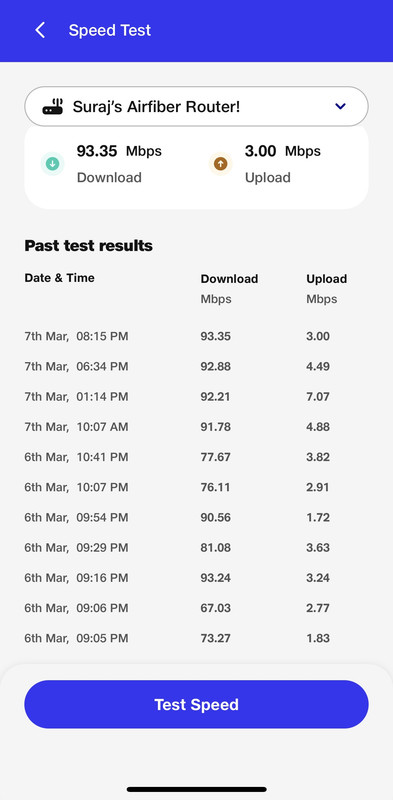
below is the speedtest of my airfiber connection in a remote village approx 3-4kms aerial distance from tower connected to n78(3500mhz) band, uploads are very less I'm assuming because of the distance and also uploads near to the tower is only 35Mbps, any suggestion on improving uploads through complaints?
test done in Jio home application (you can run tests remotely as well)
test done in Jio home application (you can run tests remotely as well)
@Surajgowda Packet loss issue is there for me too in 1.9.1
You can know the SRN RSSI value by directly connecting the RJ45 port to your laptop instead of Jio Router and login to the gateway IP. You may have to use IPv6.
You can know the SRN RSSI value by directly connecting the RJ45 port to your laptop instead of Jio Router and login to the gateway IP. You may have to use IPv6.