Dual WAN with BSNL FTTH and VoIP

Messages
22
Location
NA
ISP
BSNL
So I was hoping someone here could help or provide advice on something I'm looking to do:
I recently got BSNL FTTH as a back up broadband connection. It came bundled with a new BSNL number, delivered over VoIP.

I have an Asus ac87u set up to do dual WAN with failover between my primary broadband provider and BSNL FTTH as secondary. The primary connection comes in as PPPoE on an incoming ethernet cable, and goes directly into the ac87u's WAN port. The secondary (BSNL FTTH) is an incoming optical cable, terminated by a BSNL provided Optilink ONT cum router. The Optilink router plugs into the ASUS ac87u on one of the ASUS' LAN ports. I use 192.168.2.XXX as the subnet for all my devices; the ASUS is the gateway for this. I've put the Optilink on 192.168.1.XXX and it serves as the gateway for the secondary connection.

There is VoIP set up in the Optilink and an RJ-11 jacked cable that come out of the Optilink and into a POTS instrument for calls on the number that came with the FTTH.
From what I can make out, the Optilink VoIP end point is given a static IP on a 10.XXX.YYY.ZZZ private network, with the SIP server it's supposed to talk to also on the same 10.XXX.YYY.ZZZ private network

All of this works right now; I can make and received calls on the new number and the broadband fails over to the secondary when the primary fails.

What I'd like to do:
1. I'd like to avoid the additional hop (ASUS --> Optilink --> Internet) for the failover case, and get rid of the 192.168.1.XXX subnet entirely.
I'm assuming this would involve putting the Optilink into bridge mode and having the ASUS do the PPPoE etc.

2. I'd like to be able to use the VoIP number with VoIP apps on smartphones or IP phones on the 192.168.2.XXX subnet, and do the fancy things that SIP/VoIP allows.
In particular receive incoming calls on the VoIP number on any chosen device, and call out from any device etc.

So on to the questions:

0. It is possible to do both (1)and (2) together, correct? (Obviously I'm assuming it is)
1. A route between 192.168.2.XXX and 10.XXX.YYY.ZZZ will need to be added, correct? Is this all that's needed for a VoIP client on 192.168.2.XXX to reach the BSNL SIP server and make/receive calls ? (Assuming route is necessary but not sufficient...)
2. Will I need to run my own SIP server or something? (Does/can the Optilink act as a SIP Server or proxy by the way? I can see a Dialplan as an advanced configurable option in the Optilink's configuration interface)

What's primarily causing confusion for me right now is how to set up for the effectively two outgoing networks for the BSNL (the internet one and the VoIP one) in bridge mode, while not messing up the dual WAN etc...

Any tips/advice/pointers appreciated !
 
For SIP/VoIP on BSNL, it's MAC bound. Which means it will only work on the BSNL ONT.

I don't think so, I've got it working with soft SIP clients without issues. You can read more in this thread - Possible to use the SIP/Voip from voice on FTTH with Freepbx or something similar? | BSNL FTTH Bharat Fiber Broadband


Got it. How does one typically reach the admin interface of the ONT once it's in bridge mode? It won't have an IP then so I'm assuming the usual way won't work...?

You'll need to use the LAN port 2 to access the dashboard. Since LAN1 is binded to the bridge interface. IP Address stays the same unless you changed it.

You can use the very same cable. I don't know if the Asus supports this out of the box, but if you are using a custom firmware its a piece of cake. You need to have a virtual interface with an IP address in the same subnet as that of the ONT management interface ie 192.168.1.0/24 in your case. This would allow you to access the management UI of the ONT even when in bridge. You do not need a separate cable for it.
 
Upvote 0
So I looked at the ONT's admin interface to do as suggested and:
1. There are two WAN configurations, one for "internet" and one for "voice"
2. The setup for "voice" doesn't let you choose a LAN port to bind to; that seems to be available only if you've selected the type to be "voice"
In other words there seems no explicit way to bind both VoIP and LAN to the bridge.

The other config parameters like IP address, gateway etc are available for the "voice" WAN setup. The only difference seems to be that the IP is
a static one (on a 10.XXX.YYY.ZZZ private network) and not handed out from PPPoE. So here's another question:
Given that the ONT has two LAN ports, if I were to set up a third WAN config, with config as for the "voice" one, except that I choose the type as "internet" and bind it to the second LAN port, and say plug in an ATA to that LAN port and the telephone to the ATA, is that in principle equivalent to connecting the telephone to the ONT directly ? (I don't have an ATA at the moment so can't test that directly...)

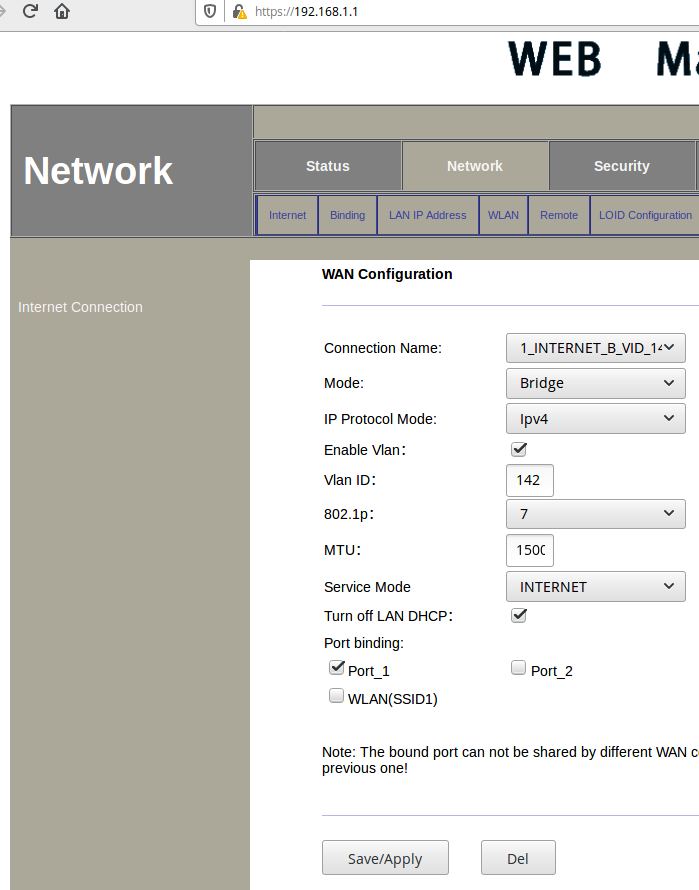
@networkwhisperer I have the exact same config you are asking for. So what you need to do is create/modify the two WAN configurations but both in bridge mode, and enter the VLAN as appropriate. Note down the static IP address config of the voice WAN.

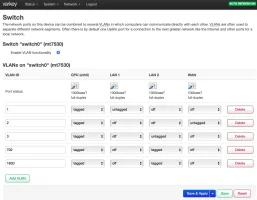
Now instead of port binding a wan config, you need to do VLAN binding to the same port. So what happens here is that, the voice, internet and the default management VLAN traffic are available from the same port. On your Asus router side, you need have the voice and data VLANs in tagged mode. Below is a screenshot from my OpenWRT device.

Screenshot 2020-03-01 at 9.58.24 PM.webp

In the above LAN2 port is the cable from the ONT. On my OpenWRT device, untagged traffic from the ONT is tagged as VLAN 3 (management UI), 702 is the data VLAN which is tagged and 1830 is the voice VLAN which is tagged.

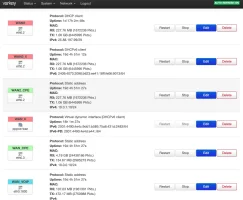
Screenshot 2020-03-01 at 10.01.07 PM.webp

The CPE interfaces are for accessing the management UIs of the CPEs.

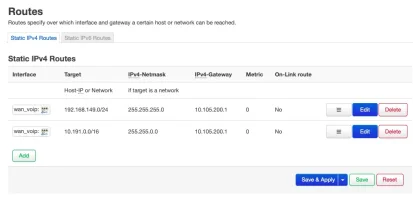
Also to get SIP working, you'd need to install siproxd on your router which takes care of fixing issues caused due to NAT. (There are more details in the above thread). Also you need two static routes which always routes through the VOIP interface (one the voice subnet and other the SIP server)

Screenshot 2020-03-01 at 10.04.58 PM.webp

Do let me know if you need any additional info.
 
Upvote 0
You need to have a virtual interface with an IP address in the same subnet as that of the ONT management interface ie 192.168.1.0/24 in your case. This would allow you to access the management UI of the ONT even when in bridge. You do not need a separate cable for it.
Ah, a virtual interface, most routers don't have that capability, unfortunately. Any ideas of a custom ROM for TP-Link Archer D2?
 
Upvote 0
@networkwhisperer This is how the VLAN binding looked on my previous Netlink ONT. My current Huawei ONT is a pure bridge ONT, so it just acts like a dumb modem and passes on everything as is, so I don't need to make any port or VLAN bindings on the ONT side.


@Dark_Nate Mostly not, most modem/router combo devices are not usually supported.
 
Upvote 0
@varkey: Thank you ! (Sorry for responding late; been on the road).

Some further things I discovered: The ONT interface for WAN setup seems to also have a "voice+internet" option in addition to the separate "voice" and "internet" ones; This option also presents a choice of LAN ports to bind to. I tried that and the voice output (as in the RJ11 out of the ONT and into the POTS phone instrument) worked as before, but once I connected a computer to the LAN port I'd chosen, I couldn't ping the 10.XXX... BSNL SIP server. I'll try again in case I missed something, but at this point I don't have evidence that choosing "voice+internet" lets voice work as before while also letting a LAN port separate out a subnet for routing to 10.XXX... from a soft client.

I have a spare Ubiquiti Edgerouter ER-X I can also press into service: It might be possible to also run siproxd on it. I'm loth to mess around with the Asus firmware (it has a Broadcom chipset which isn't well supported by Open WRT anyway, I believe).

What I'd like is for all devices to be on the same network (192.168.2.XXX at this point) whether wired or on a single wireless SSID. For softphones or SIP clients to work they'd have to reach 10.XXX... somehow, while being on the 192.168 subnet. From the discussion so far this seems possible. So:

If I stick in the Edgerouter between the Optilink ONT and the ASUS, with the ONT in bridge mode. I'm thinking I can:
0. Put the ONT into bridge mode, connect the non-voice WAN into the ASUS as before and let the ASUS do the PPPoE
1. On the ONT Bind a LAN port to the Voice WAN and plug that port into the Edgerouter WAN. Let the edgerouter do the PPPoE
2. Give the Edgerouter two separate static IPs on 192.168.2 and 10.XXX... on two separate interfaces and let it be the gateway for 10.XXX and do VLAN tagging for voice on 10.XX on the way out (that's all it can be used for anyway). The 10.XXX static IP would be the one currently assigned to the ONT for voice.
3. Connect the Edgerouter to the ASUS via the Edgerouter's 192.168.XXX assigned port.

Does this sound correct in principle? It'd still have an extra hop for voip, but I guess I can live with that.

Some questions about what exactly the ONT does:
1. Does the ONT have a SIP server or proxy built in? I can see a dialplan as an advanced config option, and there are SIPproxy config options visible to
2. I'm assuming the Edgerouter can run siproxd; if not could I run it on a standalone box (say) somewhere on 192.168.2.XXX ? What would the config look like in this case?
 
Upvote 0
@networkwhisperer No worries! 🚀
  • The VLAN binding method I suggested might be easier, you could just use a single cable for everything rather than separate cables for voice and data.
  • Also, I don't think you can use SIP ATA available on the ONT and the same time use a soft SIP client. With a given config, only one of those would work.
  • The ONT includes a SIP ATA (analog telephone adapter) which is basically a SIP client with an RJ11 interface
  • Yes, I think you can run siproxd on the ERX, I did see few mentions in the Ubiquiti forums. Also, yes the siproxd can potentially run on any device on the LAN I suppose, just need to set the IP addresses etc which need to be modified accordingly I guess. Would need some trial and error.
If you have the ERX, you can offload all routing/nat etc to it and use the Asus only as a dumb AP. Also, you get only a single 10.x.x.x IP address from BSNL for the VOIP interface, and you definitely need NAT for multiple devices to access the SIP/VOIP server. You also don't need two separate IP address subnets, the same IP address range should work, although having a separate VOIP VLAN etc shouldn't be an issue if you do need it.
 
Upvote 0
@varkey I had disconnected my bsnl landline & broadband connection around 10 months ago. Now I am thinking to opt the bsnl ftth connection. I guess both old DSL copper line & new ftth fiber cable is coming from same bsnl exchange building.
Can I get my old bsnl landline number (if available) with the new bsnl ftth connection? Is it technically possible?
 
Upvote 0
Yes and no. In exchanges with friendly staff, yes. In others, you may try to choose via LCO. As @varkey said, the series is different. We can only chose the last few digits. Currently, the format is stdcode-29-further-digits.
 
Upvote 0
Back