So I was hoping someone here could help or provide advice on something I'm looking to do:
I recently got BSNL FTTH as a back up broadband connection. It came bundled with a new BSNL number, delivered over VoIP.
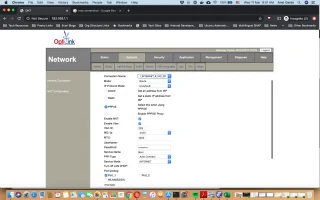
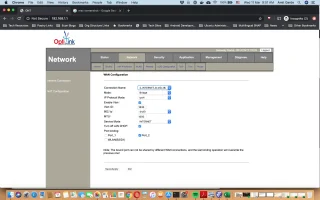
I have an Asus ac87u set up to do dual WAN with failover between my primary broadband provider and BSNL FTTH as secondary. The primary connection comes in as PPPoE on an incoming ethernet cable, and goes directly into the ac87u's WAN port. The secondary (BSNL FTTH) is an incoming optical cable, terminated by a BSNL provided Optilink ONT cum router. The Optilink router plugs into the ASUS ac87u on one of the ASUS' LAN ports. I use 192.168.2.XXX as the subnet for all my devices; the ASUS is the gateway for this. I've put the Optilink on 192.168.1.XXX and it serves as the gateway for the secondary connection.
There is VoIP set up in the Optilink and an RJ-11 jacked cable that come out of the Optilink and into a POTS instrument for calls on the number that came with the FTTH.
From what I can make out, the Optilink VoIP end point is given a static IP on a 10.XXX.YYY.ZZZ private network, with the SIP server it's supposed to talk to also on the same 10.XXX.YYY.ZZZ private network
All of this works right now; I can make and received calls on the new number and the broadband fails over to the secondary when the primary fails.
What I'd like to do:
1. I'd like to avoid the additional hop (ASUS --> Optilink --> Internet) for the failover case, and get rid of the 192.168.1.XXX subnet entirely.
I'm assuming this would involve putting the Optilink into bridge mode and having the ASUS do the PPPoE etc.
2. I'd like to be able to use the VoIP number with VoIP apps on smartphones or IP phones on the 192.168.2.XXX subnet, and do the fancy things that SIP/VoIP allows.
In particular receive incoming calls on the VoIP number on any chosen device, and call out from any device etc.
So on to the questions:
0. It is possible to do both (1)and (2) together, correct? (Obviously I'm assuming it is)
1. A route between 192.168.2.XXX and 10.XXX.YYY.ZZZ will need to be added, correct? Is this all that's needed for a VoIP client on 192.168.2.XXX to reach the BSNL SIP server and make/receive calls ? (Assuming route is necessary but not sufficient...)
2. Will I need to run my own SIP server or something? (Does/can the Optilink act as a SIP Server or proxy by the way? I can see a Dialplan as an advanced configurable option in the Optilink's configuration interface)
What's primarily causing confusion for me right now is how to set up for the effectively two outgoing networks for the BSNL (the internet one and the VoIP one) in bridge mode, while not messing up the dual WAN etc...
Any tips/advice/pointers appreciated !
I recently got BSNL FTTH as a back up broadband connection. It came bundled with a new BSNL number, delivered over VoIP.
I have an Asus ac87u set up to do dual WAN with failover between my primary broadband provider and BSNL FTTH as secondary. The primary connection comes in as PPPoE on an incoming ethernet cable, and goes directly into the ac87u's WAN port. The secondary (BSNL FTTH) is an incoming optical cable, terminated by a BSNL provided Optilink ONT cum router. The Optilink router plugs into the ASUS ac87u on one of the ASUS' LAN ports. I use 192.168.2.XXX as the subnet for all my devices; the ASUS is the gateway for this. I've put the Optilink on 192.168.1.XXX and it serves as the gateway for the secondary connection.
There is VoIP set up in the Optilink and an RJ-11 jacked cable that come out of the Optilink and into a POTS instrument for calls on the number that came with the FTTH.
From what I can make out, the Optilink VoIP end point is given a static IP on a 10.XXX.YYY.ZZZ private network, with the SIP server it's supposed to talk to also on the same 10.XXX.YYY.ZZZ private network
All of this works right now; I can make and received calls on the new number and the broadband fails over to the secondary when the primary fails.
What I'd like to do:
1. I'd like to avoid the additional hop (ASUS --> Optilink --> Internet) for the failover case, and get rid of the 192.168.1.XXX subnet entirely.
I'm assuming this would involve putting the Optilink into bridge mode and having the ASUS do the PPPoE etc.
2. I'd like to be able to use the VoIP number with VoIP apps on smartphones or IP phones on the 192.168.2.XXX subnet, and do the fancy things that SIP/VoIP allows.
In particular receive incoming calls on the VoIP number on any chosen device, and call out from any device etc.
So on to the questions:
0. It is possible to do both (1)and (2) together, correct? (Obviously I'm assuming it is)
1. A route between 192.168.2.XXX and 10.XXX.YYY.ZZZ will need to be added, correct? Is this all that's needed for a VoIP client on 192.168.2.XXX to reach the BSNL SIP server and make/receive calls ? (Assuming route is necessary but not sufficient...)
2. Will I need to run my own SIP server or something? (Does/can the Optilink act as a SIP Server or proxy by the way? I can see a Dialplan as an advanced configurable option in the Optilink's configuration interface)
What's primarily causing confusion for me right now is how to set up for the effectively two outgoing networks for the BSNL (the internet one and the VoIP one) in bridge mode, while not messing up the dual WAN etc...
Any tips/advice/pointers appreciated !