Excitel Broadband: Slow Internet Speeds to Many Servers and Locations

For me DEN goes through 4-5 additional hops through local IPs (hop no 4,5,6,7). Dunno why its doing that. Another weird thing I found is that DEN is listed as a peer on Extreme IX but none of their traffic go through Extreme.

It takes 17 hops to get to Google.com (18 including my router)

Tracing route to google.com [172.217.160.14]
over a maximum of 30 hops:

1 <1 ms 2 ms <1 ms 192.168.5.1
2 1 ms <1 ms <1 ms 192.168.20.1
3 14 ms 13 ms 9 ms 10.9.64.1
4 14 ms 8 ms 7 ms 192.168.21.133
5 29 ms 24 ms 32 ms 192.168.20.206
6 8 ms 11 ms 8 ms 192.168.20.193
7 8 ms 7 ms 10 ms 192.168.21.189
8 10 ms 18 ms 7 ms 192.168.5.193
9 12 ms 17 ms 66 ms 192.168.5.217
10 13 ms 17 ms 20 ms 112.196.151.170
11 13 ms 7 ms 7 ms 112.196.151.250
12 10 ms 11 ms 11 ms 74.125.244.195
13 47 ms 62 ms 52 ms 172.253.68.169
14 80 ms 84 ms 83 ms 72.14.233.129
15 102 ms 84 ms 83 ms 216.239.35.169
16 81 ms 82 ms 81 ms 74.125.242.33
17 94 ms 93 ms 95 ms 72.14.232.101
18 87 ms 97 ms 83 ms sin11s12-in-f14.1e100.net [172.217.160.14]

It takes 12 hops to get to 8.8.8.8 (13 including my router.)

Tracing route to google-public-dns-a.google.com [8.8.8.8]
over a maximum of 30 hops:

1 <1 ms <1 ms <1 ms 192.168.5.1
2 <1 ms <1 ms 1 ms 192.168.20.1
3 10 ms 49 ms 141 ms 10.9.64.1
4 22 ms 29 ms 29 ms 192.168.21.133
5 11 ms 9 ms 9 ms 192.168.21.213
6 8 ms 13 ms 8 ms 192.168.21.189
7 12 ms 7 ms 7 ms 192.168.5.193
8 14 ms 11 ms 10 ms 192.168.5.217
9 12 ms 27 ms 104 ms 112.196.151.170
10 8 ms 9 ms 11 ms 112.196.151.250
11 13 ms 9 ms 8 ms 108.170.251.113
12 35 ms 12 ms 8 ms 64.233.175.101
13 10 ms 10 ms 12 ms google-public-dns-a.google.com [8.8.8.8]


Seems to me like their network is misconfigured or something, since on most ISPs , traceroute to 8.8.8.8 or Google.co.in takes less than 6 hops and goes through Extreme IX. Regardless , I get good download speeds to pretty much every website.
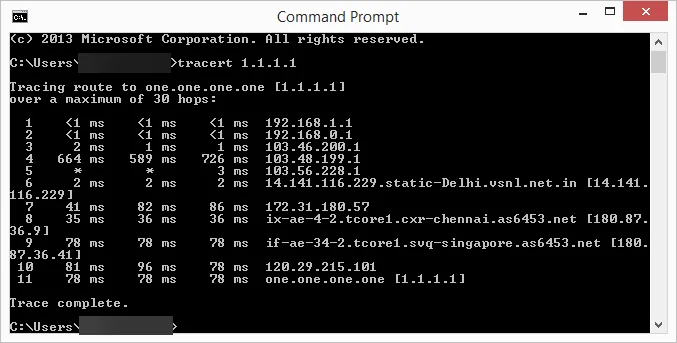
 
I tracert 1.1.1.1 on Excitel and my is going via. VSNL too.

bty23fH.webp


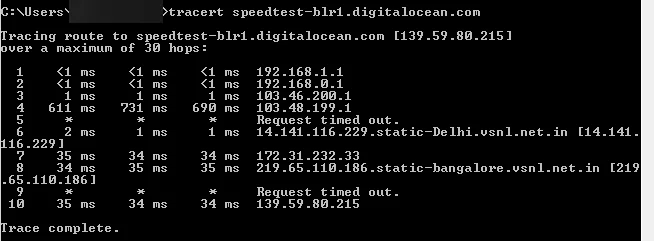
tracert to banglore DigitalOcean:

1M0UHwA.webp


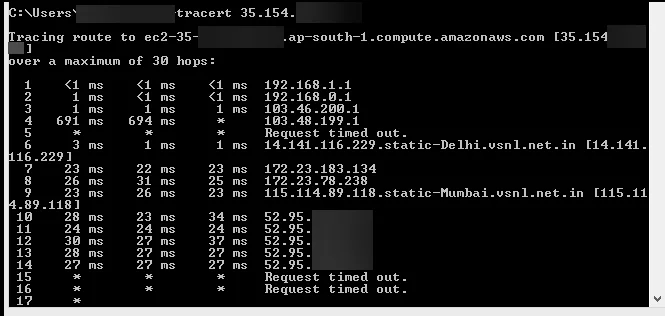
tracert to Mumbai AWS:

pDlki9y.webp


All the traffic is being routed via. VSNL only :O

Provide me the IP for the other speedtest.net nodes such as MNR or others?
 
AWS is not going through Extreme. It is going through VSNL.

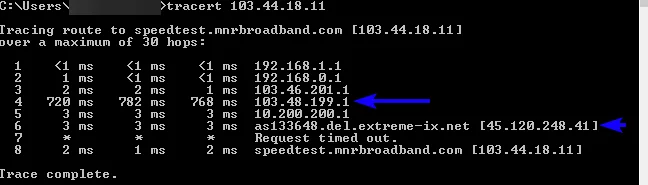
MNR Broadband TraceRT (via. Extreme IX):

First Blue Tick, This one ping is common in all the tracert and this one has very high ping.

Second Blue Tick: Shows Extreme-IX as peering partner.

BeDUNKR.webp


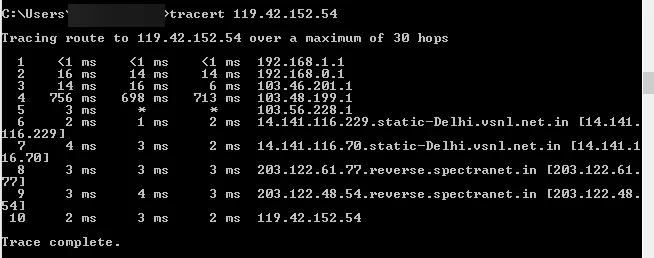
Geocity (via. VSNL):

UMEzPVa.webp


Strange. What do you think?

Can you tracert AWS Mumbai and DigitalOcean Banglore?

I don't see AWS in Extreme IX Peer.

Geocity is in Extreme IX list but then also network is going via. VSNL.
 
Geocity is peered through Extreme, shouldn't be going through VSNL , it should go through 45.120.248.35 according to peeringdb :-

Tracing route to 119.42.152.54 over a maximum of 30 hops

1 3 ms 3 ms 3 ms 192.168.5.1
2 1 ms <1 ms 1 ms 192.168.20.1
3 2 ms 1 ms 1 ms 172.16.17.1
4 * * * Request timed out.
5 8 ms 7 ms 7 ms 103.99.196.1
6 9 ms 10 ms 9 ms dhcp-192-192-9.in2cable.com [203.192.192.9]
7 66 ms * 47 ms 14.143.30.149.static-delhi.vsnl.net.in [14.143.30.149]
8 4 ms 3 ms 4 ms 14.141.116.70.static-delhi.vsnl.net.in [14.141.116.70]
9 5 ms 4 ms 4 ms 203.122.61.77.reverse.spectranet.in [203.122.61.77]
10 21 ms 6 ms 5 ms 203.122.48.54.reverse.spectranet.in [203.122.48.54]
11 4 ms 6 ms 3 ms 119.42.152.54

1 and 2 are my routers

MNR is going correctly through Extreme IX:
Tracing route to speedtest.mnrbroadband.com [103.44.18.11]
over a maximum of 30 hops:

1 1 ms <1 ms <1 ms 192.168.5.1
2 1 ms <1 ms 1 ms 192.168.20.1
3 1 ms 1 ms 1 ms 172.16.17.1
4 * * * Request timed out.
5 4 ms 4 ms 3 ms as133648.del.extreme-ix.net [45.120.248.41]
6 * * * Request timed out.
7 2 ms 2 ms 2 ms speedtest.mnrbroadband.com [103.44.18.11]


DO Bangalore takes pretty much same route as Excitel:

Tracing route to speedtest-blr1.digitalocean.com [139.59.80.215]
over a maximum of 30 hops:

1 <1 ms <1 ms 1 ms 192.168.5.1
2 4 ms 1 ms 1 ms 192.168.20.1
3 2 ms 1 ms 1 ms 172.16.17.1
4 * * * Request timed out.
5 4 ms 2 ms 5 ms 103.99.196.1
6 8 ms 8 ms 7 ms dhcp-192-192-9.in2cable.com [203.192.192.9]
7 48 ms 45 ms 38 ms 14.143.30.149.static-delhi.vsnl.net.in [14.143.30.149]
8 77 ms 75 ms 84 ms 172.31.232.33
9 55 ms 55 ms 55 ms 219.65.110.186.static-bangalore.vsnl.net.in [219.65.110.186]
10 * * * Request timed out.
11 42 ms 42 ms 43 ms 139.59.80.215

Don't have an aws instance, so I'm doing Google Cloud, goes as expected through Google:

Tracing route to 78.25.x.x.bc.googleusercontent.com [35.244.x.x]
over a maximum of 30 hops:

1 1 ms 1 ms 1 ms 192.168.5.1
2 1 ms <1 ms 1 ms 192.168.20.1
3 1 ms 2 ms 1 ms 172.16.17.1
4 * * * Request timed out.
5 66 ms 37 ms 7 ms as15169.del.extreme-ix.net [45.120.248.10]
6 4 ms 4 ms 4 ms 108.170.251.119
7 35 ms 31 ms 30 ms 209.85.143.144
8 32 ms 31 ms 31 ms 108.170.248.209
9 28 ms 31 ms 28 ms 209.85.253.40
10 * * * Request timed out.
11 * * * Request timed out.
12 * * * Request timed out.
13 * * * Request timed out.
14 * * * Request timed out.
15 * ^C

Amazon.in should go through extreme like google does but it doesn't:

Tracing route to amazon.in [54.239.33.92]
over a maximum of 30 hops:

1 <1 ms <1 ms <1 ms 192.168.5.1
2 6 ms 1 ms <1 ms 192.168.20.1
3 1 ms 1 ms 1 ms 172.16.17.1
4 * * * Request timed out.
5 5 ms 5 ms 5 ms 103.99.196.1
6 6 ms 5 ms 6 ms dhcp-192-192-9.in2cable.com [203.192.192.9]
7 46 ms 49 ms 46 ms 14.143.30.149.static-delhi.vsnl.net.in [14.143.30.149]
8 57 ms 49 ms 52 ms 172.23.183.134
9 147 ms 145 ms 145 ms ix-ae-2-591.tcore2.l78-london.as6453.net [80.231.131.81]
10 154 ms 153 ms 154 ms if-ae-15-2.tcore2.ldn-london.as6453.net [80.231.131.118]
11 169 ms 161 ms 161 ms 80.231.20.82
12 147 ms 147 ms 146 ms 54.239.100.226
13 145 ms 146 ms 152 ms 54.239.101.43
14 * * * Request timed out.
15 165 ms 162 ms 169 ms 54.239.44.39
16 * * ^C
 
What exactly is this issue? Because it's so messed up at this point. What are your guesses?

Could you do speedtest.net to MNR Broadband (make sure to select single connection for this test)
 
Speedtest to MNR on VNet (Single Connection)

I think that VSNL Route is extremely congested on Excitel. Try making an instance on google cloud (because they are peered) and create an OpenVPN Server, try speedtesting on that. Use TCP port 443 for the server btw.

Since you got 100% of your upload speed on MNR and decent download speeds.
 
Here ya go:

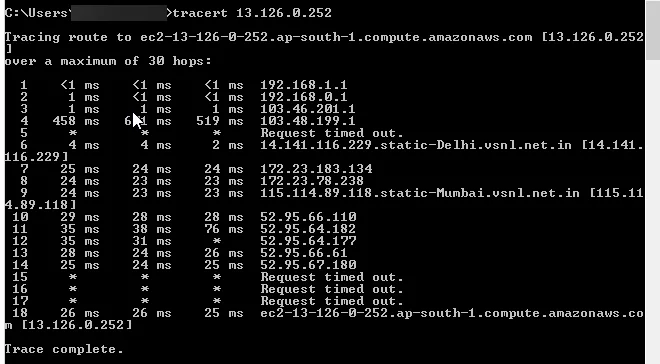
Tracing route to ec2-13-126-0-252.ap-south-1.compute.amazonaws.com [13.126.0.252]
over a maximum of 30 hops:

1 <1 ms <1 ms 2 ms 192.168.5.1
2 1 ms <1 ms 1 ms 192.168.20.1
3 1 ms 1 ms 1 ms 172.16.17.1
4 * * * Request timed out.
5 7 ms 7 ms 6 ms 103.99.196.1
6 8 ms 8 ms 8 ms dhcp-192-192-9.in2cable.com [203.192.192.9]
7 26 ms 25 ms 28 ms 14.143.30.149.static-delhi.vsnl.net.in [14.143.30.149]
8 50 ms 55 ms 63 ms 172.23.183.134
9 49 ms 46 ms 44 ms 172.23.78.238
10 25 ms 27 ms 25 ms 115.114.89.118.static-mumbai.vsnl.net.in [115.114.89.118]
11 35 ms 34 ms 34 ms 52.95.66.176
12 27 ms 30 ms 31 ms 52.95.64.156
13 30 ms 30 ms 31 ms 52.95.64.151
14 27 ms 27 ms 26 ms 52.95.66.127
15 27 ms 33 ms 27 ms 52.95.67.176
16 * * * Request timed out.
17 * * * Request timed out.
18 * * * Request timed out.
19 27 ms 26 ms 27 ms ec2-13-126-0-252.ap-south-1.compute.amazonaws.com [13.126.0.252]

Trace complete.

Goes pretty much same route as Excitel

I get decent speeds to AWS according to CloudHarmony, I think VNet network isn't as congested as excitel:

mOqHRWV.webp

CloudFront
 
Last edited:
What is your speedtest.net to Geocity (with single connection)?
 
Back